

TL;DR — Electron tiene un costo real de memoria. No tiene que imponer una penalización significativa de grabación o exportación.
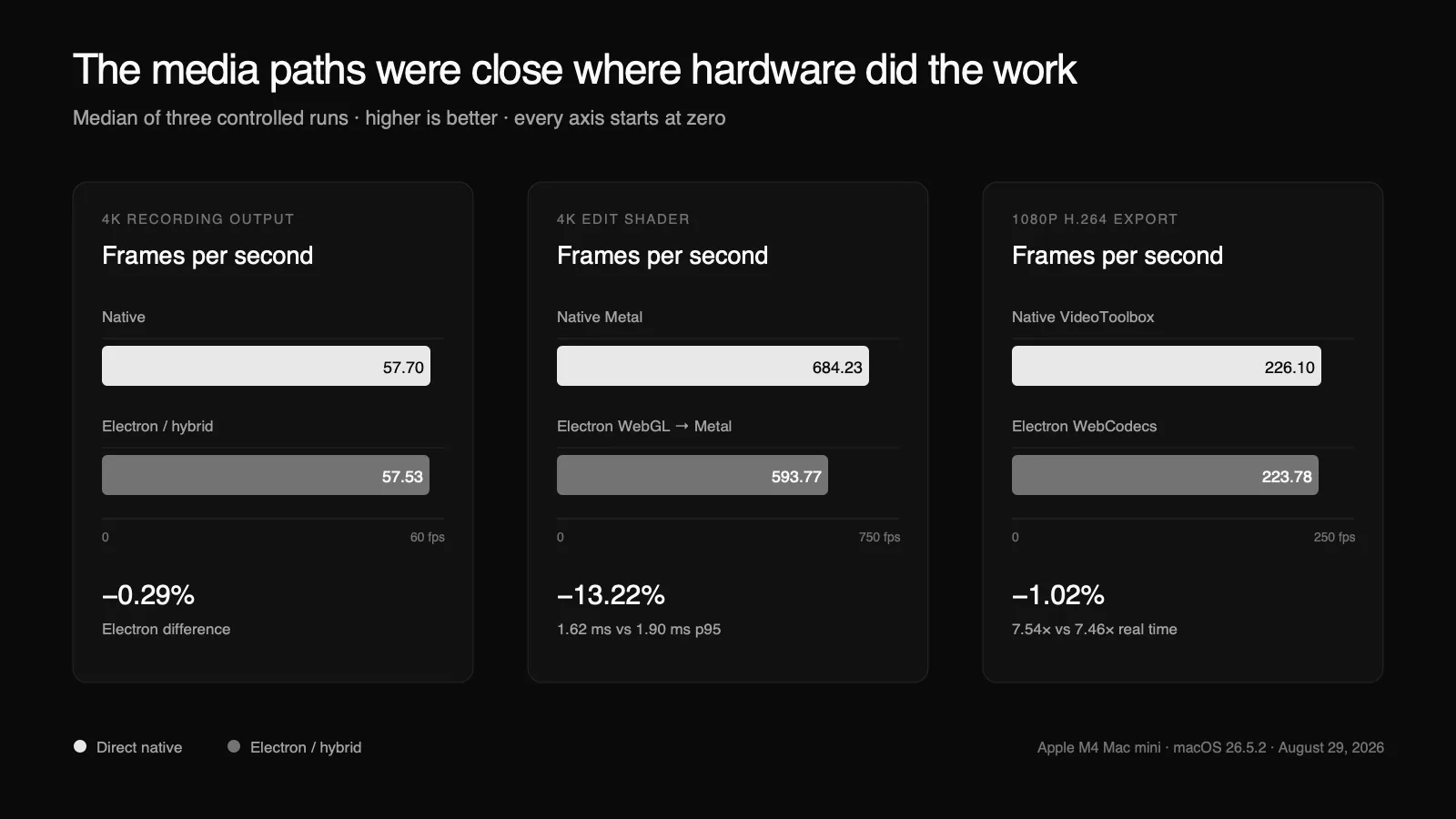
En nuestro mini Mac M4, un grabador nativo ScreenCaptureKit y el mismo grabador nativo alojado desde Electron produjeron video 4K a 57.70 y 57.53 fps. Un shader de edición 4K tomó 1.62 ms por cuadro en p95 en Metal directo y 1.90 ms a través de la ruta WebGL-a-Metal de Electron. Una exportación 1080p H.264 controlada se ejecutó a 7.54x el tiempo real a través de VideoToolbox nativo y 7.46x a través de la ruta WebCodecs de Electron.
La brecha no era cero. Simplemente no estaba donde el argumento convencional la coloca.
La clara desventaja de Electron fue la memoria: 45 MB para el host de grabación nativa directa frente a 94 MB para el host firmado Electron/Node, antes de agregar un renderizador Chromium. Una sesión empaquetada Tight Studio se estabilizó alrededor de 744–749 MB en esta prueba. Ese es un compromiso que vale la pena nombrar honestamente. No es evidencia de que los fotogramas capturados deban pasar por una página web ni de que la exportación deba recurrir a la codificación por software.
Construimos Tight Studio con Electron, así que tenemos interés en esta pregunta. Por eso hicimos que el benchmark fuera controlado y repetible, y por eso esta publicación incluye los resultados que hacen que Electron se vea peor, así como los que lo hacen ver bien.
"Nativo vs Electron" es el nivel de abstracción incorrecto.
Una aplicación de escritorio no es un único motor de ejecución.
Electron proporciona un renderizador Chromium, un proceso principal de Node.js y un shell de aplicación multiproceso. También soporta módulos nativos. La propia documentación de Electron es explícita en que una aplicación puede usar código nativo para APIs de plataforma y tareas críticas de rendimiento.
Eso significa que un grabador de pantalla en Electron puede construirse al menos de dos maneras muy diferentes:
- Capturar, componer, copiar y codificar fotogramas a través de JavaScript y superficies del navegador.
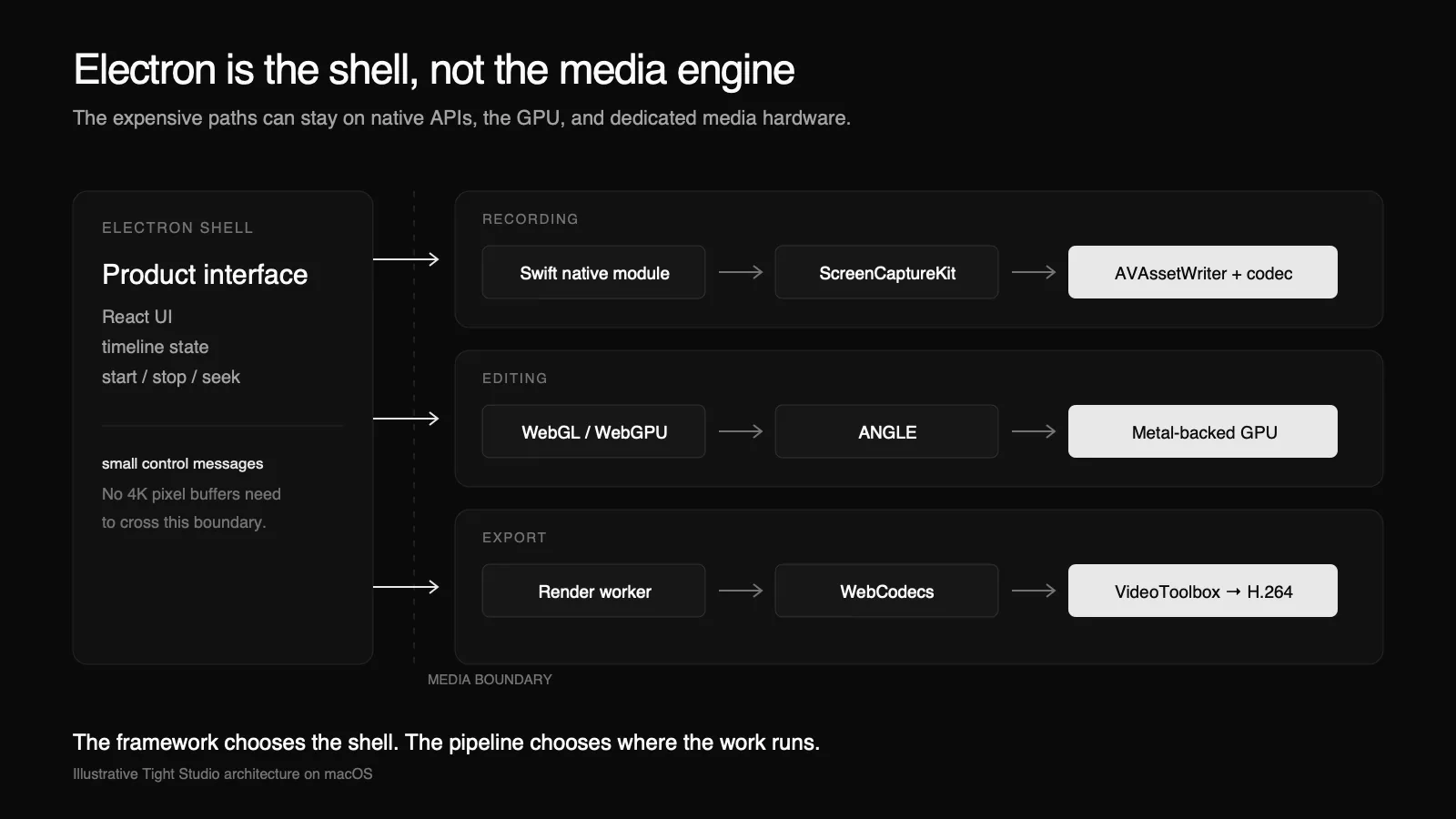
- Usa Electron para el producto UI y la orquestación mientras ScreenCaptureKit, AVFoundation, Metal, VideoToolbox u otro motor de medios nativo maneja la ruta crítica.
Esas aplicaciones comparten una etiqueta de framework. No comparten una arquitectura de rendimiento.
Electron ya potencia aplicaciones de escritorio exigentes
Esta arquitectura no es inusual. Las distribuciones actuales de macOS de Codex y Claude usan Electron. En la máquina utilizada para este artículo, Codex 26.825.41651 declara ElectronAsarIntegrity para su app.asar paquete, mientras Claude 1.26832.0 incorpora ambos Electron Framework.framework y app.asar.
La propia documentación de Electron también nombra a Visual Studio Code, Figma, Docker Desktop, Loom, Canva, Notion, 1Password, Slack, Discord y Signal entre los productos construidos con el framework. Cubren edición y depuración de código, gráficos colaborativos, gestión de contenedores, grabación de pantalla, gestión de credenciales, mensajería, voz y video, y flujos de trabajo AI.
Esa lista no es un referente de rendimiento, y no demuestra que todas las aplicaciones Electron sean eficientes. Demuestra el punto arquitectónico: elegir Electron para un entorno de escritorio no requiere que el entorno realice cada operación costosa. Los módulos nativos, los procesos GPU, los servicios locales y los sistemas remotos pueden encargarse del trabajo especializado.
Puedes reproducir la verificación del paquete macOS sin herramientas especiales. En Finder, elige mostrar contenido del paquete, luego inspecciona Contents/Info.plist, Contents/Resources/app.asar, y Contents/Frameworks/.
Tight Studio utiliza el segundo modelo. En macOS, los fotogramas de la pantalla se capturan mediante un módulo Swift usando ScreenCaptureKit y se escriben con AVAssetWriter. La grabación no se desvía a través de DOM, React o un lienzo de Chromium. Durante la edición y exportación, la composición de GPU y las API de códecs de hardware realizan el trabajo costoso; JavaScript coordina la canalización.
Apple describe ScreenCaptureKit como su API de alto rendimiento para la captura de fotogramas y audio. Electron no impide que una aplicación lo llame. Un módulo nativo puede llamar al mismo marco, recibir el mismo CMSampleBuffer objetos, y los entrega al mismo codificador del sistema.
Lo que benchmarkeamos
Evitamos comparar dos productos terminados. Una app podría renderizar subtítulos, movimiento del cursor, un recorte de cámara y cinco superposiciones mientras que otra remultiplexa la grabación original. El resultado más rápido nos diría casi nada sobre Swift o Electron.
En cambio, mantuvimos constante la carga de trabajo:
- Máquina: Apple M4 Mac mini, 10 núcleos CPU, 10 núcleos GPU, 16 GB de memoria, macOS 26.5.2.
- Grabación: el mismo motor de captura nativo empaquetado exacto, ejecutado una vez desde su CLI directo de Swift y una vez desde el ejecutable firmado de Electron/Node de Tight Studio. Ambos grabaron la misma pantalla animada de 3840×2160 a un objetivo de 60 fps.
- Edición: el mismo fondo procedural, tarjeta redondeada, cuadrícula, sombra y shader de cursor animado a 3840×2160. El nativo usó Metal; Electron usó WebGL 2 a través del renderizador Metal de ANGLE. Cada cuadro tenía un límite de sincronización para que un canvas oculto no pudiera hacer que el trabajo desapareciera.
- Exportar: 300 fotogramas a 1920×1080, 30 fps, H.264, y un objetivo de 12 Mbps. Nativo usó Metal más VideoToolbox. Electron usó WebGL más WebCodecs con aceleración por hardware solicitada.
- Ejecuciones: tres por ruta. La tabla reporta medianas.
No se incluye ningún resultado de batería. Este fue un mini Mac, y una afirmación creíble sobre la batería necesita una prueba controlada de MacBook más larga.
Resultados
| Fase | Directo nativo | Electron/híbrido | Diferencia de Electron |
|---|---|---|---|
| 4K tasa de salida de grabación | 57.70 fps | 57.53 fps | -0.29% |
| Grabando host CPU | 7.06% | 6.98% | -0,09 puntos |
| Grabando OS-servicio CPU | 31.34% | 32.76% | +1,42 puntos |
| Grabando memoria máxima del host | 45.36 MB | 94.39 MB | +49.03 MB |
| 4K editar shader rendimiento | 684.23 fps | 593.77 fps | -13.22% |
| 4K editar shader tiempo de cuadro p95 | 1,62 ms | 1,90 ms | +0,28 ms |
| Rendimiento de exportación 1080p | 226,10 fps | 223,78 fps | -1.02% |
| Velocidad de exportación 1080p | 7.54x tiempo real | 7.46x tiempo real | -1.02% |
Estas son pruebas cortas y controladas en una máquina. Establecen lo que es posible con estas arquitecturas; no son una promesa de que cada aplicación Electron será tan eficiente.
Grabación: Electron no necesita tocar un frame
El resultado de la grabación es casi un empate porque ambos caminos son iguales donde importa.
ScreenCaptureKit produce los fotogramas. AVAssetWriter y la pila de códecs del sistema los codifican. El lado de Electron le pide al grabador nativo que comience, detenga, pausar y reanudar. No recibe 4K búferes de píxeles a través de un canal IPC y no los codifica en JavaScript.
A lo largo de las tres ejecuciones, la versión nativa entregó una mediana de 57,70 fps y el host Electron entregó 57,53 fps, una diferencia del 0,29%. La mediana del registrador CPU fue del 7,06% para la versión nativa y del 6,98% para el host Electron. Los servicios de captura macOS promediaron 31,34% y 32,76% respectivamente.
El resultado de la tasa de fotogramas es el importante. La pequeña reversión de CPU es un ruido ordinario de ejecución a ejecución, no evidencia de que Electron de alguna manera acelere ScreenCaptureKit.
Hay una peculiaridad de prueba que vale la pena divulgar. macOS concede permiso de Grabación de Pantalla a una identidad de aplicación firmada. Nuestro binario de Electron en desarrollo no tenía ese permiso, por lo que la ejecución de grabación de Electron utilizó el ejecutable firmado de Tight Studio en modo compatible con Node de Electron. Eso aísla el puente nativo pero omite un renderizador de Chromium. Medimos el shell empaquetado por separado en lugar de presentar en silencio los 94 hosts de MB como una aplicación completa de Electron.
Edición: el Metal traducido sigue siendo Metal
JavaScript no expone directamente API de Apple. Ese hecho a veces se exagera hasta convertirse en una afirmación mucho más amplia: que Electron no puede usar renderizado con soporte de Metal (GPU).
El macOS de ANGLE proporciona un backend de Metal para OpenGL ES, que es lo que Chromium puede usar debajo de WebGL. Nuestro benchmark de Electron identificó su renderizador como ANGLE Metal Renderer: Apple M4.
Direct Metal fue más rápido. La ejecución nativa media renderizó 684 fotogramas por segundo; Electron renderizó 594, una brecha de rendimiento del 13%. El tiempo de fotograma P95 aumentó de 1.62 a 1.90 ms.
Ese es un costo adicional medible. También son 0.28 ms en un presupuesto de fotogramas de 16.67 ms a 60 fps.
Los editores reales hacen más de un shader, por supuesto. Decodifican video, suben o importan texturas, renderizan texto, calculan el estado de la animación y responden a la entrada. Una implementación descuidada puede quemar el presupuesto restante con copias, asignaciones, IPC síncronas o trabajo de React. Pero el compositor del navegador no es automáticamente un renderizador de software, y WebGL en un Mac no es prueba de que se haya eludido el GPU.
Cuando un camino de WebGL o WebGPU no es suficiente, Electron todavía permite un módulo Metal nativo. La arquitectura puede elegir su salida de emergencia por subsistema.
Exportar: el codificador de hardware no se preocupa por qué botón lo inició
VideoToolbox es la interfaz de bajo nivel de Apple para codificadores y decodificadores de hardware. Chromium tiene un backend de codificador VideoToolbox macOS, y WebCodecs expone una preferencia de aceleración por hardware a las aplicaciones.
En nuestra ejecución nativa, VideoToolbox confirmó la codificación por hardware. La ejecución en Electron solicitó hardware a través de WebCodecs. WebCodecs no expone el nombre del codificador seleccionado, por lo que no podemos afirmar prueba a nivel API de la selección de Electron. Su rendimiento y salida son consistentes con la ruta de hardware: nativo codificó 300 fotogramas en una mediana de 1.327 segundos; Electron tardó 1.341 segundos. Las salidas diferían en tamaño en menos del 1%.
Eso se traduce en 7,54x frente a 7,46x tiempo real, una diferencia del 1%.
Esto no significa que todos los exportadores de Electron sean rápidos. La exportación se ralentiza cuando una aplicación:
- lee los píxeles de vuelta desde el GPU para cada cuadro;
- copia fotogramas completos a través de JavaScript o IPC;
- codifica por software;
- serializa innecesariamente las etapas de decodificación, renderizado, audio y codificación;
- retiene toda la salida en memoria en lugar de transmitirla;
- usa el hilo UI como el trabajador de renderizado.
Esas son elecciones de la canalización, no requisitos impuestos por Electron.
Una verdadera exportación de Tight Studio
Los microbenchmarks muestran dónde entra la sobrecarga. Una prueba de producto nos dice si la pipeline completa es útil.
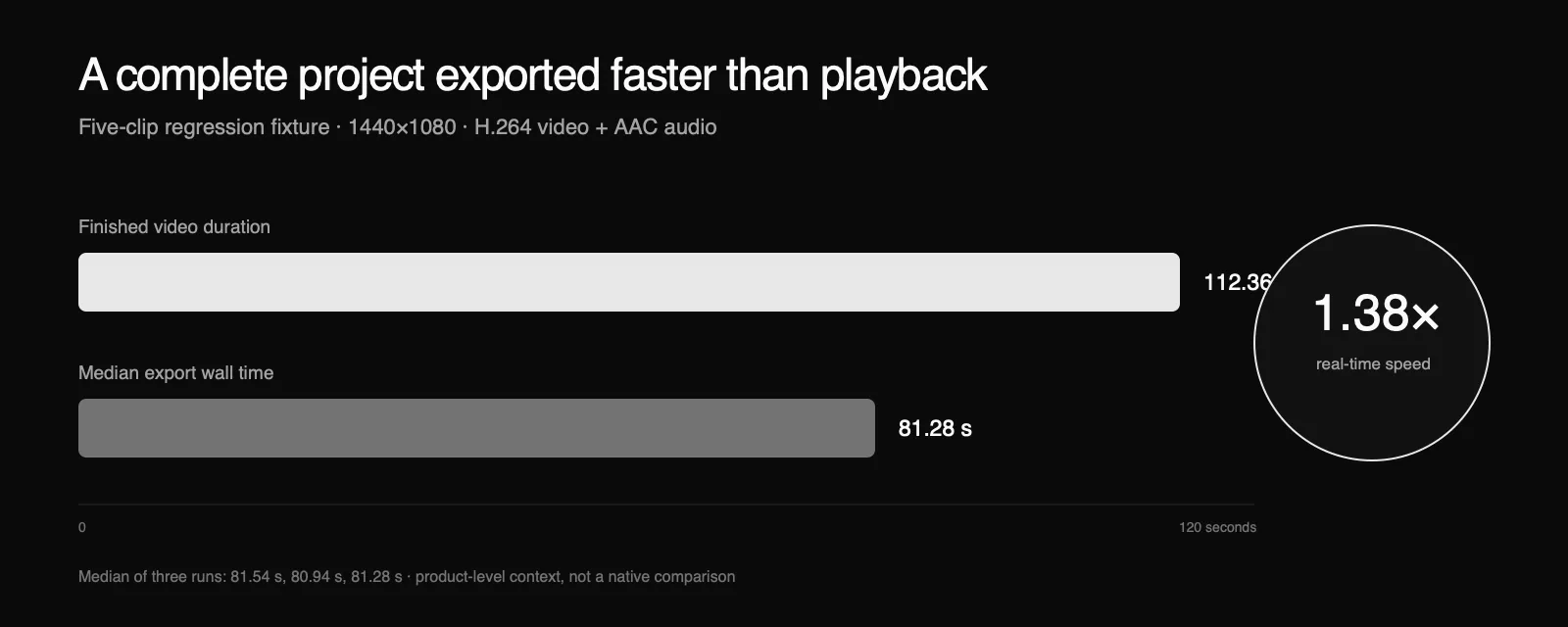
También ejecutamos el conjunto de pruebas de regresión de exportación de cinco clips existente de Tight Studio tres veces. La línea de tiempo de 112 segundos ejercita la decodificación por clip, el renderizado de GPU, audio, codificación, concatenación y multiplexado a 1440×1080. Los tiempos de exportación fueron de 81.54, 80.94 y 81.28 segundos. La mediana fue de 81.28 segundos, o 1.38 veces el tiempo real.
El archivo generado duró 112,36 segundos, aproximadamente 30 fps, con H.264 de video y AAC de audio. Este parámetro no es un indicador universal de la velocidad de exportación: los medios de origen y los efectos importan, pero es una aplicación Electron de extremo a extremo exportando más rápido que la reproducción en una prueba de repositorio repetible.
La parte que realmente pierde Electron: memoria
Electron incorpora un entorno de navegador multiproceso. Eso cuesta memoria.
El host de grabación nativa directa alcanzó un máximo de 45 MB RSS. El host firmado de Electron/Node alcanzó un máximo de 94 MB. Nuestro árbol de procesos de edición mínima de Electron estaba alrededor de 360 MB, y el árbol de procesos de exportación estaba alrededor de 394 MB. Una sesión empaquetada Tight Studio con un perfil nuevo se estabilizó alrededor de 744–749 MB en este estado particular de la aplicación.
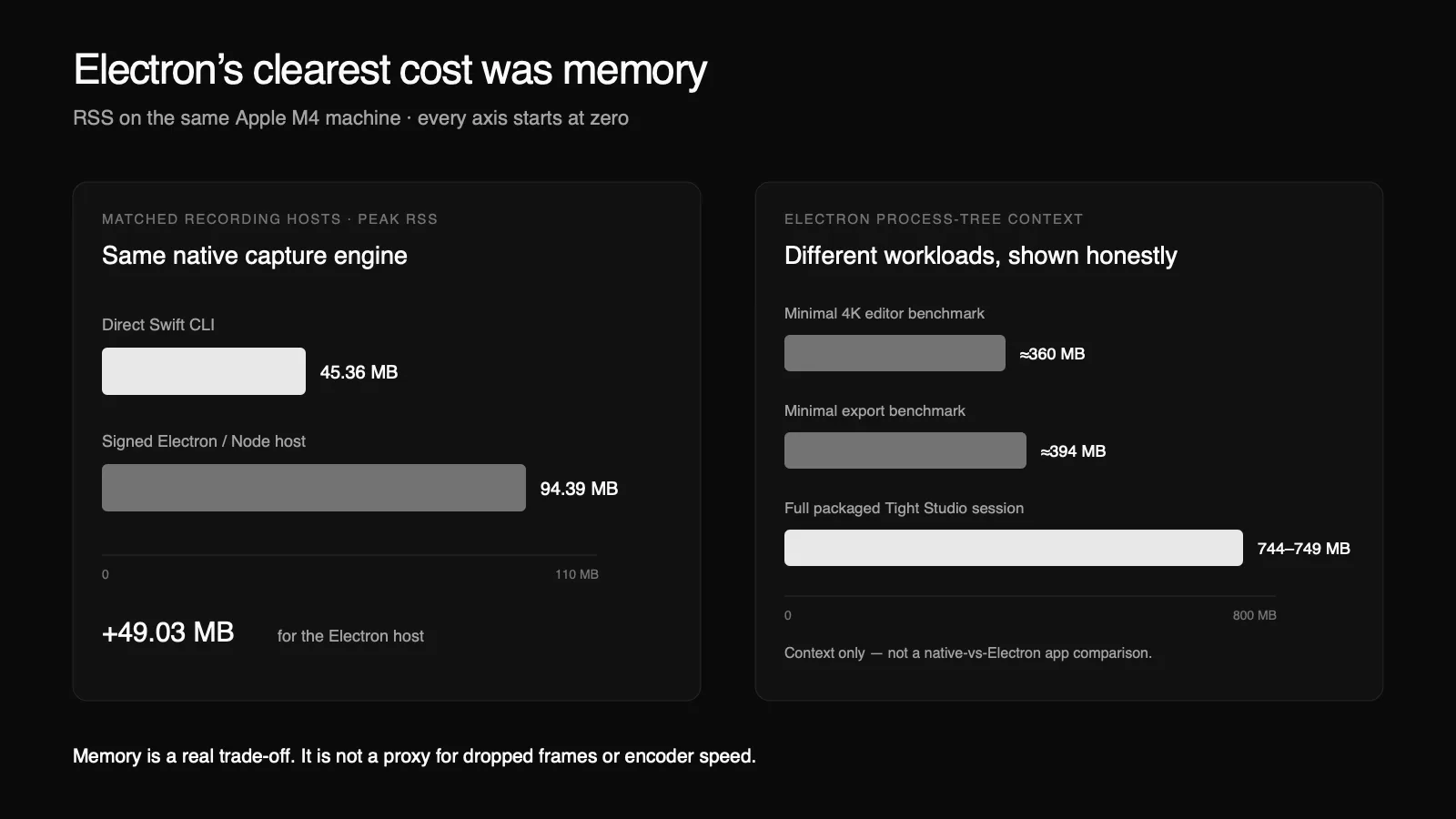
Ese último número no es una ley de Electron, y no es una comparación con una aplicación nativa. Es un recordatorio de no usar una versión de prueba mínima como camuflaje de marketing.
La memoria puede ser importante en máquinas con recursos limitados. Puede generar presión, aumentar el intercambio y, de manera indirecta, costar energía. Pero RAM asignado no es la misma métrica que registrar CPU, fotogramas perdidos, tiempo de fotograma GPU o rendimiento del codificador. Tratar uno como un sustituto de todos los demás produce malas conclusiones de ingeniería.
El objetivo práctico no es “no usar memoria de Chromium”. Es mantener el runtime del navegador alejado de rutas críticas de fotogramas en bruto, cerrar los objetos de medios de manera inmediata, limitar los buffers, transmitir la salida y mantener el trabajo inactivo inactivo.
Una mejor manera de evaluar un grabador de pantalla
Pregunte qué hace realmente cada subsistema:
- ¿Cuál API captura la pantalla?
- ¿Dónde se componen los cuadros?
- ¿El backend GPU está acelerado por hardware?
- ¿Qué implementación de codificador se selecciona?
- ¿Cuántas copias de fotograma completo se producen?
- ¿Los datos de píxeles atraviesan los límites de IPC o de JavaScript?
- ¿Puede el editor mantener 60 fps en la resolución objetivo?
- ¿Cuál es el tiempo de exportación por segundo de salida?
- ¿Cuáles son los resultados de CPU, memoria, cuadros perdidos, energía y termal en la misma carga de trabajo?
"Nativo" y "Electron" son detalles de implementación útiles. Son resultados de referencia débiles.
La conclusión
Una aplicación completamente nativa tiene la menor sobrecarga posible de la interfaz y el acceso más directo a las APIs de la plataforma. Si dos equipos construyen pipelines igualmente optimizados y con funciones idénticas, lo nativo mantiene una ventaja, especialmente en memoria y en los últimos incrementos de control de GPU.
Pero una aplicación de Electron no necesita construir su motor de medios a partir de DOM nodos y bucles de JavaScript. Puede capturar mediante ScreenCaptureKit, componer en APIs GPU respaldadas por Metal, codificar con el motor de medios de hardware y mover el trabajo crítico de rendimiento a módulos nativos o trabajadores.
Nuestras mediciones encontraron una brecha del 0.29% en la tasa de cuadros de grabación, una brecha del 13% en el rendimiento de shaders 4K sintéticos y una brecha del 1% en la exportación controlada. También encontramos una gran brecha de memoria. Esa es la forma honesta del compromiso.
El framework establece los valores predeterminados. La cadena de procesamiento establece el rendimiento.
Fuentes y reproducción
- Apple: ScreenCaptureKit
- Apple: VideoToolbox
- electron: código nativo y electron
- electron: modelo de procesos
- Electron: Por qué Electron y ejemplos de aplicaciones de producción
- ANGLE: soporte del backend Metal
- chromium: codificador macOS de videotoolbox
- W3C: Aceleración por hardware de WebCodecs
El conjunto de pruebas de referencia, la tabla de ejecuciones en bruto, la advertencia de permisos y los límites de interpretación se están preparando para un lanzamiento público independiente. Agregaremos el enlace del repositorio aquí cuando el paquete pueda ser clonado y ejecutado de manera independiente. Máquinas adicionales con Apple silicon y una prueba de potencia controlada MacBook ampliarían estos resultados, pero no están incluidas en las afirmaciones anteriores.