

Best tools for founders in 2026
Being a founder means doing the work of five different roles before you can hire any of them. You’re talking to customers, writing code, shipping a landing page, recording a launch video, chasing payments, and answering support tickets in the same afternoon.
The good news is that the tooling for early-stage founders has gotten dramatically better in the last few years. AI-native dev tools, free CRMs, no-code landing pages, and instant incorporation services mean a solo founder in 2026 can ship things that needed a 10-person team a decade ago.
This guide breaks down the best tools for founders across the eight workflows that actually matter when you’re building a company from zero, with honest tradeoffs and where each tool fits in your stack.
How to think about a founder’s tool stack
Before picking tools, it helps to map them to the work. Most founder workflows fall into eight buckets:
- Customer discovery and validation - interviews, surveys, signups
- Building the product - AI-native dev tools, backend, deployment
- Landing pages and websites - the first thing prospects see
- Demo videos and launch content - launch videos, walkthroughs, investor demos
- Sales, CRM, and outreach - tracking pipeline and reaching customers
- Marketing and audience growth - newsletters, social, content
- Operations, banking, and payments - incorporation, banking, billing
- Product analytics - knowing what’s actually happening
You probably don’t need a tool in every category on day one. Start with the workflow that’s blocking you most this week, and resist the urge to set up infrastructure for problems you don’t have yet.
Best tools for founders compared
| Category | Tool | Best for | Free tier | Starting price |
|---|---|---|---|---|
| Customer discovery | Makeform | AI-generated surveys and signup forms | Yes | Free |
| Customer discovery | Calendly | Booking customer calls and demos | Yes | $10/user/mo |
| Building the product | Cursor | AI-native code editor | Yes | $20/mo |
| Building the product | v0 | Generating React UI from prompts | Yes | $20/mo |
| Building the product | Supabase | Postgres, auth, storage backend | Yes | $25/mo |
| Landing pages | Framer | Designed marketing sites | Yes | $5/mo |
| Landing pages | Carrd | One-page launch sites | Yes | $19/yr |
| Demo videos | Tight Studio | Polished launch videos and walkthroughs | Yes | $6/mo |
| Demo videos | Loom | Async customer and team videos | 25 videos | $20/mo |
| Sales and CRM | Attio | Modern, founder-friendly CRM | Yes | $34/user/mo |
| Sales and CRM | HubSpot | Free CRM with room to grow | Yes | $20/mo |
| Sales and CRM | Chat Data | AI chatbot that captures leads and answers FAQs | Yes | $18.99/mo |
| Marketing | Beehiiv | Newsletters with built-in growth tools | Yes | $42/mo |
| Marketing | Substack | Lightweight newsletter and audience | Yes | 10% rev share |
| Operations | Stripe Atlas | Delaware C-corp incorporation | No | $500 one-time |
| Operations | Mercury | Startup banking | Yes | Free |
| Operations | Stripe | Payments and billing | Yes | 2.9% + 30c |
| Operations | ShiftFlow | Time tracking for field and hourly teams | Trial | $5.99/seat/mo |
| Operations | Beancount.io | Developer-first plain-text accounting and bookkeeping | Yes | $14.99/mo |
| Analytics | PostHog | Product analytics and session replay | Yes | $0 up to 1M events |
| Analytics | Plausible | Privacy-friendly web analytics | Trial | $9/mo |
Customer discovery and validation tools
Before you build anything that lasts, you need to be talking to potential customers. The cheapest mistake to fix is “we built the wrong thing.” These tools make it easy to capture intent, schedule conversations, and keep notes organized.
Makeform - best for AI-generated surveys and signup forms

Makeform is a free, AI-native form builder. You describe what you want in a chat prompt - “waitlist form for a B2B AI product with name, email, company size, and one open-ended question about their biggest pain” - and it generates the form, branching logic, and design in seconds.
For founders, it’s the fastest way to spin up validation surveys, launch waitlists, customer interview signups, and one-off polls without committing to a heavier research platform. Generation is free with no signup required, which makes it useful even before you have a product or a domain.
Calendly - best for booking customer calls and demos

Calendly is the standard for “send me a link, pick a time.” Founders use it for customer interviews, design partner calls, investor meetings, and early sales demos. The free tier covers a single event type, which is enough for most founders until you’re juggling several call types at once.
The main alternatives are Cal.com (open source, good free tier) and SavvyCal (cleaner UI, founder-favorite for premium scheduling). Pick whichever fits your taste - the differentiation between these tools is small at the founder stage.
Building the product
The dev tooling category has been completely reshaped by AI in the last two years. A solo founder in 2026 can ship a real product faster than a small team could in 2022, mostly because the editor, deployment, and backend layers have all gotten dramatically better.
Cursor - best AI-native code editor

Cursor is a fork of VS Code with AI baked into the editing loop. Inline edits, agent mode, codebase chat, and tab-completion that understands your repo. Most technical founders shipping production code in 2026 are using Cursor or a Cursor-equivalent (Windsurf, Zed AI, Claude Code).
If you’ve been writing code without an AI editor, the productivity jump on the first day is genuinely shocking. The free tier is enough to evaluate it; the $20/month Pro plan unlocks unlimited fast requests on the frontier models.
v0 - best for generating React UI from prompts

v0 generates React + Tailwind components and full pages from natural-language prompts. Useful for founders who can ship code but aren’t designers - you can describe a settings page or a pricing section and get a working, well-styled implementation you can drop into your codebase or iterate on inside v0.
The competitive set is moving fast: Lovable, Bolt.new, and Replit Agent all overlap. v0 stays close to the Next.js + shadcn/ui ecosystem, which most founders end up shipping on anyway.
Supabase - best Postgres backend for founders

Supabase is a hosted Postgres database with auth, storage, edge functions, and realtime built in. It’s the backend most technical founders pick first in 2026 because the free tier is generous, the SDK is good, and you don’t get locked into a proprietary database.
The main alternatives are Firebase (mature but Google-flavored) and Neon (Postgres-only, branching-first). Pick Supabase when you want a full BaaS; pick Neon when you only need a database and want serverless Postgres branching.
Landing pages and websites
Your landing page is the first thing every customer, investor, and potential hire will see. You don’t need to overthink it for V1, but you do need it to look credible. Two tools cover most founders.
Framer - best for designed marketing sites

Framer is a no-code site builder that produces sites that actually look like 2026 (smooth animations, real typography, responsive components). Strong fit for founders who want a Webflow-quality marketing site without the Webflow learning curve.
The free tier hosts a real site on a framer.website subdomain. Custom domain plans start at $5/month, which is the only number that actually matters when you’re choosing between options at this tier.
Carrd - best for one-page launch sites

Carrd is the one-page-site tool indie founders have used for years. $19 per year for unlimited sites with a custom domain. Perfect for waitlists, simple launch pages, link-in-bio sites, and proof-of-concept marketing pages.
If your only goal is “collect emails and explain the product in three sentences,” Carrd is faster than anything else and stays out of the way.
Demo videos and launch content
Founders end up making more video content than they expect: launch videos for Product Hunt and X, investor demos, sales walkthroughs, customer onboarding clips, and quick async updates for the team. A clean video on your landing page is one of the highest-leverage assets you can ship.
Tight Studio - best for launch videos and product walkthroughs

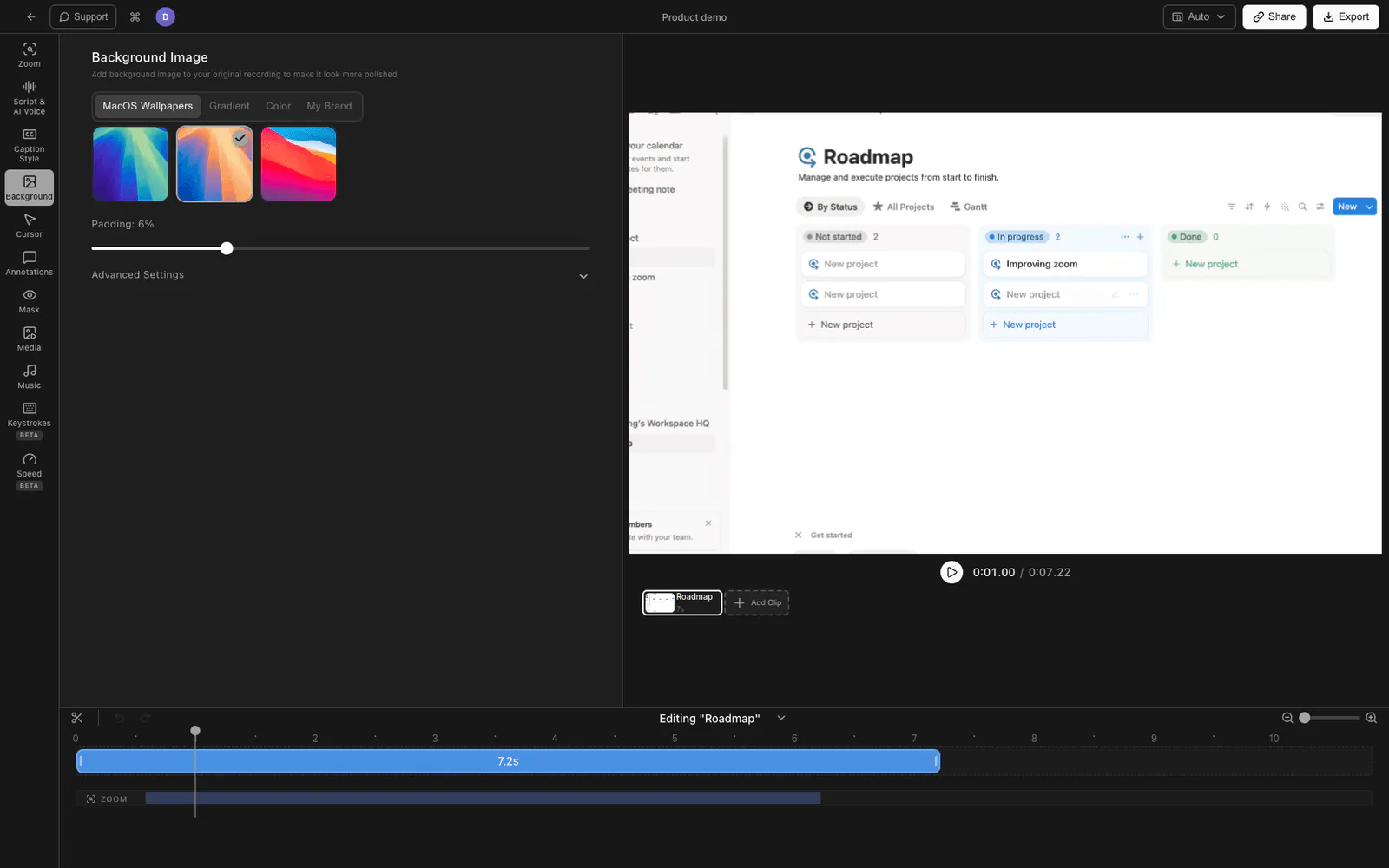
Tight Studio is a Mac screen recorder and editor built for the kind of polished product videos founders actually need to ship: launch videos, demo videos for the homepage, investor walkthroughs, and customer onboarding clips.
The features that matter most for founder workflows:
- Smart zoom animation - automatically follows your clicks with smooth zoom-in motion. The difference between “viewers can sort of see what’s happening” and “viewers can clearly see exactly what’s being clicked” matters a lot for dense product UIs.
- AI voiceover - generate clean narration from a script. Useful when you need a launch video out the door and don’t want to spend an afternoon re-recording yourself.
- Cursor animation and click highlighting - makes interactions obvious without manual annotation work.
- Multi-take recording - record sections separately and combine them. If you flub the third feature in a five-feature demo, just re-record that segment.
- Text annotations and intro/outro slides - add a branded title card and callouts without leaving the editor.
Tight Studio is best when you need a finished, polished video file to drop on a landing page, post to X, send to investors, or attach to a launch email. It’s Mac-only and focused on screen-recorded video rather than interactive product tours.
Loom - best for async customer and team videos

Loom is the standard for “record a quick walkthrough and send a link.” Founders use it heavily for customer support replies, async product demos for prospects who can’t make a call, internal updates, and design-review videos.
The polish is lower than a dedicated demo tool, so it’s not the right fit for landing-page hero videos or launch posts. But for daily async work, the speed-to-shareable-link is unmatched.
Sales, CRM, and outreach tools
You will need a CRM earlier than you think. Even at 10 design partners, having pipeline state in one place beats remembering everything in your head and your inbox.
Attio - best modern, founder-friendly CRM

Attio is a Notion-style CRM that has become the default pick for new B2B startups in 2026. It’s built around a relational data model (you can build custom objects and views) and has automatic enrichment for companies and contacts.
The free tier covers a single workspace with 3 users, which is enough until you’re past 100 customers. The paid plan at $34 per user is competitive with HubSpot once you actually need automation.
HubSpot - best free CRM with room to grow

HubSpot’s free CRM is genuinely free and reasonably full-featured: contacts, deals, basic email tracking, scheduling, and a connected inbox. The catch is that the upgrade ramp gets expensive fast once you want automation, sequences, or marketing features.
For founders who think they’ll eventually have a sales team, HubSpot is the safe choice because everyone has used it. For founders who want a tool that feels like it was built this decade, Attio is usually the better daily-use experience.
Chat Data - best for AI chatbots that capture leads on your site

Chat Data lets you train a custom AI agent on your landing page, docs, PDFs, and product content, then drop it on your site as a chat widget. For founders, that means a visitor showing up at 2am gets a real answer to “does this integrate with Salesforce” or “what’s the pricing for 50 seats” without you being awake, and the conversation captures their email for follow-up.
It also deploys to WhatsApp, Slack, Discord, and a handful of other channels, which matters if your early users live in a Discord community or your B2B prospects prefer WhatsApp. The free tier is enough to wire it up to a launch site; the $18.99/month entry plan is reasonable once you have meaningful traffic to qualify.
Honest tradeoff: an AI chatbot only earns its place once you have enough inbound to make it worth setting up. Pre-launch, hand-written replies still convert better. Reach for Chat Data after launch when the same five questions are eating your evenings.
Marketing and audience growth tools
Distribution is the hard part. Founders who build an audience early have a structural advantage on every launch, every fundraising round, and every hire.
Beehiiv - best for newsletters with built-in growth tools

Beehiiv is a newsletter platform built for growth, not just sending. It includes a recommendations network (other newsletters can recommend yours and vice versa), built-in monetization, referral programs, and a clean editor. Used by a long list of founder-led newsletters in 2026.
The free tier covers up to 2,500 subscribers, which is more than enough to validate whether you have something to say before paying.
Substack - best for lightweight newsletter and audience

Substack remains the easiest place to start writing publicly. The product is opinionated (one publication per writer, simple typography, no real customization), which is a feature when you just want to start writing without designing.
Substack’s network effect is real: getting recommended by other Substack writers can drive the first few thousand subscribers without paid acquisition. The 10% revenue share is steep if you ever turn on paid subscriptions, which is why some founders eventually graduate to Beehiiv or Ghost.
Operations, banking, and payments
These are the unglamorous tools that keep a company running. Get them wrong and you spend a quarter on cleanup; get them right and you barely think about them.
Stripe Atlas - best for Delaware C-corp incorporation

Stripe Atlas handles Delaware C-corp incorporation, EIN registration, founder stock issuance, and the basic legal docs founders need on day one. $500 one-time, with a 75-page founder guide that’s worth reading even if you incorporate elsewhere.
If you’re a non-US founder building a US company, Atlas is still the cleanest path. The main alternative is Mercury Mathematics (Mercury’s incorporation product, included with banking), which has gotten competitive in the last year.
Mercury - best startup banking

Mercury is the default startup bank in 2026. Free business checking and savings, FDIC insurance up to $5M through sweep accounts, and an interface that doesn’t feel like it was designed in 1998. Approval is fast for funded startups and reasonable for bootstrapped ones.
Mercury Treasury sweeps idle cash into money market funds for additional yield, which matters once you’ve raised a meaningful round. Mercury also added incorporation and credit cards to its product line, so for some founders it’s now the only operations tool needed.
Stripe - best for payments and billing

Stripe is the default for accepting payments, running subscriptions, and handling tax. Stripe Billing covers usage-based, seat-based, and hybrid pricing models. Stripe Tax handles the VAT and sales-tax math you do not want to handle manually.
The 2.9% + 30c rate is standard. Once you’re past meaningful revenue, you can negotiate Interchange Plus pricing. Stripe Checkout is the fastest path to a working payment page if you don’t want to build one.
ShiftFlow - best for tracking team hours and shifts at field-based businesses

ShiftFlow is an employee time tracking and shift scheduling app aimed at founders running field-based or local service businesses: construction, electrical, plumbing and heating, healthcare, security, and cleaning crews. The core flow is one-tap clock-in and clock-out, GPS-verified location, automatic break tracking, and timesheets that flow straight into payroll.
For founders managing a crew rather than a dev team, this is the visibility layer you’ll otherwise rebuild out of spreadsheets and group chats: who is on-site right now, who wrapped early, how much each job phase actually cost in labor. ShiftFlow also covers shift scheduling, mileage tracking, overtime and premium pay rules, job codes, kiosk mode for a shared device on a site, and a built-in team chat.
Pricing is seat-based at $5.99 per seat per month (or $60 per seat per year if you commit annually), with a 14-day free trial and no permanent free tier. Honest caveat: if you’re a tech founder building a SaaS product, you can skip this category entirely until you have actual field operations. If you’re running a service business with crews on jobs, this is the kind of operations tool that pays for itself the first time you avoid a payroll dispute.
Beancount.io - best for developer-first accounting and bookkeeping

Beancount.io is a hosted, AI-assisted version of the open-source Beancount plain-text accounting language. Instead of clicking through QuickBooks forms, you write transactions in a versioned text file (“write your finances like code”) and the platform handles double-entry validation, reconciliation, reports, and AI-driven anomaly detection on top.
For technical founders, the appeal is the same as Git for code: every change is auditable, you can script reports, and you never get locked into a proprietary file format. The hosted product layers a web UI, AI categorization, multi-ledger support, and a “AI CFO” Q&A on top of the open-source core, so you don’t have to babysit a local CLI install if you don’t want to.
It’s open-source-friendly with one ledger and one collaborator on the free tier, and the Premium plan starts at $14.99/month for personal finance with five ledgers and AI requests. Honest caveat: this is built for founders who are comfortable with text files and double-entry mental models. If you’d rather hand bookkeeping to an accountant who lives in QuickBooks Online or Xero, stay there - Beancount is for the founders who’d rather own the ledger themselves.
Product analytics tools
Once you have users, you need to know what they actually do. The good news is that the analytics layer is now mostly free at founder scale.
PostHog - best all-in-one product analytics

PostHog is a self-serve product analytics platform that bundles event tracking, funnels, retention, session replay, feature flags, A/B testing, and surveys. The free tier covers up to 1 million events per month, which is enough for most pre-PMF startups.
For founders who want one tool that grows from “I want to count signups” to “I want to A/B test the onboarding funnel and replay broken sessions,” PostHog is hard to beat on price-to-feature ratio.
Plausible - best privacy-friendly web analytics

Plausible is a lightweight, cookie-free Google Analytics alternative. One simple dashboard, fast script, no cookie banner needed in the EU. Used by a lot of indie and EU-based founders who want web analytics without the GA4 complexity.
If you want both web analytics and product analytics, PostHog covers both. If you only need web analytics and want the dashboard to load instantly, Plausible is the cleaner choice.
Tools to skip (or delay)
A few categories that founders feel pressure to invest in but often don’t need yet:
- Heavy project management tools - Linear is great if your team is engineering-heavy, but most pre-launch founders can run on a Notion doc or a single GitHub project board.
- Design systems and Figma libraries - if you’re shipping with Tailwind + shadcn/ui, you already have a design system. Don’t build a separate Figma component library until you have a designer.
- Dedicated cold email platforms - tools like Apollo, Instantly, and Smartlead are powerful but easy to misuse. Pre-PMF, hand-written outreach from your own inbox converts better and protects your domain reputation.
- Marketing automation suites - HubSpot Marketing Hub, Marketo, and similar are great at scale but heavy and expensive at the founder stage. A newsletter tool plus a basic CRM covers 95% of early needs.
- Customer support help desks - until you have meaningful ticket volume, founders should answer support themselves. Replying personally to your first 100 tickets is research, not toil.
How to build your founder stack
A reasonable starter stack for a solo or two-person founder team in 2026:
- Customer discovery: Makeform for surveys, Calendly for calls
- Building the product: Cursor + Supabase + Vercel (or v0 if you can’t ship UI yet)
- Landing page: Framer or Carrd
- Demo videos: Tight Studio (Mac) for polished, Loom for async
- Sales/CRM: HubSpot free or Attio free; add Chat Data once your launch traffic generates repeat questions
- Marketing: a Beehiiv newsletter and an X account you actually post on
- Operations: Mercury banking + Stripe Atlas (or just Mercury for incorporation), Stripe for payments
- Analytics: PostHog free tier covers everything until you have real volume
The total monthly cost for this stack at the start is roughly the price of one tool ($20 for Cursor) plus a Framer plan ($5) plus a domain. Everything else runs on free tiers until you have customers paying you.
Frequently asked questions
What tools do founders use?
Most founders use 8 to 15 tools across eight categories: customer discovery (Makeform, Calendly), building the product (Cursor, v0, Supabase, Vercel), landing pages (Framer, Carrd), demo videos (Tight Studio, Loom), sales and CRM (Attio, HubSpot, Chat Data), marketing (Beehiiv, Substack, X), operations (Stripe Atlas, Mercury, Stripe), and analytics (PostHog, Plausible). The exact mix depends on whether you’re technical, B2B vs B2C, and pre-PMF vs growing.
What is the best tool for a solo technical founder?
For a solo technical founder shipping a SaaS product in 2026, the highest-leverage stack is Cursor for code, Supabase for the backend, Vercel for hosting, Framer or Carrd for the landing page, Tight Studio for demo videos, Stripe for payments, PostHog for analytics, and Mercury for banking. This covers everything from “blank repo” to “first paying customers” without leaving free tiers for most components.
What is the best free CRM for founders?
The two best free CRMs for founders are Attio (free for up to 3 users, modern UI, generous free workspace) and HubSpot CRM (genuinely free forever, full-featured at the entry tier). Attio feels more native to founder workflows and integrates well with email and calendar. HubSpot is the safer pick if you expect to scale to a sales team that will recognize the product.
How do founders make demo videos for their product?
Most founders make demo videos by recording their screen, narrating over the top, and editing for clarity. Tight Studio is purpose-built for this with smart zoom, AI voiceover, cursor effects, and multi-take recording, which is why it’s a popular pick for launch videos and landing-page hero clips. For quick async demos and customer support replies, Loom remains the standard. For interactive “try it yourself” demos on a landing page, Arcade or Storylane are the leading options.
Do I need to incorporate before I start building?
No. Most founders prototype, talk to customers, and even take pre-orders before incorporating. Incorporation matters once you have co-founders splitting equity, an investor cutting a check, real revenue, or a contract that requires a corporate counterparty. When that point comes, Stripe Atlas (Delaware C-corp, $500) is the default for US tech startups and Mercury Mathematics is a strong newer alternative bundled with banking.
How much should a founder’s tool stack cost per month?
A solo founder pre-revenue can run on roughly $25-50 per month: Cursor ($20), Framer ($5), and a domain. Everything else (Supabase, Vercel, Mercury, Stripe, HubSpot or Attio free, PostHog, Beehiiv) has a free tier that covers early-stage usage. Once you have paying customers and start adding paid plans, expect $200-500 per month at seed stage and $1-2k per month once you have a small team.
What is the best tool for founders to build a landing page?
For most founders, Framer is the best balance of design quality, ease of use, and price ($5/month for a custom domain). For one-page waitlist or launch pages, Carrd at $19 per year is hard to beat on cost. If you’re already shipping a product on Next.js or Astro, building the landing page in your existing stack is also fine - just don’t get stuck on the marketing site when you should be talking to customers.