
How to add background music in Loom

You finished a Loom recording - an onboarding walkthrough, a product update, a marketing clip - and it would feel more produced with a soft music bed underneath. So you opened the Loom editor and went looking for a music library or an “add audio” button. There isn’t one. Loom does not have a way to add background music to a recording.
This guide covers what Loom supports today for music, what is missing, the workarounds people use, and how to add a background music track in Tight Studio.
What Loom supports today
Loom’s editor has no music feature of any kind. There is no built-in music library, no way to upload your own audio file, and no music volume or mix control. Loom’s own editing documentation describes the editor as trim, split, stitch, and edit-by-transcript. Nothing in it adds a music track to your recording.
This is a deliberate design choice rather than an oversight. Loom is built for fast, async talking-head and screen messages - record, share a link, move on. A music-scoring step is the kind of production work Loom intentionally leaves out to stay quick. That is reasonable for its core use, but it does mean if you want music, the editor will not help you.
The official feature request: Loom users have asked for this. Loom’s public Atlassian feedback portal has request LOOM-195, “Ability to add background music while editing a Loom video,” at status “Gathering Interest” (2 votes): jira.atlassian.com/browse/LOOM-195. Loom has acknowledged the request but has not built an in-editor music feature as of May 2026.
Workarounds in Loom
There are two ways people get music into a Loom. Neither happens in the Loom editor, and both have real downsides.
Workaround 1: The system-audio hack while recording
On the Loom desktop app you can enable “use system audio” and play a track from Spotify, YouTube, or Apple Music in the background while you record, so the music is captured along with your voice. Loom’s own community documents this as the method for getting music into a Loom: loom.com/community.
- Works for: getting some music into the file with no extra tools
- Does not work well because: the music is permanently mixed into the recording’s audio. You cannot change its volume relative to your voice afterward, you can talk over it, a notification can interrupt it, and tracks from a streaming service are generally not licensed for republishing - putting a Spotify song under a customer-facing video is a copyright risk.
Workaround 2: Export and add music in another editor
Download the recording as MP4 and add a music track in iMovie, CapCut, Camtasia, Premiere Pro, or DaVinci Resolve.
- Works for: people who own a separate editor and have time
- Does not work for: quick turnaround, and anyone who chose Loom precisely so they would not need a second tool
Either way, Loom itself cannot add a music track to a recording. For a controllable music bed without a second editor, the practical answer is a recorder that has a music library built in.
How to add background music in Tight Studio
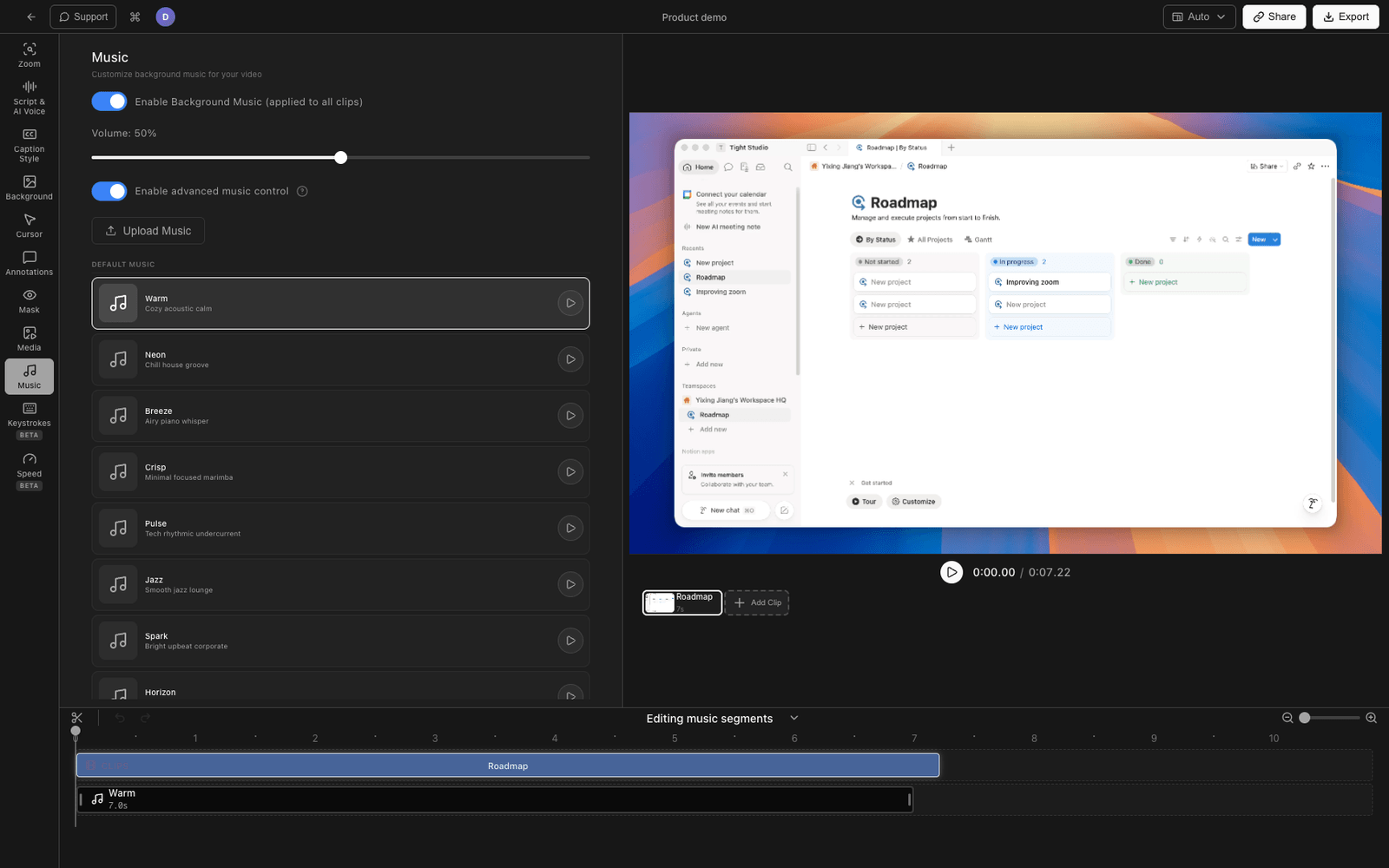
Tight Studio is the all-in-one screen recorder for tutorials, demos, course videos, and social cuts, and it has a music library built into the editor - so the music is a real track you control, added after recording, not baked into the capture.
Pick a track from the built-in library
Open your recording in the Tight Studio editor and choose from a library of 10 royalty-free tracks: Warm, Neon, Breeze, Crisp, Pulse, Jazz, Spark, Horizon, Glow, and Drift - spanning calm acoustic, lo-fi and house, upbeat corporate, cinematic, and ambient styles. The track you pick plays underneath the whole recording. Because it is royalty-free, you can publish the video without the copyright risk of a streaming-service song.
Or upload your own music
If you have a track of your own, upload it directly (mp3, wav, aac, m4a, ogg, flac) and use it as the music bed instead of a library track.
Set the music volume
Use the volume control to set how loud the music sits under your voice, so the narration stays clear and the music stays in the background.
All of this is in the free download.
Comparing background music support
| Capability | Loom | Tight Studio |
|---|---|---|
| Built-in royalty-free music library | No | Yes (10 tracks) |
| Upload your own music file | No | Yes |
| Add music in the editor after recording | No | Yes |
| Control music volume | No | Yes |
| Music as a separate track (not baked into the capture) | No | Yes |
| Licensed for republishing | No (streaming hack) | Yes (royalty-free library) |
Frequently asked questions
Can you add music to a Loom video?
Not in the Loom editor. As of May 2026, Loom has no music library, no audio-track upload, and no music controls. The only way to get music into a Loom is to play it from a streaming app while recording with system audio on, which bakes it permanently into the recording’s audio.
Does Loom have a music library?
No. Loom’s editor is limited to trim, split, stitch, and edit-by-transcript. There is no music library or audio-track feature, per Loom’s own editing documentation. The request for one (LOOM-195) is at “Gathering Interest” on Loom’s public feedback portal.
Is it safe to play Spotify while recording a Loom?
For a private internal message it is usually fine. For anything you publish or share externally, it is risky: tracks from Spotify, Apple Music, and YouTube are generally not licensed for use in republished video, so the music can trigger a copyright claim. A royalty-free music library avoids that problem entirely.
Will Loom add background music?
Loom has acknowledged the request - it is tracked publicly as LOOM-195, “Ability to add background music while editing a Loom video,” at “Gathering Interest” status. There is no published timeline. Until it ships, Loom’s editor cannot add a music track.
Can I add music to an existing Loom recording?
Not inside Loom. You can export the Loom recording as MP4, open it in Tight Studio, pick a royalty-free track (or upload your own), and set its volume. You do not have to re-record.
How much does Tight Studio cost?
Tight Studio has a free tier with limits on Add Clip and shareable videos, plus a Pro plan for unlimited recording, exporting, and sharing. The music library is available on the free download. See tight.studio for the latest pricing.