
How to add click sound effects in Loom
You have noticed it in good software tutorials: a soft, satisfying click sound every time the presenter presses the mouse. It makes the video feel tactile, and it tells the viewer exactly when something happened so they can follow along. You went looking for that setting in Loom and could not find it. Wanting a click sound on your recordings is a reasonable thing for tutorial and demo content. Loom does not have one.
This guide covers what Loom supports today for click feedback, what is missing, the workarounds people try, and how to add click sound effects in Tight Studio.
What Loom supports today
Loom has no click sound effect. There is no audible click when you press the mouse - not in the recorder, not in the editor. The only click-related feature Loom has is “Highlight mouse clicks,” which draws a visual ring around the cursor when you click. Per Loom’s documentation, it is silent (a visual cue only), it is a toggle you set before recording, it works in the desktop app only (not the Chrome extension), and it is available on paid plans only (Education, Business, Business + AI, Enterprise).
Loom’s editor has no cursor enhancements at all - no click sound, no smooth cursor motion, no custom cursor size. Loom’s official editing feature list contains zero cursor-polish features. The silent visual highlight is the entire surface area, and it can only be turned on ahead of time, never added or changed afterward.
The official feature request: Loom users have asked for stronger click feedback for a long time. Loom’s public Productboard feedback portal has a “Mouse click emphasis during recording” item originally raised around April 2019: portal.productboard.com. What shipped from it was the silent visual highlight. As of May 2026, Loom still has no click sound effect.
Workarounds in Loom
None of these gives you a real, controllable click sound, but here is what people try.
Workaround 1: Turn on “Highlight mouse clicks” before recording
In the Loom desktop app, enable Highlight mouse clicks before you record. You get a visual ring on each click.
- Works for: a silent visual cue that something was clicked
- Does not work for: an actual click sound, and it is paid + desktop only, and cannot be added or changed after recording
Workaround 2: Pipe a system click sound while recording
Use an external utility that plays a click sound on every mouse press, and record with system audio on so the sound is captured.
- Works for: getting some audible click into the file
- Does not work for: control - it fires on every click including misclicks, cannot be adjusted or removed afterward, and is permanently mixed into the audio along with any other system noise
Workaround 3: Export and add click sounds by hand
Download the MP4 and, in a video editor, drop a click sound effect onto the timeline at every click and line each one up.
- Works for: people with a separate editor and a lot of patience
- Does not work for: anything practical - hand-syncing a sound to every click across a tutorial is extremely tedious, and it needs a second tool
The bottom line: Loom cannot add click sound effects, before or after recording. For a clean, consistent click sound without hand-syncing, the practical answer is a recorder that adds it automatically.
How to add click sound effects in Tight Studio
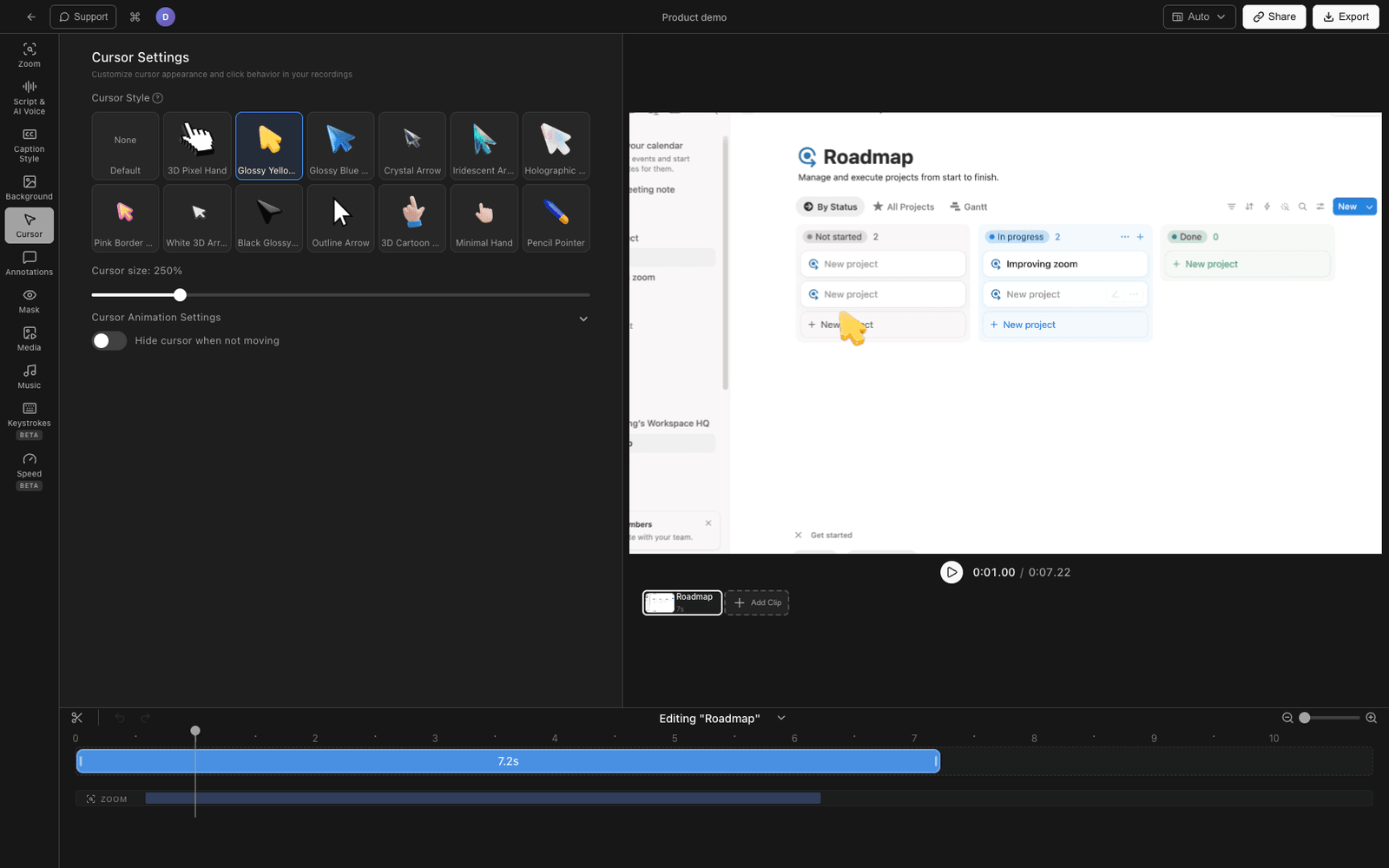
Tight Studio is the all-in-one screen recorder for tutorials, demos, course videos, and social cuts, and it adds click sound effects automatically.
Turn on the click sound
Open your recording in the Tight Studio editor. A click sound plays automatically on each mouse click in the recording - you toggle it on or off, and a volume control sets how loud the click is so it sits right under your narration. Because it is driven by the click data captured during recording, every click is synced automatically; you never hand-place a single sound.
Pair it with the click highlight and smooth cursor
The click sound works alongside a visual click highlight and smooth cursor motion, so each click reads clearly both audibly and visually. You can also adjust the cursor size so the pointer is easy to follow.
It is editable after recording
All of this is applied in the editor on the finished recording, not a record-time-only switch you have to remember to flip beforehand. If you forgot to think about clicks while recording, it does not matter - turn it on afterward.
All of this is in the free download.
Comparing click feedback support
| Capability | Loom | Tight Studio |
|---|---|---|
| Audible click sound effect | No | Yes |
| Click sound volume control | No | Yes |
| Visual click highlight | Yes (paid, record-time, desktop only) | Yes |
| Smooth cursor motion | No | Yes |
| Adjustable cursor size | No | Yes |
| Cursor polish editable after recording | No | Yes |
Frequently asked questions
Does Loom have a click sound effect?
No. As of May 2026, Loom has no audible click sound anywhere - not in the recorder or the editor. Its only click feature is a silent visual highlight ring, which is paid, desktop-app only, and set before recording.
What does “Highlight mouse clicks” do in Loom?
It draws a visual ring around the cursor when you click, to draw the viewer’s eye. It makes no sound. It is a toggle you enable before recording in the Loom desktop app, on paid plans, and it cannot be added or changed after the recording is finished.
Can I add a click sound to a Loom after recording?
No. Loom’s editor has no cursor enhancements, so there is no way to add a click sound to a finished Loom. The only options are to pipe a system click sound while recording (uncontrollable, baked into the audio) or to hand-add sound effects in a separate video editor.
Why do tutorial videos have click sounds?
A click sound tells the viewer exactly when an action happened, so they can follow each step without missing it, and it makes the video feel more tactile and produced. It is one of the small details that separates a polished tutorial from a raw screen capture.
Can I add click sounds to an existing recording?
Not inside Loom. You can export the Loom recording as MP4, open it in Tight Studio, and turn on the click sound and click highlight there - though click sounds work best when the recorder captured the click data, so recording the session in Tight Studio gives the cleanest result.
How much does Tight Studio cost?
Tight Studio has a free tier with limits on Add Clip and shareable videos, plus a Pro plan for unlimited recording, exporting, and sharing. Click sound effects are available on the free download. See tight.studio for the latest pricing.