
How to make a vertical video with screen and camera in Screen Studio
You want a vertical video for Reels, Shorts, or TikTok where the screen recording sits in the top half and your talking-head camera fills the bottom - the stacked layout you see on every good short-form tutorial. Screen Studio lets you switch to a 9:16 canvas, but when you try to build that split, the camera stays a free-floating bubble you have to drag and resize by hand, and there is no preset that does the stack for you. You are not missing a setting. Screen Studio does not currently ship a stacked screen-and-camera layout.
This guide covers what Screen Studio supports today for vertical video, what is missing, the workarounds people use, and how to make a stacked vertical video in Tight Studio if you need that now.
What Screen Studio supports today
Screen Studio does support vertical video. It has aspect-ratio presets including 9:16, 1:1, 4:3, 3:4, and 4:5 (4:5 was added in v3.0.0, February 2025), and it exports a proper vertical file. This is documented in the aspect ratio guide and the changelog. If all you need is a vertical crop of your screen, Screen Studio does that.
What Screen Studio does not have, as of May 2026, is a layout that arranges the screen and the camera into a stack:
- A preset that puts the screen in a top panel and the camera in a bottom panel (or vice versa)
- A split-screen / picture-by-picture composition where both fill the frame at fixed regions
- Content-aware reframe that intelligently converts a horizontal recording into a vertical one
In Screen Studio the camera stays a free-floating overlay - a circle or rounded rectangle you position manually over the screen. On a 9:16 canvas you can drag it to the bottom, but you are eyeballing the size and position every time, the screen does not get its own dedicated top panel, and there is no one-click stacked template.
No tracked request for this: A stacked screen-and-camera layout is not a tracked request on Screen Studio’s public feedback hub at hub.screen.studio, and there is no content-aware reframe. Screen Studio’s team is small and ships deliberately - vertical aspect ratios themselves are relatively recent - so this is a real gap with no public timeline.
Workarounds in Screen Studio
If you are staying in Screen Studio and need a stacked vertical video, there are two options. Neither gives you a true stacked layout.
Workaround 1: Hand-place the camera bubble on a 9:16 canvas
Switch the canvas to 9:16, then drag the floating camera overlay down to the lower portion of the frame and resize it. This approximates a stack.
- Works for: a rough top-screen / bottom-camera look if you are willing to position it by hand
- Does not work for: a clean split where the screen has its own panel and the camera fills a fixed bottom region - the camera stays a floating bubble over the screen, not a panel beside it, and you redo the placement on every project
Workaround 2: Export and recompose in another editor
Export the screen and, if you can, the camera separately, then build the stacked layout in Final Cut, Premiere Pro, CapCut, or DaVinci Resolve.
- Works for: situations where you have time and a second editor
- Does not work for: quick turnaround, or keeping everything in one tool
The hand-placement route is workable but tedious and never quite a clean split, and the second-editor route defeats the point of a fast one-app recorder. If a stacked vertical layout is a requirement, the practical answer is a recorder that has the preset built in.
How to make a stacked vertical video in Tight Studio
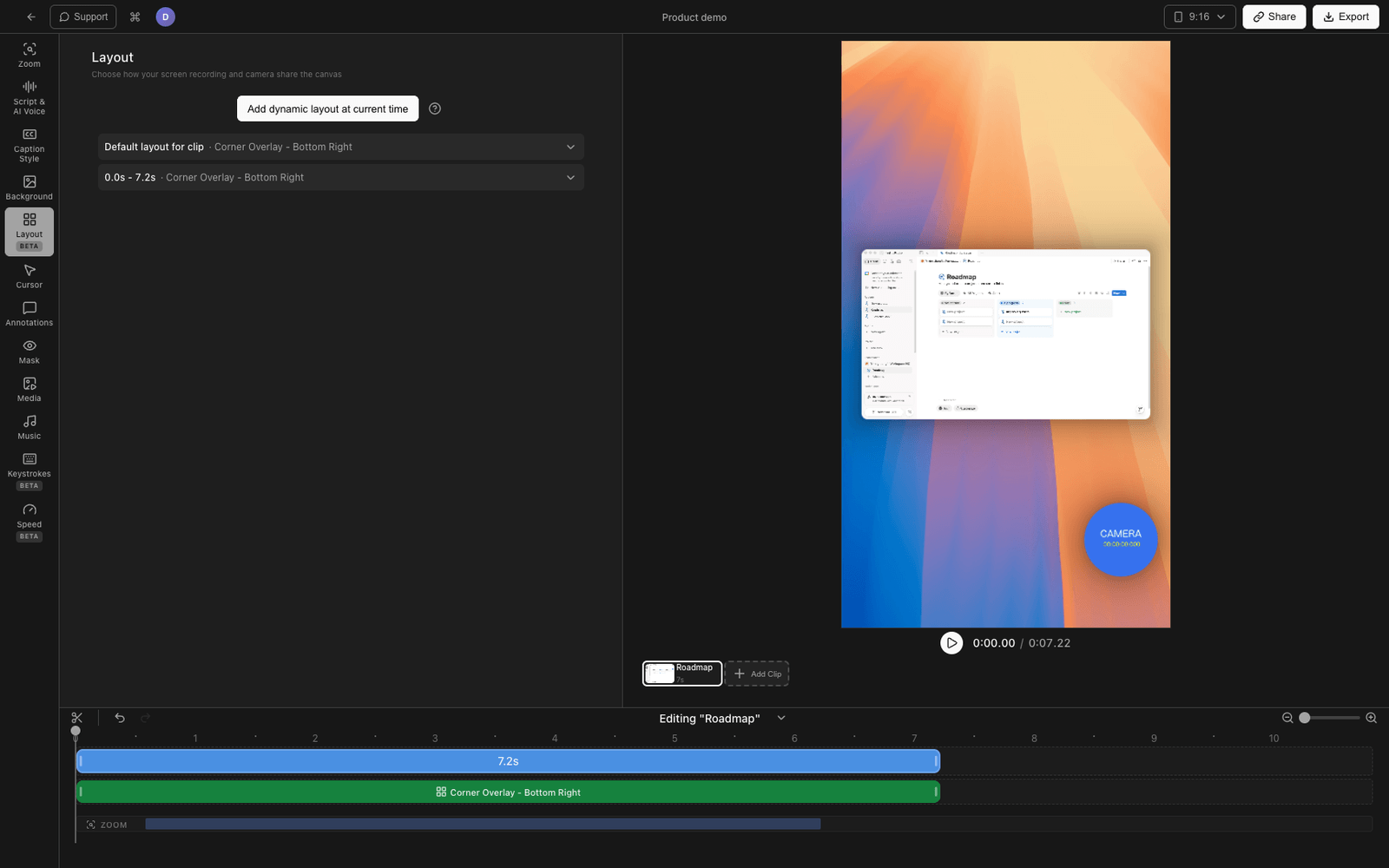
Tight Studio is the all-in-one screen recorder for tutorials, demos, course videos, and social cuts, and it ships dedicated stacked layout presets for vertical video.
Using a stacked preset
- Open your recording in the Tight Studio editor.
- Set the canvas to the vertical 9:16 aspect ratio. The stacked presets are designed for vertical canvases.
- Open the Layout panel and choose a Camera Stacked preset:
- Camera Top - Fit: camera in a top panel, screen shown at its native shape below, background filling the edges
- Camera Top - Cover: a 50/50 split, camera on top, screen cropped to fill its half
- Camera Bottom - Fit: screen on top at native shape, camera in a bottom panel
- Camera Bottom - Cover: a 50/50 split, screen on top cropped to fill, camera on the bottom
- Tune the gap between the panels and the corner roundness if you want.
The screen gets its own panel and the camera gets its own panel - it is a real stack, not a floating bubble. Captions reposition to the split line automatically, and zoom stays bounded to the screen panel so the stack is preserved when you zoom in.
Why we built it this way
Short-form tutorials live or die on the stacked layout, and asking people to hand-place a camera bubble on every project (or bounce to a second editor) is exactly the friction a screen recorder should remove. A preset that composes the stack for you keeps the whole edit in one app.
A note on accuracy: Tight Studio does not do AI content-aware reframe. The stacked presets compose the screen and camera into fixed vertical panels - they do not auto-track a subject the way a dedicated repurposing tool does.
Comparing vertical video support
| Capability | Screen Studio | Tight Studio |
|---|---|---|
| 9:16 vertical canvas and export | Yes | Yes |
| Multiple aspect ratio presets | Yes | Yes |
| Free-floating camera overlay | Yes | Yes |
| One-click stacked screen + camera layout | No | Yes (4 presets) |
| Screen in its own panel (not a bubble over it) | No | Yes |
| Captions auto-reposition for the split | No | Yes |
| Content-aware / AI reframe | No | No |
Frequently asked questions
Can you make a vertical video in Screen Studio?
Yes. Screen Studio has a 9:16 aspect-ratio preset (along with 1:1, 4:3, 3:4, and 4:5) and exports a proper vertical file. What it does not have is a stacked screen-and-camera layout - the camera stays a free-floating overlay you position by hand.
Does Screen Studio have a split-screen or stacked camera layout?
Not as a preset. You can manually drag the floating camera bubble toward the bottom of a 9:16 canvas, but there is no one-click layout that gives the screen its own panel and the camera its own panel.
Does Screen Studio convert a horizontal recording to vertical automatically?
There is no content-aware reframe in Screen Studio. Switching the aspect ratio crops the canvas; it does not intelligently recompose a 16:9 recording into a 9:16 one.
How do I make a stacked vertical video in Tight Studio?
Set the canvas to 9:16, open the Layout panel, and pick a Camera Stacked preset (camera top or bottom, fit or cover). The screen and camera each get their own panel, with adjustable gap and corner roundness.
Will I lose my Screen Studio recordings if I switch to Tight Studio?
No. If you have the screen and camera as separate files you can bring them into Tight Studio and apply a stacked preset there. You do not have to re-record.
How much does Tight Studio cost?
Tight Studio has a free tier with limits on Add Clip and shareable videos, plus a paid plan for unlimited recording, exporting, and sharing. See tight.studio for the latest pricing.