
How to smooth or animate the cursor in Tella
You recorded a walkthrough in Tella and the cursor looks the way it looked while you were doing it - jittery, fast, hard to follow. You want it to glide smoothly between targets and feel deliberate, the way polished product demos do. So you go looking for a cursor smoothing setting in the editor.
It is a reasonable thing to want. Smooth, animated cursor movement is one of the biggest differences between a raw screen grab and a demo that looks produced. Here is the straight answer on where Tella stands, the limited workaround, and how to get smooth cursor motion without leaving the editor.
Does Tella smooth or animate the cursor?
No. As of May 2026, Tella has no cursor-smoothing or cursor-styling feature. The recorded cursor moves exactly as it did during capture - Tella does not interpolate its path, change its size, animate it, or add a click effect.
Tella does not run a public feature-request board (no Canny, Featurebase, or open roadmap), so there are no upvotes to point at - but the absence is clear from Tella’s own properties. Cursor smoothing, cursor size, cursor animation, and click highlighting appear nowhere in Tella’s complete documentation index (tella.com/docs/llms.txt) or its changelog covering December 2022 through May 2026 (tella.com/docs/changelog). The closest related feature is auto-zoom tracking that follows the cursor while a zoom is active (tella.com/docs/help/editing/add-a-zoom.md) - but that pans the zoom toward the cursor; it does not smooth the cursor’s own movement, and it is limited to Mac-app recordings. Tella is a well-made product focused on clips and sharing - cursor motion polish is simply not part of it today.
The workaround in Tella
There is no in-editor way to smooth or restyle the cursor in Tella. The only adjustments available are outside Tella, at the operating-system level, before you record:
- Increase the macOS pointer size in System Settings, so the cursor is at least easier to follow.
- Turn on “Shake mouse pointer to locate” so a lost cursor is findable.
- Move the mouse deliberately and slowly while recording, since whatever you do live is exactly what ends up in the video.
Be honest about what this is: it is not smoothing. macOS pointer settings change the cursor system-wide, affect every other app, and do nothing about jittery motion - they only make the unsmoothed cursor bigger. There is no path in Tella to soften the cursor’s path, animate it between targets, add a click ripple, or change its size for just the recording. For a produced-looking demo, recording carefully by hand is the only lever, and it does not get you close.
How to smooth the cursor with Tight Studio instead
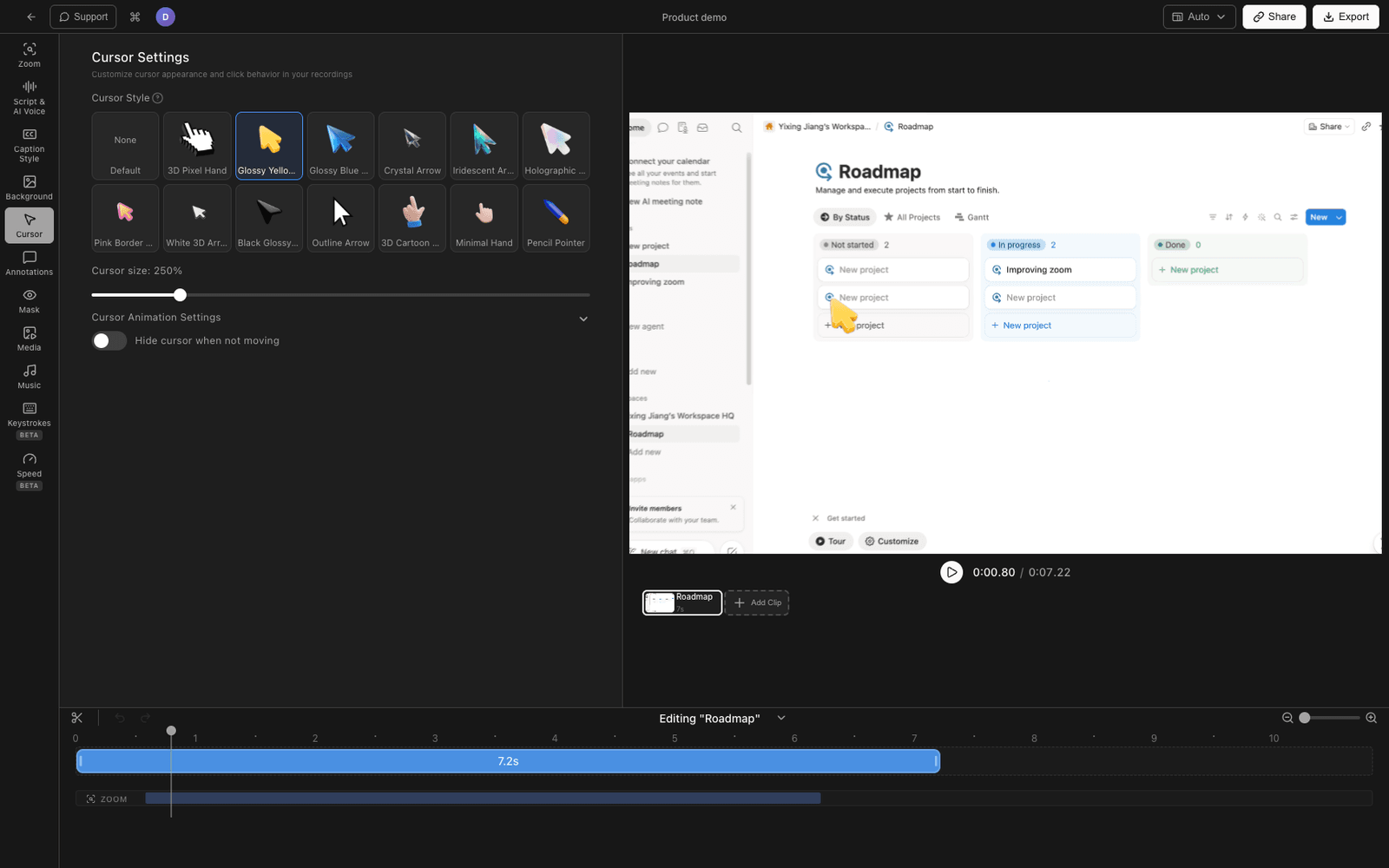
If cursor polish is part of what makes your demos look produced, it helps to have it in the editor so you can dial it in after recording instead of trying to mouse perfectly live. Tight Studio is a Mac screen recorder and editor with cursor smoothing and animation built in.
1. Record normally
Record your screen the way you always would - no need to move the mouse unnaturally slowly. Tight Studio records the cursor as data, which is what lets it reshape the motion afterward.
2. Set a cursor smoothing level
In the Cursor Settings panel, raise the cursor smoothing level. Tight Studio softens the recorded path so the cursor glides between targets instead of jittering - tunable from off to maximum, so you choose how produced it looks.
3. Pick an animation style
Choose a cursor animation type - options range from snappier to slower, more cinematic movement - so the cursor’s pacing matches the feel of the video.
4. Add motion blur, lean, and click feedback
Turn on cursor motion blur for fast moves, a subtle cursor lean so it tilts in the direction of travel, and click highlighting (plus optional click sound) so taps read clearly. Cursor size is adjustable too, for the recording only - not your whole system.
Because all of this is applied in the editor, you tune it while watching the result and change it any time without re-recording. Tight Studio is the all-in-one screen recorder for tutorials, demos, course videos, and social cuts, so smooth cursor motion sits alongside click-following zoom, annotations, captions, and AI voiceover.
Why we built it into the editor
Hands are not smooth, and asking people to mouse like a robot to get a produced-looking demo is the wrong place to solve the problem. Recording the cursor as data and smoothing its path in the editor means you record naturally and decide how polished it looks afterward.
Tella vs Tight Studio for cursor smoothing
| Tella | Workaround (macOS settings + careful mousing) | Tight Studio | |
|---|---|---|---|
| Cursor path smoothing | No | No - careful mousing only | Yes (adjustable level) |
| Cursor animation style | No | No | Yes |
| Cursor motion blur | No | No | Yes |
| Click highlight / sound | No | No | Yes |
| Cursor size for the recording only | No (system-wide only) | No - system-wide | Yes |
| Adjustable after recording | n/a | No | Yes |
Frequently asked questions
Does Tella have cursor smoothing?
No. As of May 2026, Tella has no cursor-smoothing feature. The recorded cursor moves exactly as it did during capture. Cursor smoothing does not appear in Tella’s documentation index or changelog. The only cursor-related behavior is auto-zoom tracking, which pans a zoom toward the cursor but does not smooth the cursor itself.
Can I make the cursor bigger or animated in Tella?
Not within Tella. You can increase the macOS pointer size in System Settings, but that changes the cursor system-wide and does not animate or smooth it. There is no in-editor cursor size, animation, or click-effect control in Tella.
How do I get smooth cursor movement in a screen recording?
Use a recorder that smooths the cursor path in the editor. Tight Studio records the cursor as data and lets you set a smoothing level, animation style, motion blur, lean, and click highlighting after recording, so you record naturally and tune the polish afterward.
What is the best Tella alternative for cursor animation?
Tight Studio is the closest like-for-like alternative on Mac - it has the same category of recording and editor polish as Tella, plus cursor smoothing, animation styles, motion blur, and click highlighting that Tella does not offer.