
How to write a video script (+ free template)

A good video script is the difference between a video that flows and one that wanders. It does not need to be a screenplay. For most videos - YouTube tutorials, product demos, explainers, training, social posts - a script is a short document that tells you what to say, what to show, and in what order.
This guide walks through the full process of writing a video script: picking the right format for your video, structuring the content, writing lines that sound natural when spoken, and using the script when you record. There is a free template at the bottom you can copy and adapt.
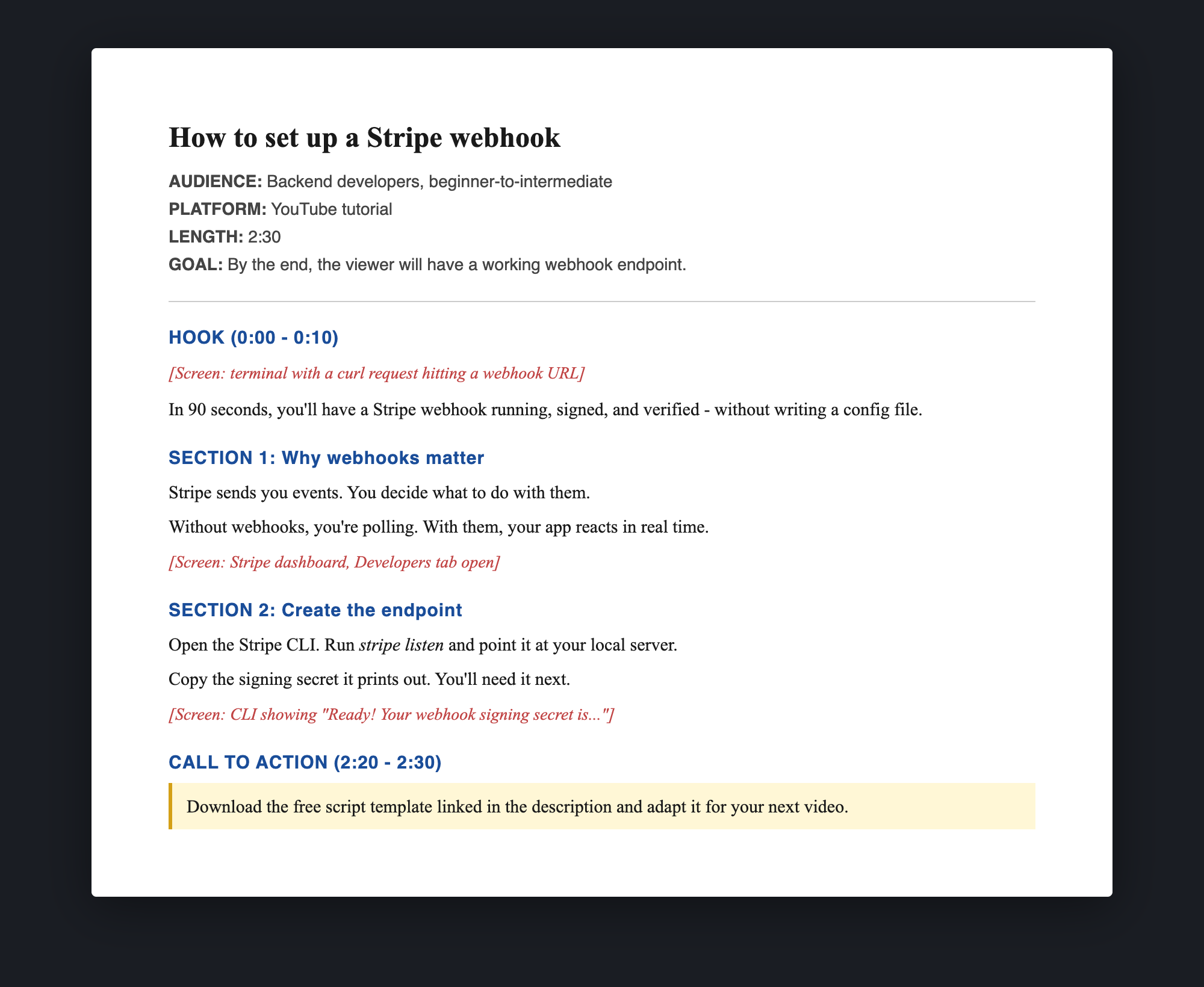
Why bother writing a video script
You can wing a 30-second selfie video. For anything longer than that, a script saves time three ways:
- You record fewer takes. Most retakes happen because the speaker lost their train of thought, not because of a technical issue. A script removes that.
- You edit faster. A script doubles as a shot list. You know what footage you need before you start, so you stop after the right takes instead of recording an hour of “just in case”.
- Your video makes its point. Unscripted videos drift. Viewers feel it. A 3-minute scripted video usually outperforms a 6-minute improvised one on retention.
The exception is a true-to-life vlog or talking-head where the personality is the point. For everything else - tutorials, demos, ads, training, explainers - script it.
Pick the right type of video script
Different videos need different script formats. Pick one before you start writing.
- Single-column narration script - One column of dialogue, broken by short visual notes in brackets or italics. Best for talking-head videos, YouTube tutorials, voiceover content, and AI-generated narration. This is what most people mean when they say “video script”.
- Two-column AV script - Two columns: video on the left, audio on the right. Best for ads, explainers, and any video where visuals and narration are tightly choreographed.
- Storyboard or shot list - A numbered list of shots with notes on the action, camera angle, and dialogue per shot. Best for cinematic content, short films, and ads with multiple locations.
- Outline-only “script” - A bullet list of points to cover, no full sentences. Best for personality-driven content (podcasts, vlogs, livestreams) where you want to sound spontaneous.
If you are not sure, start with a single-column narration script. It is the most flexible format and the easiest to read off a teleprompter or paste into an AI voiceover tool.
How to write a video script in 7 steps
The same workflow works for a 60-second product demo or a 10-minute tutorial. Adjust the depth of each step to the length of the video.
1. Define the goal in one sentence
Before you write anything, finish this sentence: “By the end of this video, the viewer will ____.”
Examples:
- “By the end of this video, the viewer will know how to set up a Stripe webhook.”
- “By the end of this video, the viewer will want to start a free trial of our product.”
- “By the end of this video, the viewer will be able to identify three signs of phishing.”
If you cannot write this sentence in one line, your topic is too broad. Split it into two videos.
2. Know your audience and platform
A script for absolute beginners reads differently than a script for engineers. A 30-second TikTok reads differently than a 10-minute YouTube tutorial.
Note three things at the top of your draft:
- Audience - who is watching and what do they already know
- Platform - YouTube, embedded on a landing page, internal Slack, LinkedIn, etc.
- Length - target runtime in minutes:seconds
Most people read about 150 words per minute on camera. So 60 seconds = roughly 150 words, 3 minutes = roughly 450 words. Use this to size the script as you write.
3. Write the hook (first 5-10 seconds)
The first sentence has to earn the next 30. On YouTube, social, and embedded videos, retention drops fastest in the first 10 seconds. A weak opener loses half your viewers before they hear your point.
Four hook patterns that work:
- State the payoff. “In 90 seconds, I will show you how to set up SSO without writing a line of code.”
- Ask the viewer’s question. “Why does my screen recording have no sound? Here is the fix.”
- Show the result first. Open on the finished product or outcome, then explain how to get there.
- Counter-intuitive claim. “Everything you read about how to write a video script is wrong about one thing.”
Avoid: “Hi everyone, today we are going to talk about…” It buries the lead.
4. Outline the body
Before writing full sentences, list the 3-5 points you will cover, in order. Each point should map to roughly equal screen time.
For a 3-minute tutorial, an outline might look like:
- The problem (20 seconds)
- The free built-in method and why it falls short (40 seconds)
- The recommended method, step by step (90 seconds)
- A comparison so the viewer can pick (20 seconds)
- Call to action (10 seconds)
If a point needs more than one minute, split it into sub-points. If a point feels thin, cut it. Outline first, write sentences second.
5. Write in spoken English, not written English
This is the hardest part for most writers. The natural rhythm of speech is different from the natural rhythm of writing.
Rules of thumb:
- Use contractions. “You will” sounds robotic. “You’ll” sounds human. (Unless you are writing for an AI voiceover that handles contractions poorly - then test both.)
- Short sentences. One idea per sentence. If you can break a sentence at a comma, break it.
- Read every line out loud. If it is hard to say, rewrite it. Tongue twisters and clause-heavy sentences sound terrible on camera.
- Cut filler. “Basically”, “essentially”, “as you can see”, “I just want to mention that”. Delete every one.
- Talk to one viewer. Use “you”, not “you all” or “everyone”.
A good test: read the script to a coworker. If they react like you are reading at them, rewrite. If they react like you are talking to them, ship it.
6. Add visual cues
In a single-column script, add short bracketed notes between paragraphs for what should be on screen. Two-column scripts have this baked in.
Example:
[Screen: tight.studio homepage]
If you have ever tried to record your screen with audio on a Mac, you have probably hit this wall.
[Screen: macOS Screenshot toolbar, mic dropdown open]
The built-in Screenshot toolbar records your microphone, but it cannot record system audio.
Visual cues do not need to be exhaustive. One cue per paragraph is enough for most videos. The cues are for you, the editor, not the viewer.
7. End with one clear call to action
Pick one. Not three. If you ask viewers to subscribe, follow you, visit your site, and download a template, they will do none of them.
Good calls to action:
- “Download the free template linked in the description.”
- “Start a free trial at tight.studio.”
- “Try this in your own workflow and let me know what you change.”
Bad calls to action:
- “If you liked this video, smash the like button, subscribe, hit the bell, share with a friend, check out my Patreon, and read the description.”
Free video script template
Copy the block below into a doc and replace the bracketed sections. Works for any length up to about 10 minutes.
TITLE: [Working title]
AUDIENCE: [Who is this for and what do they already know]
PLATFORM: [YouTube, landing page, social, internal, etc.]
LENGTH: [Target runtime, e.g. 2:30]
GOAL: By the end of this video, the viewer will [one specific outcome].

---

HOOK (0:00 - 0:10)
[1-2 sentences. State the payoff, ask the viewer's question, or open on the result.]

[Screen / shot: what is on camera during the hook]

---

SECTION 1: [Point 1 title]
[Spoken script in short sentences. Use contractions. One idea per line.]
[Spoken script continued.]

[Screen / shot: visual cue]

---

SECTION 2: [Point 2 title]
[Spoken script.]

[Screen / shot: visual cue]

---

SECTION 3: [Point 3 title]
[Spoken script.]

[Screen / shot: visual cue]

---

CALL TO ACTION (last 10 seconds)
[One specific ask. Mention what they get for taking the action.]

[Screen / shot: end card, logo, or product]
The same template in two-column AV format, for ads and tightly choreographed explainers:
| VIDEO                              | AUDIO                                     |
|------------------------------------|-------------------------------------------|
| Open on [shot description]         | [Spoken line that hooks the viewer.]      |
| Cut to [shot description]          | [Spoken line.]                            |
| Screen recording of [feature]      | [Spoken line explaining the feature.]     |
| Logo with tagline                  | [Call to action.]                         |
Tips that separate a good script from a bad one
A handful of small things that make a script work on camera.
Write the body first, the hook last. You will only know what to tease in the hook once you know what the body actually delivers. Most writers waste an hour polishing an opener for a section they later rewrite.
Cut everything in the script that does not serve the goal. Tangents kill retention. If a sentence is interesting but not on-topic, save it for another video.
Read the full script out loud, in one take, before recording. Time it. If it runs long, cut. Most first drafts run 30-50% too long.
Avoid jargon unless your audience uses it. “SDR”, “PLG”, “VPC” are fine for an internal SaaS audience and confusing for a general one. When in doubt, define the term the first time you use it.
Number-stack your points. “Three reasons”, “five steps”, “two ways”. Numbered structure tells the viewer how long the video will be and gives them an internal progress bar.
Plant a payoff in the hook, deliver it at the end. “I will show you a free template at the end” gives viewers a reason to stay. Make sure you actually deliver it.
How to use the script when you record
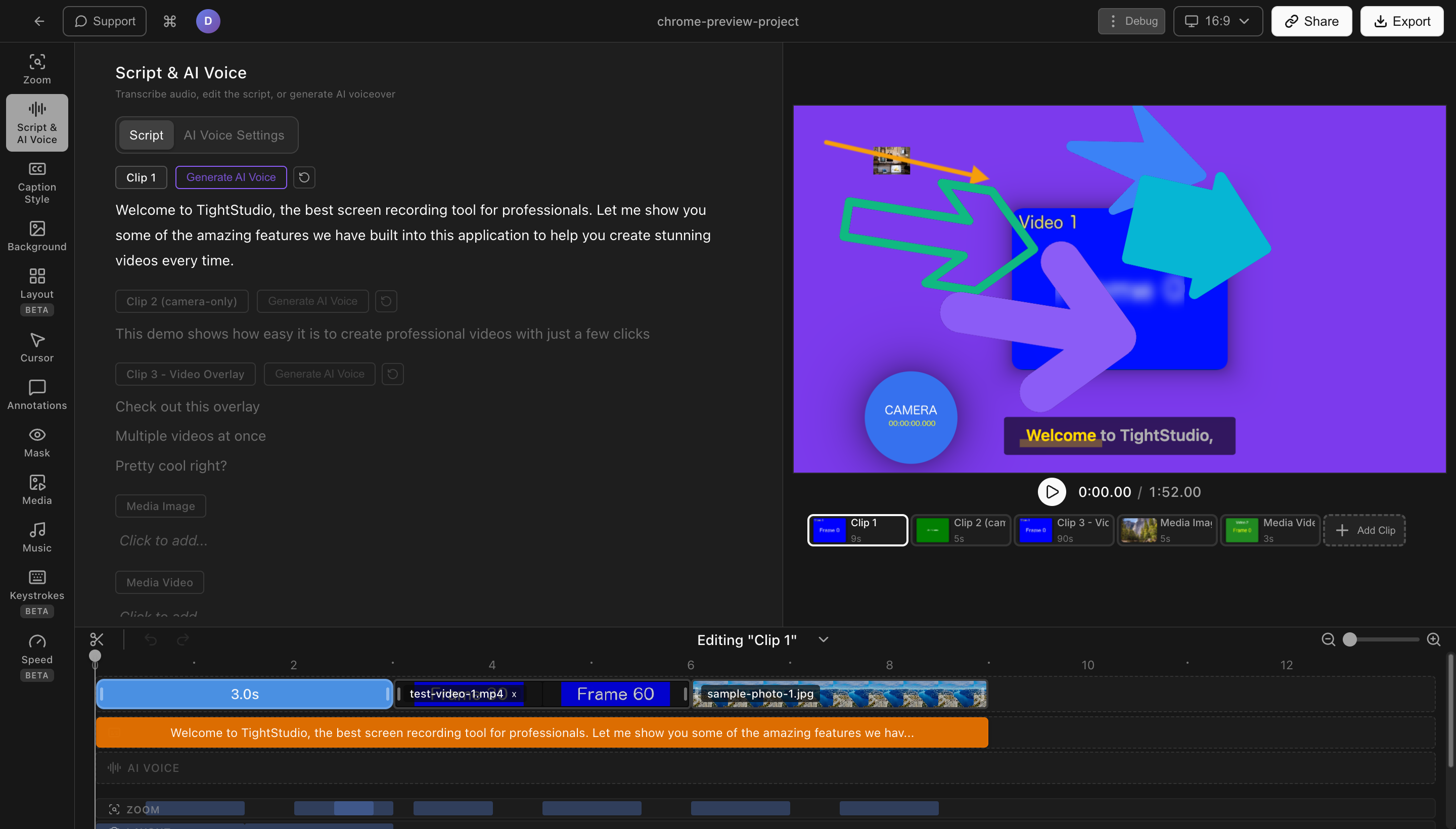
A script is only useful if you can read it without sounding like you are reading.
- Teleprompter on your camera or screen. The most natural-looking option. Most recording tools (including Tight Studio) include a built-in teleprompter you can scroll while you record. Free standalone options: PromptSmart on iPad, the Teleprompter app on Mac.
- Bullet points on a second monitor. Convert the script to 5-10 bullet points and glance over while recording. You sound more spontaneous but you have to know the content well.
- AI voiceover from the full script. Paste the script into an AI voiceover tool, pick a voice, generate the audio, and layer it over your screen recording. Removes the recording step entirely. Best for content where the visuals carry the personality.
- Memorize and improvise. Read the script three times, set it aside, and record from memory. Works for 30-second videos. Falls apart past 90 seconds.
If you are recording a screen tutorial or product demo, the screen recording + teleprompter + AI voiceover combination is the fastest path from script to finished video. Tight Studio has both a teleprompter for recording with your own voice and an AI voiceover option for generating narration from the typed script, so you can pick per video instead of bouncing between apps.
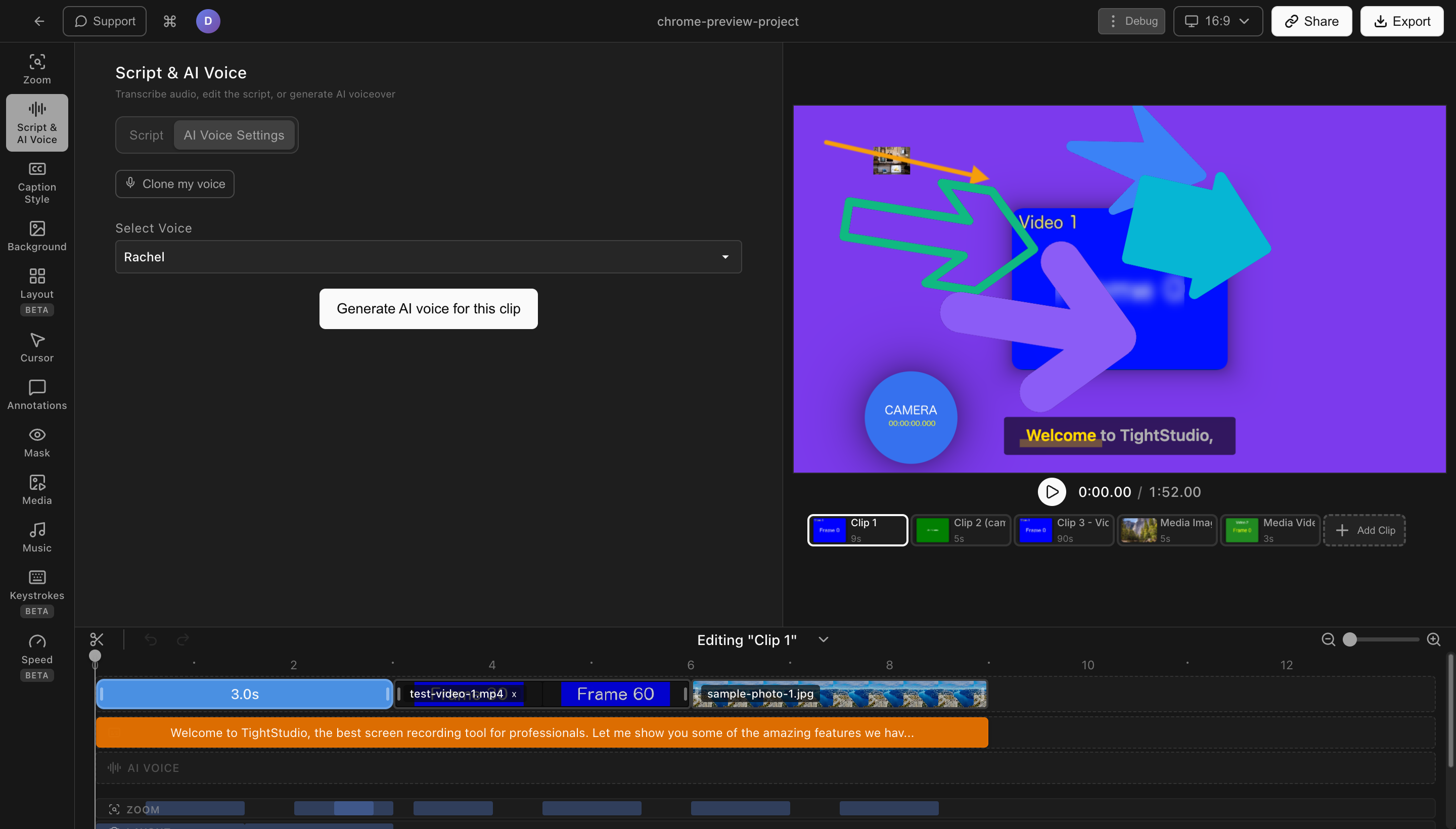
Comparing video script formats
| Format | Best for | Length | Visuals included |
|---|---|---|---|
| Single-column narration | Tutorials, talking-head, YouTube, AI voiceover | Any | Inline bracketed cues |
| Two-column AV script | Ads, explainers, choreographed videos | Short to medium | Dedicated video column |
| Storyboard / shot list | Cinematic, short films, multi-shot ads | Any | Per-shot notes |
| Outline only | Vlogs, podcasts, livestreams | Any | Sparse or none |
Frequently asked questions
How do I write a video script?
Start with one sentence describing what the viewer will get from the video. Outline 3-5 points in the order you will cover them. Write each point in short, spoken-English sentences. Add a hook at the start that promises a payoff. Add one specific call to action at the end. Read the whole thing out loud and cut anything that feels hard to say. Most scripts run 30-50% too long on the first draft - trim aggressively.
What is a video script template?
A video script template is a reusable structure you fill in for each video. A common layout includes a header (title, audience, platform, length, goal), a hook section, three to five body sections with visual cues, and a closing call to action. The template above in this guide is free to copy.
How long should a video script be?
About 150 words per minute of finished video. So a 60-second video script is roughly 150 words, a 3-minute script is roughly 450, and a 10-minute script is roughly 1,500. Adjust for your speaking pace - read the script out loud and time it before recording.
Do I need a script for a YouTube video?
For tutorial, explainer, or educational content - yes. Scripted YouTube videos generally have higher retention than unscripted ones in the same category. For vlogs, reactions, or personality-driven content, a bulleted outline often works better than a full script. For shorts under 60 seconds, you can usually script just the hook and improvise the rest.
What is the best format for a video script?
For most videos, a single-column narration script is easiest to write and easiest to read from a teleprompter. Use a two-column AV script when visuals and audio need to be tightly synced (ads, choreographed explainers). Use a shot list or storyboard for cinematic content with multiple camera angles.
How do I make my video script sound natural?
Use contractions, short sentences, and one idea per line. Read every sentence out loud and rewrite anything that is hard to say. Cut filler words like “basically”, “essentially”, and “as you can see”. Talk to one viewer using “you”, not “everyone”. The single best test is to read the script to a coworker - if they react like you are talking to them, the script is working.
Can AI write a video script for me?
Yes. ChatGPT, Claude, and Gemini all produce serviceable first drafts when given a clear prompt. A prompt that works: “Write a [length] video script for [topic] aimed at [audience]. Use a friendly, second-person voice. Hook the viewer in the first sentence. Cover [points]. End with one call to action. Format with one sentence per line.” Expect to rewrite 30-50% of the draft. AI is good at structure and bad at sounding like a specific person.
What software should I use to write a video script?
Any text editor works. Google Docs and Notion are the most common - both support comments and shared editing if you are working with a team. For teleprompter-ready scripts, plain text or a doc with no formatting works best. Specialized tools like Final Draft and Celtx are overkill for short-form video and built for screenplays.
How do I write a script for a screen recording or product demo?
Outline the steps you will demonstrate before writing the script. Write the spoken script alongside the steps - one or two sentences per step. Keep visual cues simple (“zoom on the settings button”, “switch to the dashboard”). When you record, run the screen actions slightly slower than feels natural - the script will fit better and viewers can follow along. Tight Studio and similar tools let you record the screen, narrate with the script open in a teleprompter, and add auto-zoom on clicks so you do not have to call out every button in the script.