

The best Loom alternative depends on what you want to change. Cap keeps the quick-recording-and-link workflow. Tella adds multi-clip editing and automatic cleanup. Screen Studio and Tight Studio give you editable zooms and cursor motion on Mac. OBS Studio gives you free local recording without a subscription, but sharing is a separate step.
Those are different replacements. A recorder that exports a beautiful MP4 does not necessarily replace your team’s video library, comments, or access controls.
We make Tight Studio, so this is a first-party comparison. This guide combines our August hands-on comparisons with official product and plan checks on September 5, 2026. It does not claim that we freshly tested every current release. ScreenPal and Vidyard are documentation-based entries; CleanShot’s newly advertised editor is also documentation-based, not part of our older test.
The short list: 10 Loom alternatives compared
Prices are in USD where quoted. Annual subscriptions are labeled explicitly, and free recording is separated from free hosting. Follow each product’s pricing link for regional prices, taxes, and current offers.
| Tool | Recording platform | Free access or paid starting point | What changes from Loom | Main tradeoff |
|---|---|---|---|---|
| Cap | Mac, Windows, Linux, Chrome, per vendor listing | Free personal use; commercial desktop $29/year; Pro $12/user/month monthly | Instant sharing plus Studio editing; self-hosting option | Free cloud clips still have a five-minute limit |
| Tella | Mac, Windows, browser | Trial; Pro $13/user/month billed yearly | Multi-clip editing, auto zoom, transcript cleanup, hosted links | Ongoing use requires a subscription |
| Screen Studio | Mac | $29/month monthly or $9/month billed yearly | Editable zooms, smooth cursor, local transcription, share links | No Windows recorder |
| Tight Studio | Apple Silicon Mac | Free standard exports; Plus $9/month yearly; Pro $24/month yearly | Zoom and cursor animation, multi-take editing, generated narration | No Windows or Intel Mac app; ongoing AI generation requires Pro |
| CleanShot X | Mac | Paid app; compare app and cloud plans | Screenshots, quick recordings, and a newly advertised Studio Mode | New editor not covered by our August test |
| OBS Studio | Mac, Windows, Linux | Free and open source | Local recording, scenes, sources, audio routing | No hosted review page or post-capture editor |
| FocuSee | Mac, Windows | Standard $49.99/year; version-limited lifetime option | Automatic zoom and 3D motion | Some AI features require additional credits |
| Camtasia | Mac, Windows | Paid Essentials plan for watermark-free Editor exports | Multi-track editing, cursor effects, annotations, training features | More complexity than a quick async recorder |
| ScreenPal | Mac, Windows, Chromebook | Free recordings up to 15 minutes; paid tiers | Recorder, editor, and hosting together | Conflicting free hosting descriptions on its pricing page |
| Vidyard | Desktop/browser recording workflows | Free limited plan; paid Starter; team plans quoted | Viewer analytics, calls to action, sales integrations | CRM integrations require a higher tier |
Start with the part of Loom you need to replace
Loom remains a reasonable baseline. Its Starter plan allows 25 videos per person with a five-minute recording limit. Business is listed at $18 per user per month on monthly billing and removes those limits; annual billing is cheaper. Business + AI adds transcript editing and automatic cleanup. Loom is not just a basic recorder with no editing.
Before switching, separate three requirements:
- Sending a message: How quickly can you record, copy a link, and let someone watch without creating an account?
- Publishing a reusable video: Can you replace a take, zoom into small controls, change narration, and export the finished file?
- Managing a library: What happens to permissions, comments, embeds, and old links after migration or cancellation?
An editing upgrade can be a collaboration downgrade if colleagues lose the feedback workflow they already use. Our Tight Studio vs Loom comparison walks through that distinction with screenshots.
1. Cap: Keep the record-and-share workflow
Cap separates Instant sharing from Studio editing. Paid cloud features include a Loom importer and transcripts; self-hosting requires infrastructure work.
Our Cap 0.5.9 Mac test found editable automatic zoom and cursor controls. It does not verify today’s broader platform listing.
The catch: free personal use is not free commercial use. Cap’s FAQ distinguishes unlimited-length local Studio recordings from five-minute free cloud clips. Check both licensing and hosting before migrating business videos.
2. Tella: Edit several takes before sharing
Tella combines hosted video with multi-clip recording, automatic zoom, transcript editing, silence and filler-word removal, captions, and layout changes. It has desktop recorders as well as browser options; it is not a browser-only tool without system audio.
Our August Tella test covered generated zooms, additional clips, cleanup controls, layouts, and the hosted viewing page. You can shape a recording before sending the link without moving it into another editor.
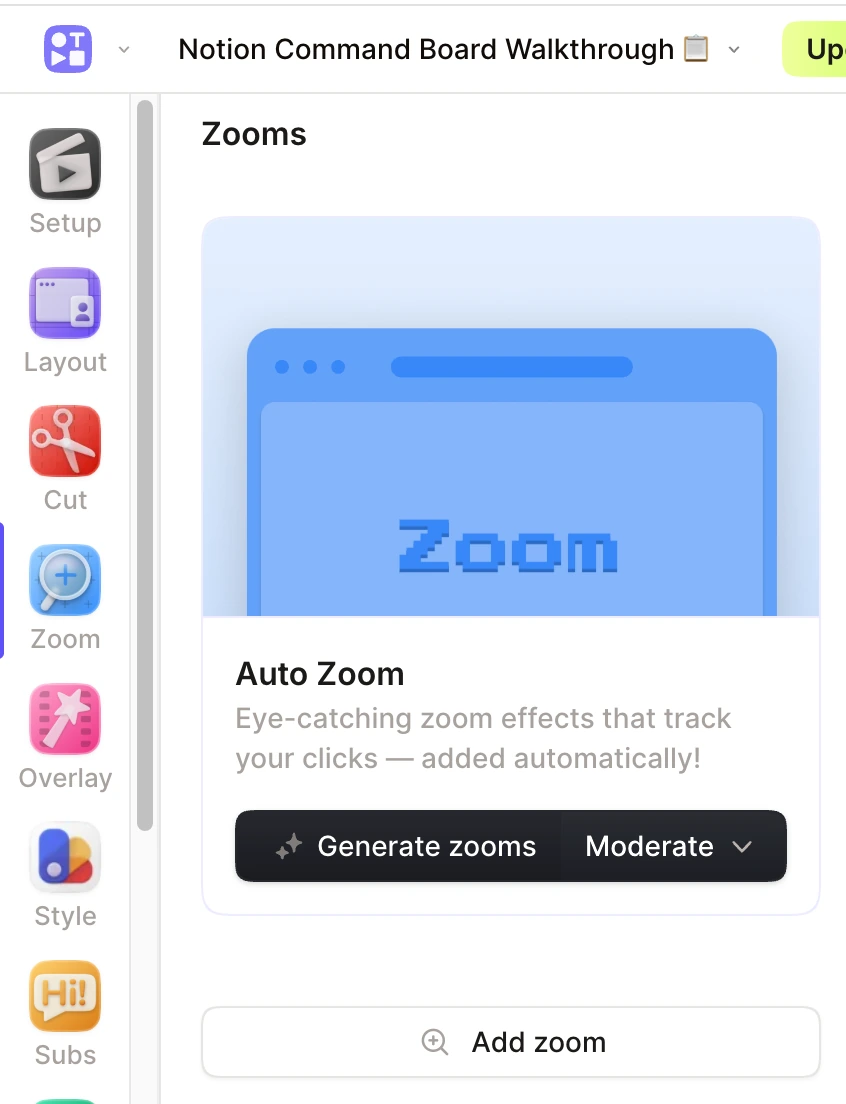
From our August 2026 test: Tella’s automatic-zoom controls, not a newly captured September screenshot.
Pro is listed at $13 per user per month billed yearly. Treat the trial as a trial, not an ongoing free plan. Check higher-tier requirements for custom domains, restricted access, or advanced analytics.
3. Screen Studio: Keep zoom and cursor motion editable
Screen Studio turns Mac recordings into videos with editable automatic zoom, cursor smoothing, backgrounds, captions, and shareable links. It also advertises local transcription and selected-app audio capture.
Our Screen Studio comparison used the same walkthrough in both editors. Zoom quality was competitive between Screen Studio and Tight Studio; we did not find grounds to declare our app universally better.
Screen Studio costs $29 per month on monthly billing or $9 per month billed yearly. Comparing its monthly price with another product’s annual rate would exaggerate the difference. Its main constraints here are Mac-only recording and a more focused editor than Camtasia’s full production environment.
4. Tight Studio: Combine takes, animation, and narration
Tight Studio is our app. It adds smooth zoom and cursor animation to an editor where you can record separate takes, import media, add timed text and shape annotations, and generate voiceover from a script. Intro and outro slides and a background-music library stay in the same project.
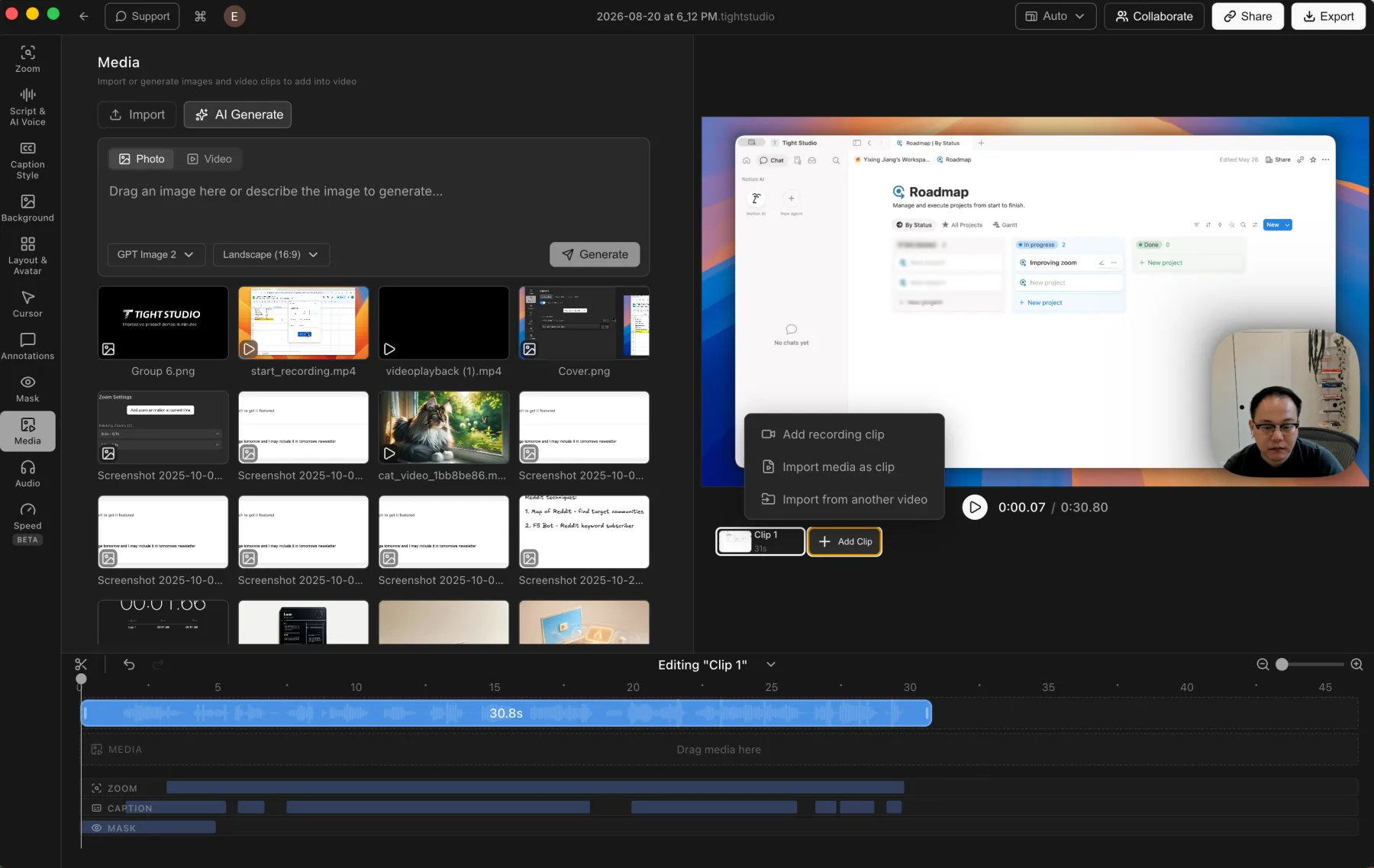
Tight Studio 3.1.5 in our August test: additional takes and imported media inside one editable project.
You can keep editing when a recording needs a corrected section or new narration, rather than treating the first capture as the finished message. Our AI voiceover guide explains narration separately from transcription and captions.
Free includes standard exports without a watermark, five account-level Add Clip trial uses, five share links that expire after seven days, and 100 trial AI credits. Plus costs $9 per month billed yearly or $19 monthly. Pro costs $24 per month billed yearly or $49 monthly and includes ongoing AI generation and team features. See plans and limits.
The limitations matter: Tight Studio requires an Apple Silicon Mac, uses cloud transcription, and does not offer selected-app audio filtering or automatic microphone cleanup. It records system audio and microphone audio separately, with independent volume controls. It is a Mac desktop app built with Electron, not an all-native implementation.
5. CleanShot X: Keep screenshots and video together
CleanShot’s current recording page now describes Studio Mode with smart zooms, cursor smoothing, backgrounds, motion blur, and MP4 or GIF export. Cloud sharing adds links and timestamped feedback.
This is a meaningful change from the capture-first workflow in our August review. That older test does not establish the capabilities or limitations of the new editor, and we have not rerun it for this guide.
If you already rely on CleanShot for screenshots, check the newer video workflow before adding another subscription. Compare the app and cloud plans separately, especially update eligibility and hosting requirements. Buying the app does not establish that every cloud feature is included.
6. OBS Studio: Record locally without a subscription
OBS Studio is free, open source, and available on Mac, Windows, and Linux. You configure scenes, screen and camera sources, and audio before recording. There is no subscription-based recording timer, although storage and hardware still constrain a session.
Our OBS comparison includes a screen-and-webcam recording test. OBS provides much more capture control than a one-button recorder, but it does not replace Loom’s hosted review page or add a conventional post-recording editor.
Choose your upload destination and editing tool before treating OBS as a complete replacement. Free capture does not make the rest of the workflow automatic.
7. FocuSee: Add automatic zoom on Mac or Windows
FocuSee offers automatic zoom alongside 3D motion, backgrounds, camera capture, and video export. Our FocuSee test covered editable zoom segments and perspective controls, but did not find a same-project workflow for assembling new recording takes.
Its pricing page lists Standard at $49.99 per year. Advanced plans add AI credits; some AI tools are separately metered. The $199.99 one-time option grants lifetime access to version 2.x, not every future major version.
Check the sharing and revision workflow you need. Automatic presentation effects alone do not establish that an app can replace a team’s hosted library.
8. Camtasia: Move into a full production editor
Camtasia offers screen recording inside a broader multi-track editor. In our Camtasia Editor 2026.0.7 test, SmartFocus added automatic zoom and pan, while separate controls handled annotations, cursor effects, media tracks, and audio. Training features include quizzes and SCORM export.
You gain control, but also spend more time learning and editing. Check TechSmith’s current plan comparison: the inexpensive Starter tier should not be mistaken for watermark-free Camtasia Editor. Essentials is the relevant starting tier for that requirement. Our test findings apply to the desktop Editor, not every product carrying the Camtasia name.
9. ScreenPal: Compare recording, editing, and hosting together
ScreenPal offers a recorder, editor, and hosting across Mac, Windows, and Chromebook workflows. Its free recorder allows sessions up to 15 minutes, longer than Loom Starter’s five-minute limit. Paid plans expand recording time and editing features.
One detail needs confirmation before migration: the current comparison table lists ten hosted videos on Free, while the FAQ on the same page describes unlimited free hosting. Budget around the stricter table limit until ScreenPal confirms what applies to your account.
This entry is documentation-based, not a hands-on test. Try system-audio capture, captions, and export on your device; do not assume every platform or free tier has identical features.
10. Vidyard: Connect video to sales workflows
Vidyard emphasizes viewer analytics, branded sharing pages, calls to action, and sales integrations. Its current free-plan comparison lists five recorded videos per month, up to 30 minutes each. Paid Starter expands recording and analytics, while CRM and marketing integrations sit in the Teams tier.
The purchasing question is different from buying a better recorder: do you need engagement data connected to your sales workflow?
This is a documentation-based entry, not a hands-on review. Confirm the integration and security tier before comparing seat prices. A free recording account is not equivalent to a configured team sales-video system.
Before moving your Loom library
Try the replacement with a disposable recording before uploading sensitive work. Record the screen, camera, microphone, and system audio you actually need. Make one correction and send the result to a colleague.
Use this short acceptance check:
- Can a viewer open the link in a private browser window with the intended access restrictions?
- Can you replace one section without re-recording the whole video?
- Are captions, small interface text, and audio understandable on a phone?
- Does downloading preserve the quality you need?
- Which library items migrate: videos only, or also titles, captions, folders, comments, and permissions?
- Will old embeds and links keep working, and what happens after cancellation?
Keep original exports and a record of important links until you verify the migration. An importer is not proof that every comment, permission, and embed transfers unchanged.
Frequently asked questions
What is the best free Loom alternative?
For local recording without a subscription, start with OBS. On Apple Silicon Mac, Tight Studio offers standard exports without a watermark, with limited trials for sharing, additional takes, and AI. Cap’s free offering is for personal use, not unlimited free commercial cloud hosting. Decide whether you need a file or a hosted feedback page before choosing.
Which Loom alternatives work on Windows?
Tella, Cap, FocuSee, Camtasia, ScreenPal, and OBS have Windows recording options. Screen Studio, Tight Studio, and CleanShot are Mac choices. Availability is not a promise that every feature matches the Mac version; trial the inputs and editor you need.
Which alternatives add automatic zoom?
Screen Studio, Tight Studio, Tella, Cap Studio Mode, FocuSee, and Camtasia SmartFocus offer automatic zoom workflows. CleanShot now advertises smart zooms too, though we have not retested its new editor. See our Loom auto-zoom guide for the distinction between capture-time emphasis and editable post-recording zoom.
Is a desktop recorder more private than Loom?
Not automatically. Local capture, editing, cloud transcription, AI narration, and hosted sharing are separate data flows. OBS can save locally; Cap offers self-hosting; Screen Studio advertises local transcription. Tight Studio uses cloud transcription. Verify where each enabled feature sends data and follow your organization’s requirements.
Should I leave Loom just to get better-looking videos?
Not necessarily. Keep Loom if its existing library and feedback workflow already solve your team’s communication needs. Add an editor if only a few recordings need polish. Replace it when the alternative also passes your sharing, permissions, and migration checks. For an editing-focused comparison, see our Screen Studio alternatives guide.