


The best Tella alternatives to compare are Tight Studio, Screen Studio, Loom, Descript, Cap, and OBS Studio. They replace different parts of Tella: editable screen recordings, generated narration, hosted video conversations, or local capture without a subscription. None is a drop-in replacement for every feature.
If you already use Tella or are deciding whether to subscribe, start with what you want to change. Tight Studio combines local Mac editing with script-generated narration. Screen Studio emphasizes automated visual polish. Loom keeps the shared conversation central. Descript expands speech and transcript editing. Cap separates desktop editing from cloud hosting, while OBS provides free recording with configurable sources.
Below, we compare prices, free access, and what each choice changes from Tella, including the features you may give up.
Disclosure and method: We make Tight Studio. This guide combines our existing product comparisons and dated screenshots with official documentation and pricing checked on September 7, 2026. It is not a fresh six-app performance benchmark. Descript is a documentation-based entry. Current documentation takes precedence when a product has changed since our earlier tests; the order is not a measured quality ranking.
The best Tella alternatives at a glance
| Alternative | What changes from Tella | Recording platform | Main limitation to check |
|---|---|---|---|
| Tight Studio | Local editing with multiple takes, zoom animation, and script-generated narration | Apple Silicon Mac | AI services require internet; free sharing is limited |
| Screen Studio | Focused Mac editor with automatic zoom, cursor motion, and local transcription | Mac | No Windows recorder; new purchases use a subscription |
| Loom | A shared video library, comments, and workplace integrations | Mac, Windows, mobile, browser workflows | Free screen recordings stop at five minutes |
| Descript | Transcript-based editing plus generated speech and voice cloning | Mac, Windows desktop recording | Media allowances, AI credits, and export tiers |
| Cap | Separate Instant and Studio modes, with optional self-hosting | Mac, Windows, Linux, per vendor listing | Free use is personal; business use needs a paid license |
| OBS Studio | Local recording and live production with configurable scenes and audio | Mac, Windows, Linux | You supply the editing and hosted-sharing workflow |
Pricing comparison
Prices below are USD starting points checked September 7, 2026. An annual equivalent is not a monthly subscription: the year is billed upfront. Per-user plans multiply with paid seats. Follow the linked plan pages for taxes, regional pricing, and exact allowances.
| Tool | Free access | Paid starting point |
|---|---|---|
| Tella | Seven-day trial | Pro $13/user/month billed yearly, or $26 monthly |
| Tight Studio | Standard exports without a watermark; limited feature trials | Plus $9/month billed yearly, or $19 monthly; Pro with ongoing AI $24/month billed yearly, or $49 monthly |
| Screen Studio | No permanent free plan listed | $9/month billed yearly, or $29 monthly |
| Loom | 25 videos/person; five-minute screen recordings | Business $18/user/month on monthly billing |
| Descript | Limited media and AI allowances | Hobbyist $16/person/month billed yearly, or $24 monthly |
| Cap | Personal use; free cloud clips up to five minutes | Commercial desktop $29/year; Pro cloud plan $12/user/month monthly |
| OBS Studio | Free and open source | No paid recording plan |
Do not compare these prices as though they buy identical services. A desktop license with limited sharing is not equivalent to a hosted team library. An AI plan may cost more than the app’s entry-level editing plan.
What are you replacing in Tella?
Tella already combines native Mac and Windows recording, browser capture, multiple clips, transcript cleanup, captions, overlays, and hosted sharing. It also supports automatic zoom and animated cursors. Those are not features you must leave Tella to obtain. Tella features
This is particularly important for older comparisons: Tella announced animated cursor controls on August 28, 2026, then automatic application of zooms after recording on September 4. Our August 21 test predates those releases, so we do not use it to claim today’s Tella lacks smoothing or always requires manually generating zooms. Tella changelog
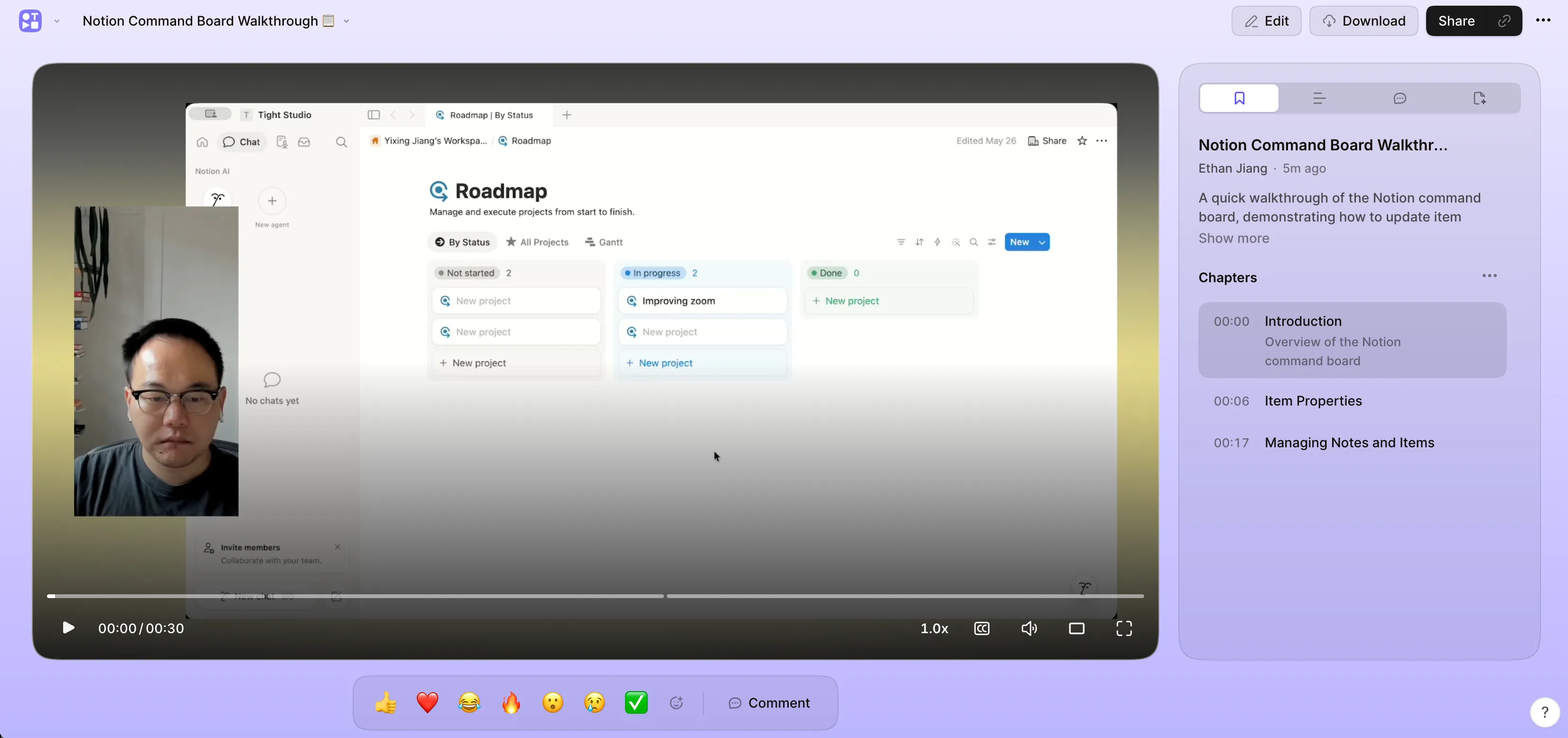
Our August 2026 Tella test: the hosted viewer is part of what a replacement may need to preserve.
The useful switching questions are more specific: Do you need local project files? New narration generated from a script? A genuinely free recorder? Different collaboration controls? Direct iPhone screen capture? Keep the requirements that matter and compare the complete recording-to-delivery path.
1. Tight Studio: Local Mac editing with generated narration
Tight Studio puts automatic zoom, animated cursors, multiple takes, text and shape annotations, and script-based narration in one editable Mac project. You can record a corrected section, import footage, add an introduction, and adjust the result before exporting. Background music and intro/outro slides stay in that project too.
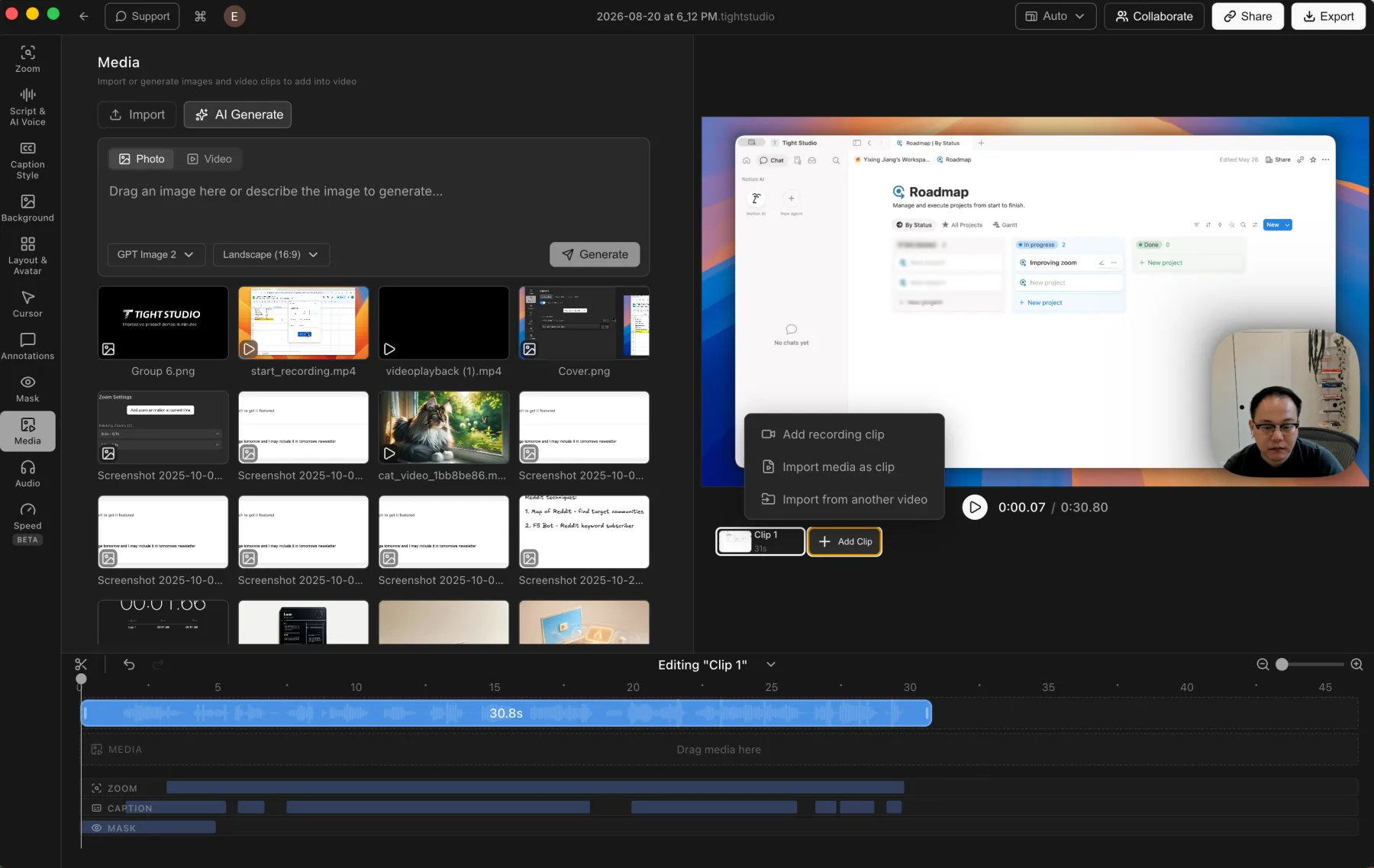
Tight Studio 3.1.5 in our August comparison: separate takes and imported media remain editable together.
The reason to compare it with Tella is the editing and narration workflow, not exclusive access to auto zoom. Tella’s Studio Voice enhances speech you recorded. Tight Studio can generate spoken narration from text and regenerate it after you change the wording. See the script and AI voice guide for that distinction and its credit requirements.
Direct connected iPhone and iPad capture is another difference. Tella’s documented approach uses a QuickTime window or an uploaded phone recording; Tight Studio brings the connected device into the recorder as a screen source. Our Tella iPhone recording guide explains the available paths.
What you give up: Windows and browser recording. Tight Studio requires an Apple Silicon Mac. Local editing also does not mean everything stays offline: AI transcription and narration use cloud services, and share links require an upload.
Free-plan catch: Standard exports have no watermark, but AI Voice trial exports do. Free also includes five Add Clip trial uses and five share links that expire after seven days. Plus expands editing and sharing; Pro includes ongoing AI generation. Check the current plans against the features you will actually use.
2. Screen Studio: Automated presentation in a Mac editor
Screen Studio provides editable automatic zoom, cursor smoothing, backgrounds, local transcription, and shareable links. It also records connected iPhone and iPad screens. If you want to keep your recording and visual adjustments in a focused Mac app, it is a close alternative to evaluate.
The distinction from Tella is the workflow, not the existence of smooth motion. Tella now has cursor animation too. Record the same short sequence in each app and compare the exported result: does the zoom reveal the right control, stay readable while scrolling, and settle when you pause? The better choice is the one that needs fewer corrections for your footage.
Our Screen Studio comparison includes dated examples of its editing controls. That earlier comparison is not a benchmark against Tella’s latest cursor release.
What you give up: Windows recording and Tella’s browser workspace. Screen Studio offers sharing, so it should not be described as export-only; compare the viewer and feedback features you depend on.
Price catch: $9/month billed yearly means $108 upfront for a year. Monthly billing is $29. Do not treat an older one-time-license review as the current offer for new buyers.
3. Loom: Keep the shared video conversation central
Loom is worth comparing when the link, comments, and workplace integrations matter more than refining the visual composition. Its shared libraries and integrations with tools such as Slack, Jira, and Confluence make the surrounding conversation part of the product.
Tella also hosts videos, so switching to Loom is not inherently a hosting upgrade. Test the experience on both sides: record a message, send it, open it without your recording account, and respond. A familiar collaboration workflow can matter more than another editing control.
What changes in editing: Loom Business includes waveform editing and trimming/stitching. Business + AI adds transcript editing, filler-word removal, and silence removal. Those capabilities make “Loom has no editor” an inaccurate reason to dismiss it, but you should check the paid tier rather than assume Free includes them.
Free-plan catch: Starter allows 25 videos per person and five-minute screen recordings. It is a continuing free option, unlike Tella’s time-limited trial, but it is not unlimited. Business is $18/user/month on monthly billing; AI editing requires a different tier.
For a broader collaboration-focused comparison, see our Loom alternatives guide.
4. Descript: Expand transcript editing into speech generation
Tella can clean up a recorded explanation. Descript combines screen capture with a wider text-based editing workflow, letting you shape a recording through its transcript rather than only manipulating clips. It is worth evaluating when the spoken explanation needs as much revision as the screen footage.
Its plans include AI Speech with stock voices and custom voice clones on paid tiers. This is different from Tella’s Studio Voice audio enhancement: generating a replacement sentence and improving the sound of an existing sentence solve different problems.
What you need to test: Whether Descript’s screen presentation, cursor treatment, and framing meet your expectations from Tella. A strong speech editor is not proof of equivalent automatic screen-recording polish. This entry is based on documentation, not a new side-by-side recording test.
Free-plan catch: Free includes one media hour per month and limited trial AI credits. Hobbyist is $16/person/month annually or $24 monthly, with 1080p watermark-free export; Creator adds 4K export. Check both media and AI allowances, because neither is the same as unlimited recording and generation.
If generating narration is the deciding factor, our AI voiceover guide for Tella separates enhancement, transcription, and script-to-speech workflows.
5. Cap: Separate local editing from cloud hosting
Cap separates Instant sharing from Studio editing and offers self-hosting. Its vendor listing includes Mac, Windows, and Linux. That makes it a relevant comparison when you want more choice over how local recording and hosted delivery fit together.
Our earlier Cap 0.5.9 Mac comparison found editable automatic zoom and cursor controls. It does not verify every feature on today’s other platforms. Test the version you intend to use before assuming parity.
What changes from Tella: You can compare a commercial desktop license separately from a cloud subscription. Self-hosting is an additional path, but introduces setup, storage, maintenance, and access-control work.
Free-plan catch: Cap’s commercial-license documentation distinguishes free personal use from paid business use. Free cloud clips are limited to five minutes. Its pricing FAQ says personal local Studio recordings have no time limit, although its table reserves “unlimited local recordings & editing” for paid tiers; confirm that discrepancy if it affects your choice.
The desktop license starts at $29/year. Pro is $12/user/month monthly and expands cloud sharing, transcriptions, and team features. A Loom importer is advertised; do not assume it imports Tella projects.
6. OBS Studio: Free local recording with more capture control
OBS Studio is free, open source, and available on Mac, Windows, and Linux. It lets you combine screen and camera sources into scenes and configure audio before recording. There is no paid tier to unlock longer recordings, although disk space and hardware still limit a session.
What changes from Tella: You gain capture and live-production control rather than an integrated browser editor. OBS does not provide a conventional post-recording timeline or Tella-style hosted feedback page. Budget for an editor and a delivery destination if you need more than the recorded file.
This is the clearest free Tella alternative on the list when the requirement is local capture without a subscription. It is not a free replacement for every part of Tella. Our OBS comparison shows that recording-versus-editing distinction with a screen-and-webcam example.
Before an important take, make a short recording with the actual application, microphone, and computer audio. Check the saved file and confirm that each source is present. More configurable inputs mean more settings to verify.
Which free Tella alternative should you try?
“Free” can mean a recorder, an editor, hosting, or a temporary trial. Decide which one you need before comparing limits.
- A local file without a subscription: OBS Studio is the simplest licensing choice among these options.
- Edited Mac exports: Tight Studio allows standard exports without a watermark, with separate trials for additional takes, AI, and sharing.
- A hosted conversation: Loom Starter works within its video-count and recording-length limits.
- Personal local recording with optional cloud sharing: Consider Cap, but check commercial licensing and its conflicting free local-limit descriptions.
- Transcript editing: Descript has a free tier with media and AI allowances; verify export restrictions separately.
Tella’s seven-day trial is not an ongoing free recording plan. Choose the alternative based on the limit you are actually trying to remove, not just the word “free” on its pricing page.
Before switching: check what happens to your Tella videos
According to Tella’s plan documentation, existing videos remain viewable and shareable without an active subscription, but recording, editing, and exporting stop. Download the files you need while you still have access. The trial permits finished exports but not uploads or raw-recording exports.
An exported MP4 is not a portable Tella project. Do not expect an import into another app to recreate separate screen and camera layers, editable zooms, comments, chapters, permissions, or viewing history. Some information may need to be exported separately or rebuilt.
Use this acceptance checklist with one non-sensitive video before moving a library:
- Capture: Record your normal screen, camera, microphone, and system-audio sources.
- Revise: Replace a section and correct a caption or spoken sentence.
- Export: Check small text, cursor movement, audio, and the resolution of the saved file.
- Share: Open the link in a signed-out browser and verify who can watch or comment.
- Preserve: Inventory important links, embeds, captions, and original recordings before cancellation.
- Price: Compare the paid seats, AI allowances, storage, and billing term needed for that exact workflow.
Keeping Tella can still be the right decision if the alternative solves one problem but makes editing or delivery substantially harder.
Frequently asked questions
What is the best Tella alternative?
There is no single replacement for every Tella feature. Compare Tight Studio for local Mac editing and generated narration, Screen Studio for a focused Mac recording editor, Loom for hosted conversations, Descript for transcript and speech work, Cap for flexible local/cloud options, and OBS for free capture.
Which Tella alternatives work on Windows?
Loom, Descript, Cap, and OBS have Windows options. Tight Studio and Screen Studio are Mac choices. Platform availability does not guarantee matching features: check system audio, camera capture, editing, and export on your actual machine. Tella itself also has a Windows recorder, so Windows support alone is not a reason to switch.
Can I get Tella-style automatic zoom for free?
Tight Studio offers automatic zoom in its free Mac workflow, and Cap Studio also has zoom controls, subject to its licensing terms. Do not equate a free trial or preview with unrestricted exporting and hosting. OBS’s free capture is a different proposition from an editor that generates post-recording zooms.
Which alternative can generate an AI voiceover?
Tight Studio generates narration from a script, while Descript offers AI Speech and custom voice clones. Check credits and plan requirements before choosing. Tella’s Studio Voice improves recorded audio; we did not find a built-in script-to-speech or voice-cloning workflow in the Tella documentation reviewed for this article.
Is a desktop Tella alternative automatically more private?
No. Local recording, transcription, AI generation, and sharing are separate data flows. OBS can save locally; Screen Studio advertises local transcription; Tight Studio uses cloud AI services; Cap offers self-hosting. Check each enabled feature and your organization’s requirements rather than assuming that a desktop app keeps everything offline.
Choose the replacement that fixes your actual constraint
The best Tella alternatives are not necessarily the apps with the longest feature lists. Start with the constraint: recurring cost, narration changes, local project control, recording sources, or how viewers receive the result. Shortlist two tools, complete the same video in each, and compare the work required from recording through delivery.
If you want to evaluate editable Mac recordings with script-based narration, download Tight Studio and try a standard export before choosing a paid plan. If Tella already handles your recording, revisions, and sharing well, a new subscription may not solve anything you need to change.