Recordly offers good automatic zoom, local-model captions, webcam cropping, and a wide background library in an open-source, cross-platform editor. Tight Studio adds transcript correction, microphone and music tools, multi-clip projects, media imports, and a maintained first-party roadmap.
Recordly gets zoom right. The project around it is the risk.
Choose Tight Studio
When you want polished automatic zoom inside a maintained production workflow with multi-take projects, sharing, collaboration, captions, music, and optional AI creation.
Choose Recordly
When open-source code, a $0 price, or Windows and Linux support outweigh the bugs we encountered and the uncertainty around the original project.
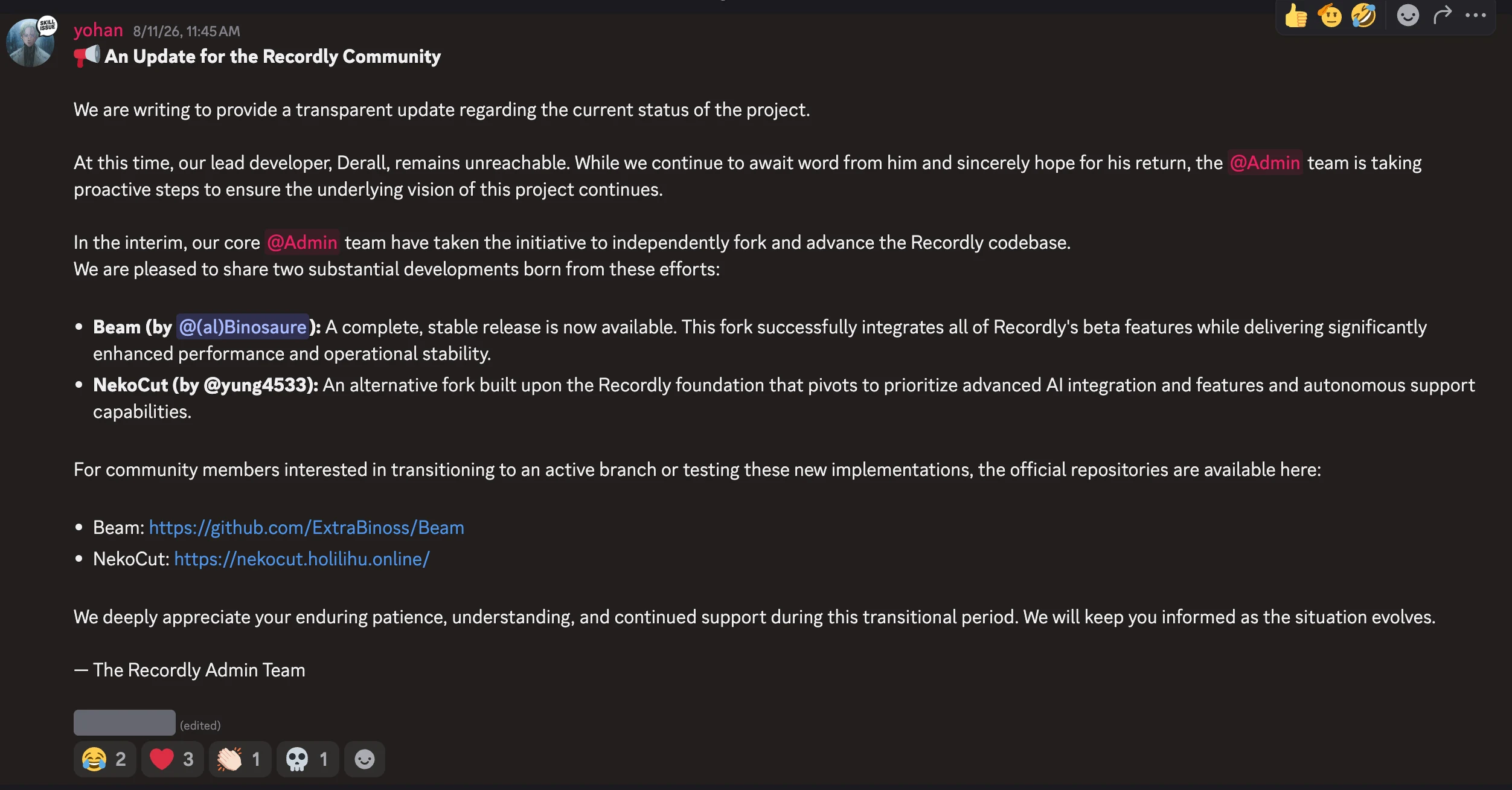
The deciding issue is not zoom quality: both apps produce attractive automatic zoom and support manual framing. Recordly's August 11 community update said its lead developer remained unreachable and its admin team had started two independent forks.
This is a first-party comparison. Ethan evaluated Recordly on August 21, 2026, using the Notion walkthrough shown below and compared its zoom, cursor, background, webcam, caption, audio, annotation, clip-assembly, capture-mode, AI voice, export, and extension workflows with Tight Studio's current editor. Recordly's automatic zoom, panning, background selection, webcam crop tool, local-model captions, and core annotation set were strengths. Its caption workflow lacked style presets and a correction panel; it also lacked microphone audio, music, multi-clip recording, additional video-clip import, AI voice, connected iPhone and iPad capture, and camera-only recording; its selected cursor showed a rough, haloed edge; its tested export took roughly twice as long; and its extension marketplace returned API error 525.
Scope note: Recordly is now splitting into independently maintained forks. Behavior, signing, support, and release quality can differ between the original project, Beam, and NekoCut.
Project continuity
The original Recordly project is in transition
Recordly presents itself as an open-source alternative to polished commercial screen recorders. That source access is real, but open source does not guarantee active ownership or dependable support.
What the update says
An August 11, 2026 post from the Recordly Admin Team says lead developer Derall “remains unreachable.” It also says the core admin team independently forked the codebase into Beam, described there as a stable continuation, and NekoCut, an AI-focused alternative. The Beam GitHub URL shown in the announcement returned 404 when we checked it on August 21.
Recordly community update posted August 11, 2026. The screenshot documents the maintenance transition; it does not establish the reason for the developer's absence.
What this means if you depend on the app
Recordly is better evaluated as a codebase with competing continuations than as one stable, vendor-backed product. Before adopting it, verify which repository is active, who signs releases, whether projects migrate cleanly, how quickly issues are answered, and which fork will own compatibility fixes. In our testing, bugs appeared across multiple workflows, so the maintenance question has practical consequences beyond roadmap optics.
Auto zoom and manual zoom controls
Auto zoom turns clicks and cursor activity into animated close-ups after recording. It keeps text and interface details readable without manual keyframing.
The problem it solves
A full-screen capture can make the important button, field, or menu too small to follow. Building every close-up by hand takes time. Auto zoom directs attention while preserving an editable timeline.
Our take
Tie on the core result. Recordly produces a nice automatic zoom-in animation, pans smoothly across different zoom centers, and supports manual targets. Tight Studio exposes more controls for shaping that motion, but zoom alone is not the reason to avoid Recordly.
Tight Studio
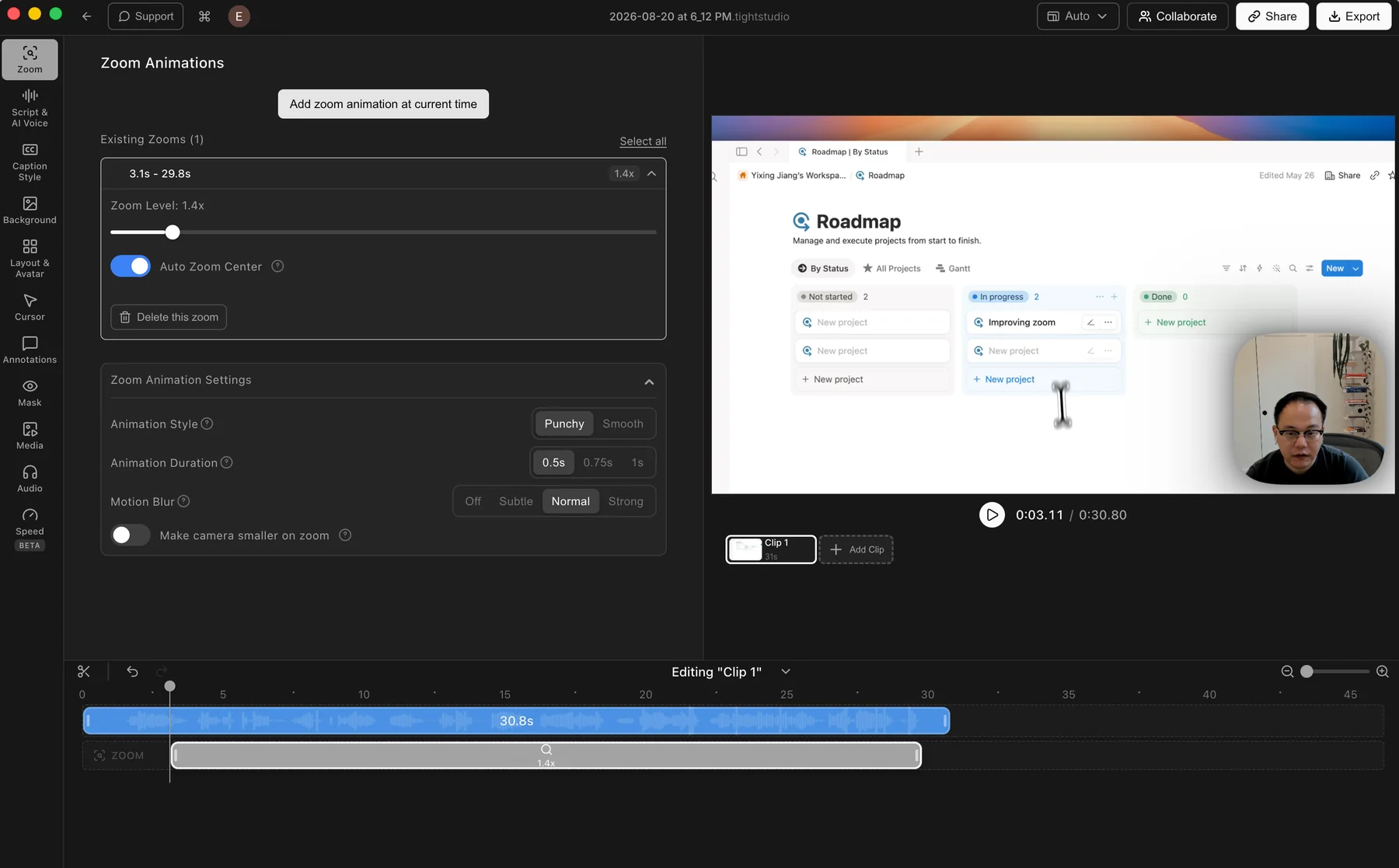
Tight Studio: an automatic zoom segment with its animation controls open.
Pros
Generates zooms after recording, so the original capture remains editable.
Manual zooms can be added and adjusted directly on the timeline.
Controls cover zoom level, auto-centering, animation style and duration, motion blur, and camera size.
Cons
The larger motion-control set takes longer to tune than a simple automatic preset.
Finding your preferred animation style may take a little adjustment.
Recordly
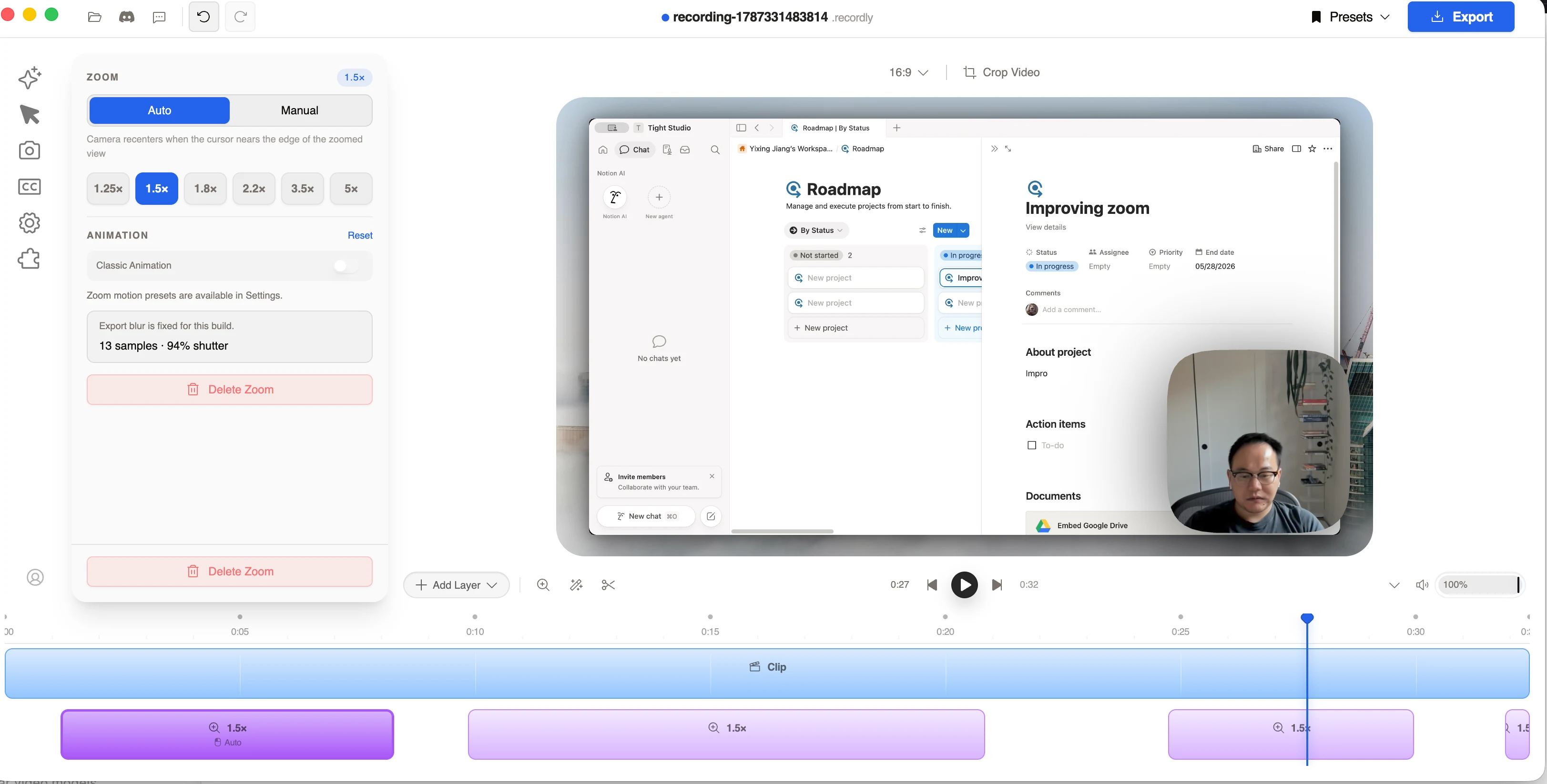
Recordly: an automatic 1.5x zoom with editable Auto and Manual modes on the timeline.
Pros
Produces a pleasing automatic zoom-in animation and pans smoothly between different zoom centers.
Keeps zooms as editable timeline segments with several magnification presets.
Lets each zoom use automatic cursor-aware framing or a manually specified center.
Cons
Exposes fewer motion controls than Tight Studio for animation style, duration, and camera treatment.
The otherwise capable zoom workflow sits inside a project whose original maintenance path is now uncertain.
Cursor images, motion controls, and edge quality
Cursor replacement and motion treatment keep the pointer readable while giving a recording a more deliberate visual style.
The problem it solves
The system cursor is easy to lose at video scale, but enlarging a low-quality cursor asset can expose rough antialiasing and halos. A cursor tool needs both useful motion controls and a clean image at the final display size.
Our take
Tight Studio wins on cursor presentation. Recordly deserves credit for detailed blur, bounce, speed, sway, and loop controls, but its selected 2.5x cursor showed visibly rough, haloed edges in the editor preview. Tight Studio provides broader cursor choices, custom uploads, and a cleaner outline in the comparison.
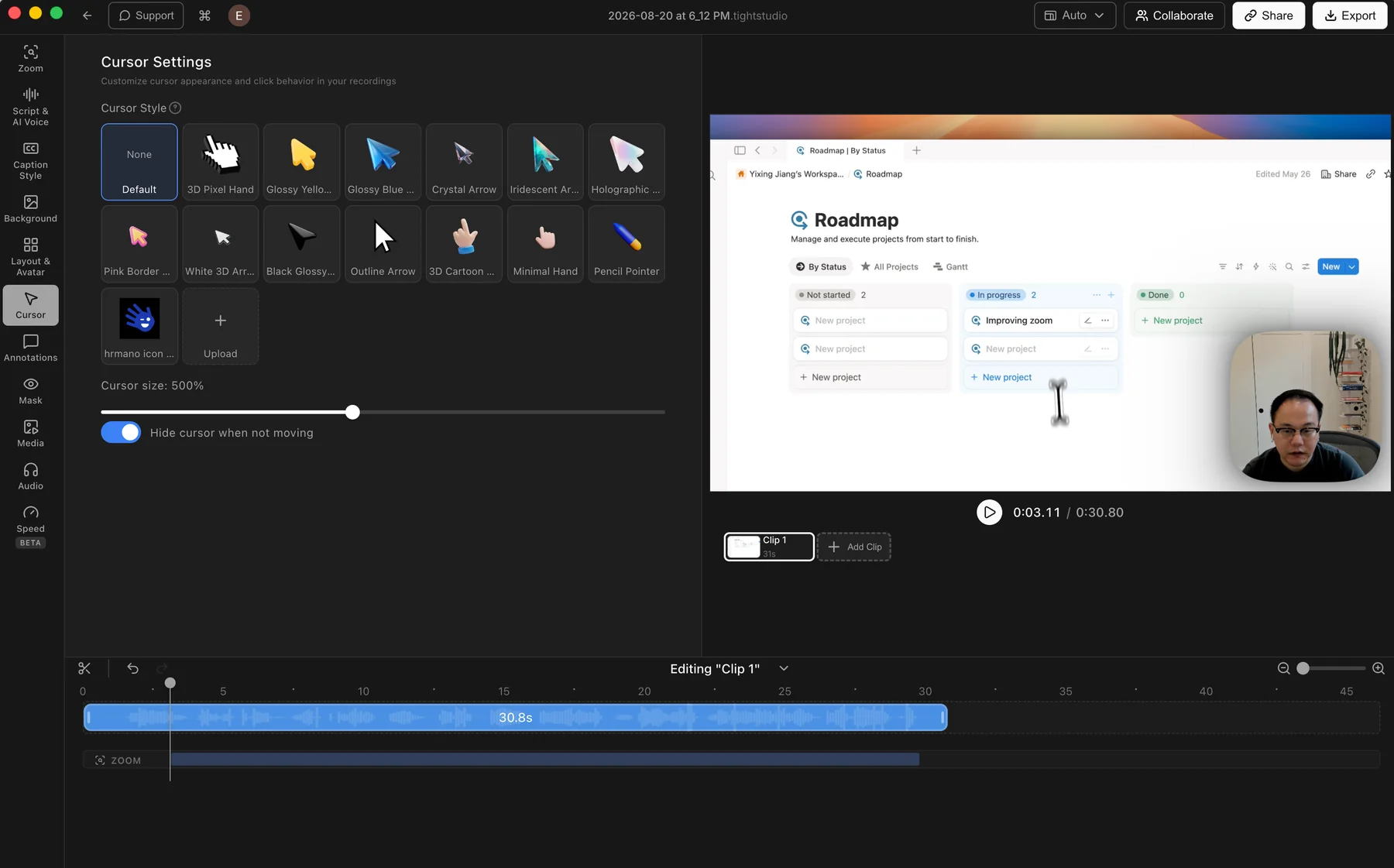
Offers a varied library of preset cursor designs and adjustable cursor size.
Lets users upload their own cursor image for a branded or product-specific pointer.
Can hide the cursor when it is not moving to reduce visual clutter.
Rendered cursor edges remained clean in the editor preview we compared.
Cons
Does not offer built-in click effects or click sounds.
Recordly
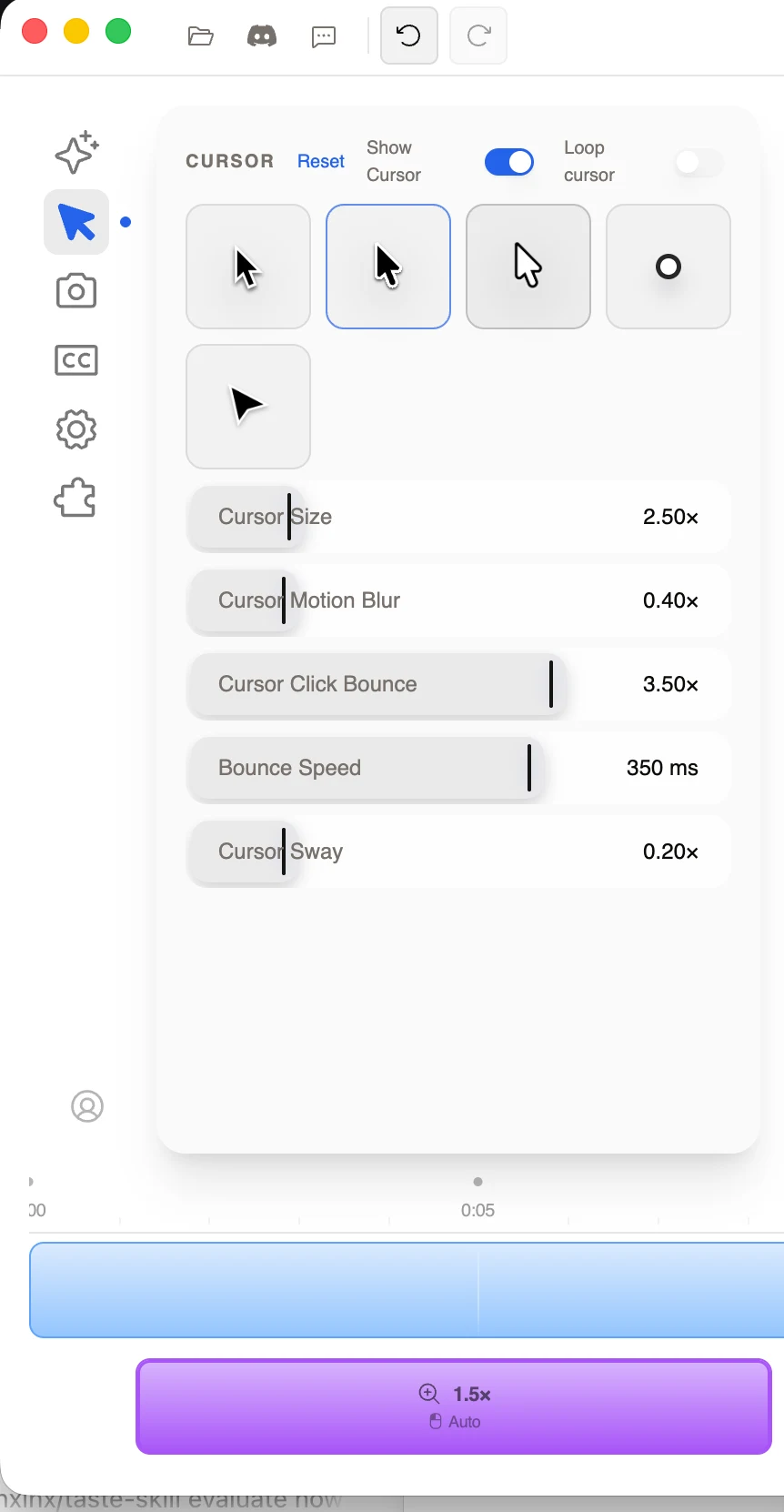
Recordly: five built-in cursor choices with size, blur, bounce, speed, sway, visibility, and loop controls.
Recordly close-up: the selected 2.5x cursor shows a visibly rough, haloed outline in the editor preview.
Pros
Provides five basic cursor images, including filled and outlined arrows plus a circle option.
Exposes useful motion controls for blur, click bounce, bounce speed, sway, and looping.
Lets users adjust cursor size and hide the rendered cursor entirely.
Cons
The selected 2.5x cursor showed visibly rough edges and a gray-white halo in the editor preview.
The built-in image selection is smaller than Tight Studio's and no custom cursor upload was found.
The final export was not separately pixel-inspected, so the artifact is documented as a preview-quality concern rather than a claim about every export.
Background images, colors, gradients, and video
Backgrounds add separation around the captured screen, control the visual tone, and give the final frame room for consistent spacing and brand treatment.
The problem it solves
A raw screen capture can feel flat or blend into the page around it. Background images, colors, gradients, blur, padding, shadow, and corner controls create contrast without rebuilding the composition in another editor.
Our take
Recordly wins on visible background breadth. The tested panel shows 24 built-in image presets, custom uploads, video, color, and gradient modes, plus extensive blur and frame controls. Tight Studio covers the core image, gradient, color, and custom-brand workflows in a more compact panel, but its visible built-in selection is smaller.
Tight Studio
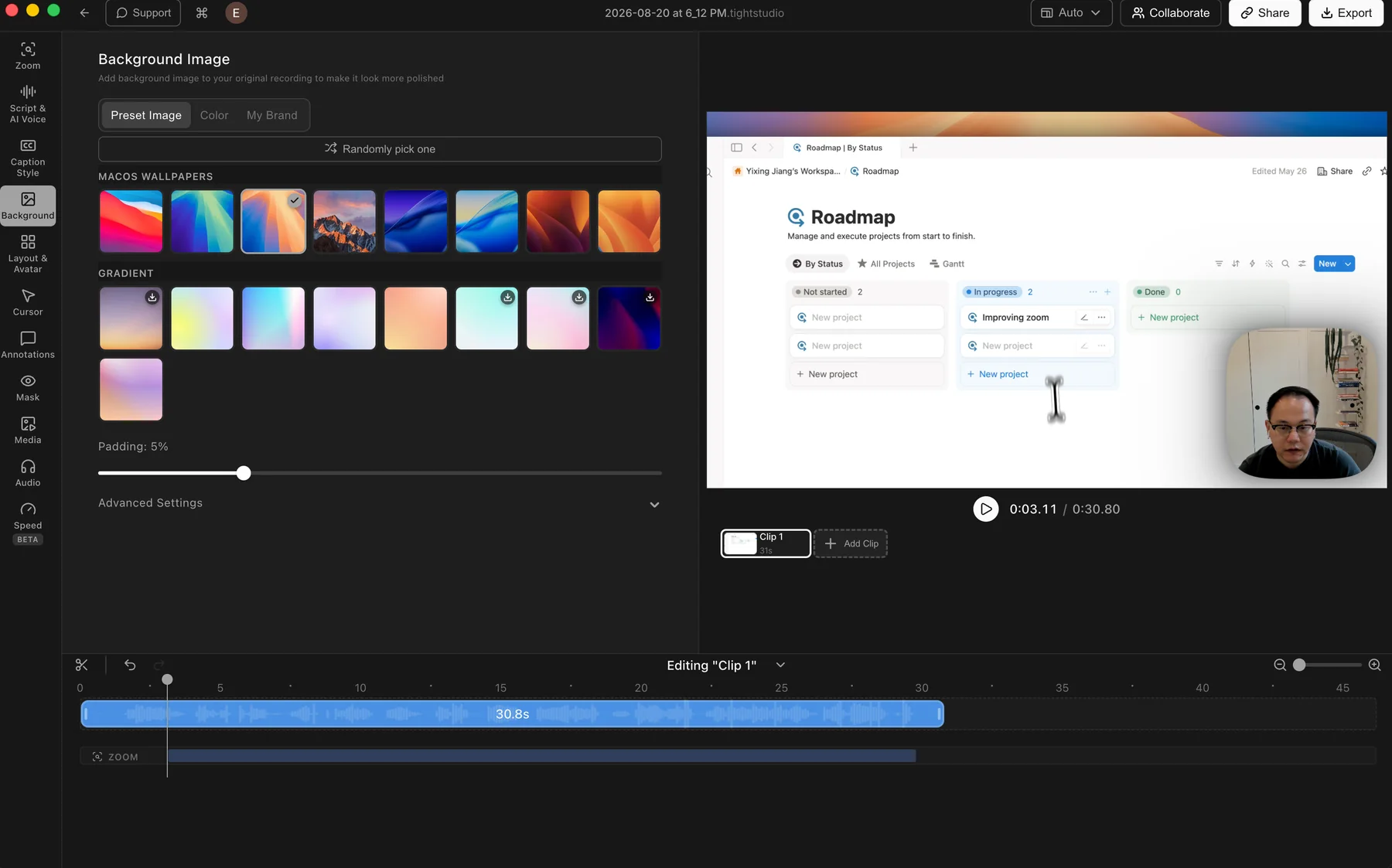
Tight Studio: preset wallpapers and gradients with color, brand image, and padding controls.
Pros
Includes preset macOS wallpapers and gradient backgrounds for quick styling.
Solid colors and custom brand images cover the main branded-video workflows.
Random selection and padding controls make it easy to change the frame quickly.
Cons
Shows fewer built-in image choices than Recordly in the tested panels.
Some fine controls sit inside Advanced Settings instead of the main panel.
Recordly
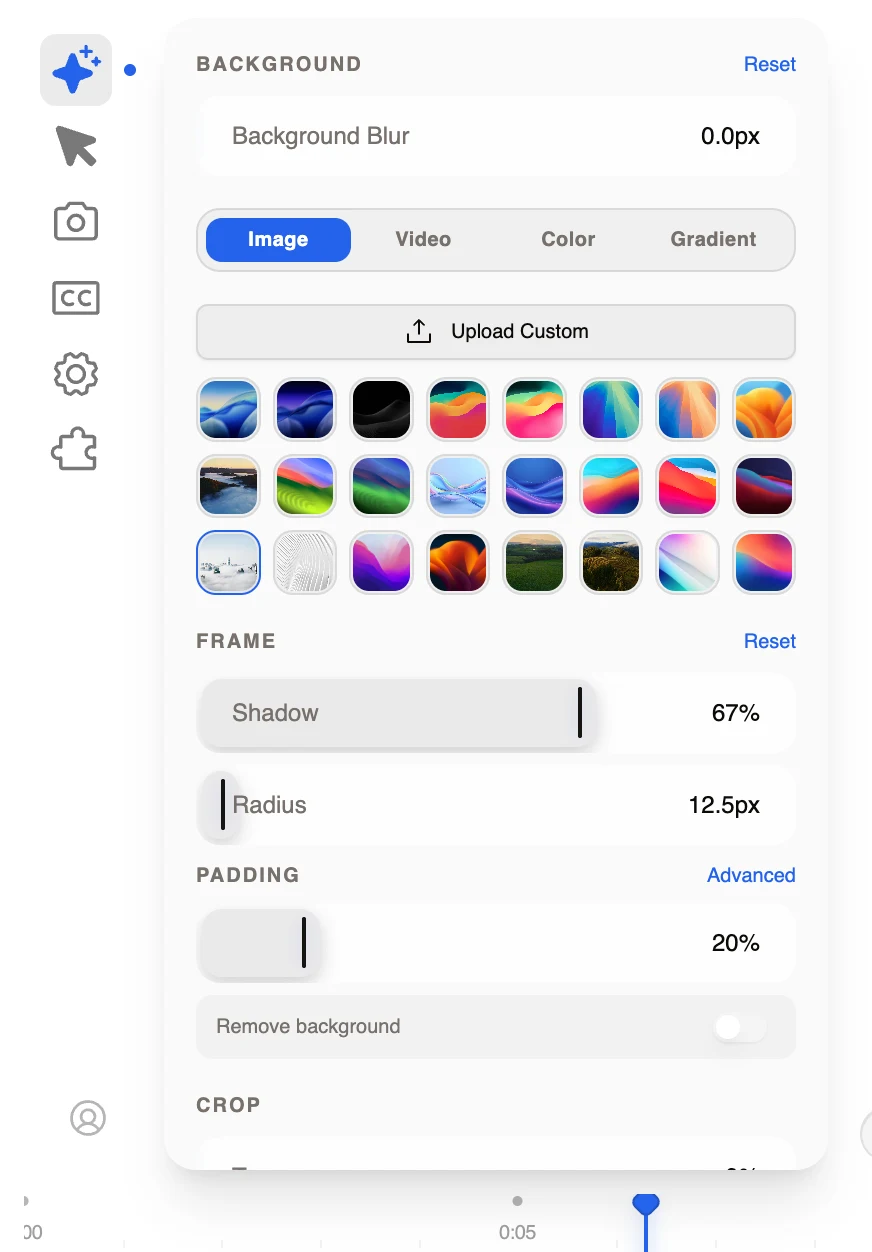
Recordly: 24 visible image presets plus custom upload, video, color, gradient, blur, frame, padding, removal, and crop controls.
Pros
Shows a wide built-in image library with 24 visible presets in the tested panel.
Supports custom uploads plus dedicated Image, Video, Color, and Gradient modes.
Keeps background blur, frame shadow and radius, padding, background removal, and crop controls in the same workflow.
Cons
The long control panel is denser and requires scrolling to reach all crop and advanced settings.
Video-background rendering and background-removal quality were not separately tested for this comparison.
Webcam cropping, framing, and dynamic layouts
Webcam controls determine whether the presenter stays a fixed corner overlay or can be reframed and moved into different compositions as the recording changes.
The problem it solves
A recorded webcam can include distracting space or cover important screen content. Cropping fixes the source framing, while position, shape, background, and timeline-based layout controls determine how the presenter fits each moment of the finished video.
Our take
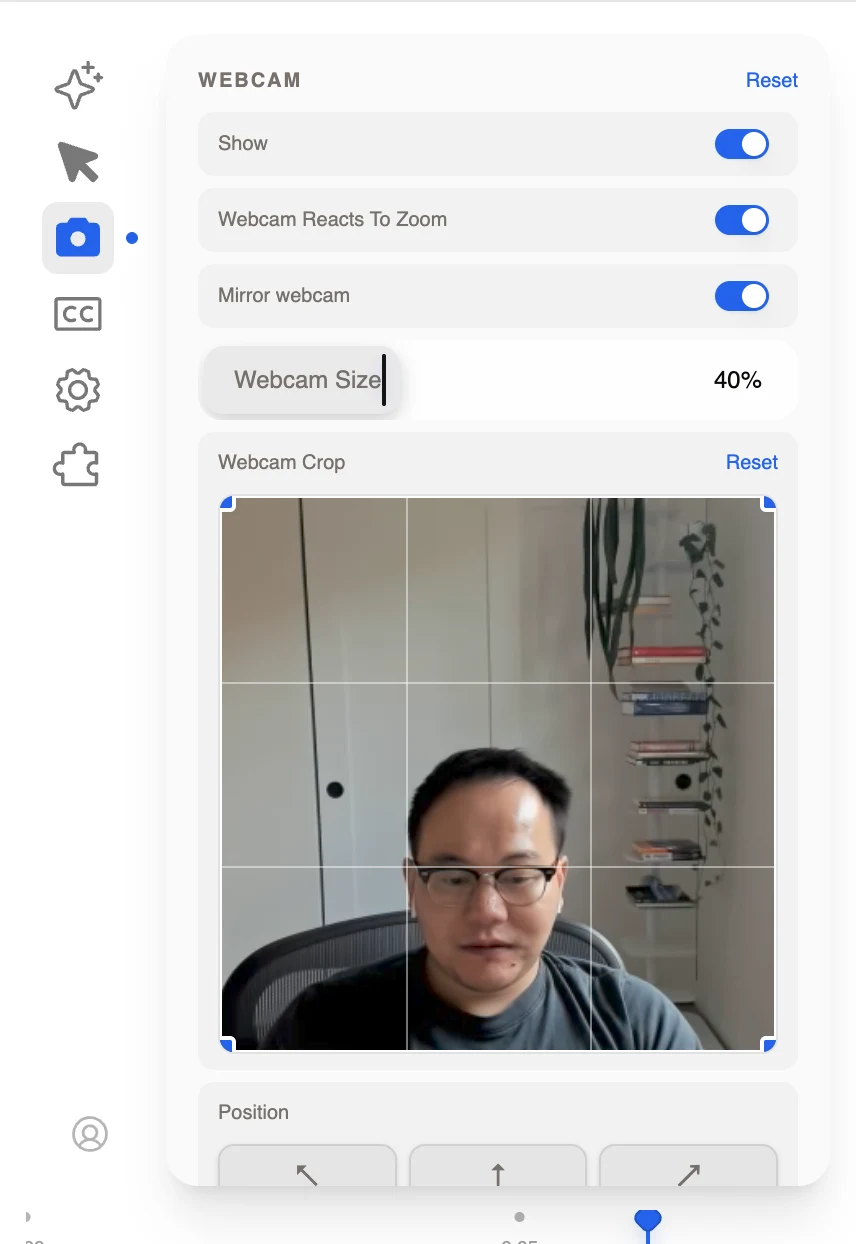
Tight Studio wins on camera composition, while Recordly has the better crop tool. Recordly uniquely lets users crop the recorded webcam and also adjusts size, mirroring, roundness, zoom reaction, and corner position. Tight Studio lacks that crop grid but supports dynamic layouts across the timeline plus camera-background removal and replacement.
Tight Studio
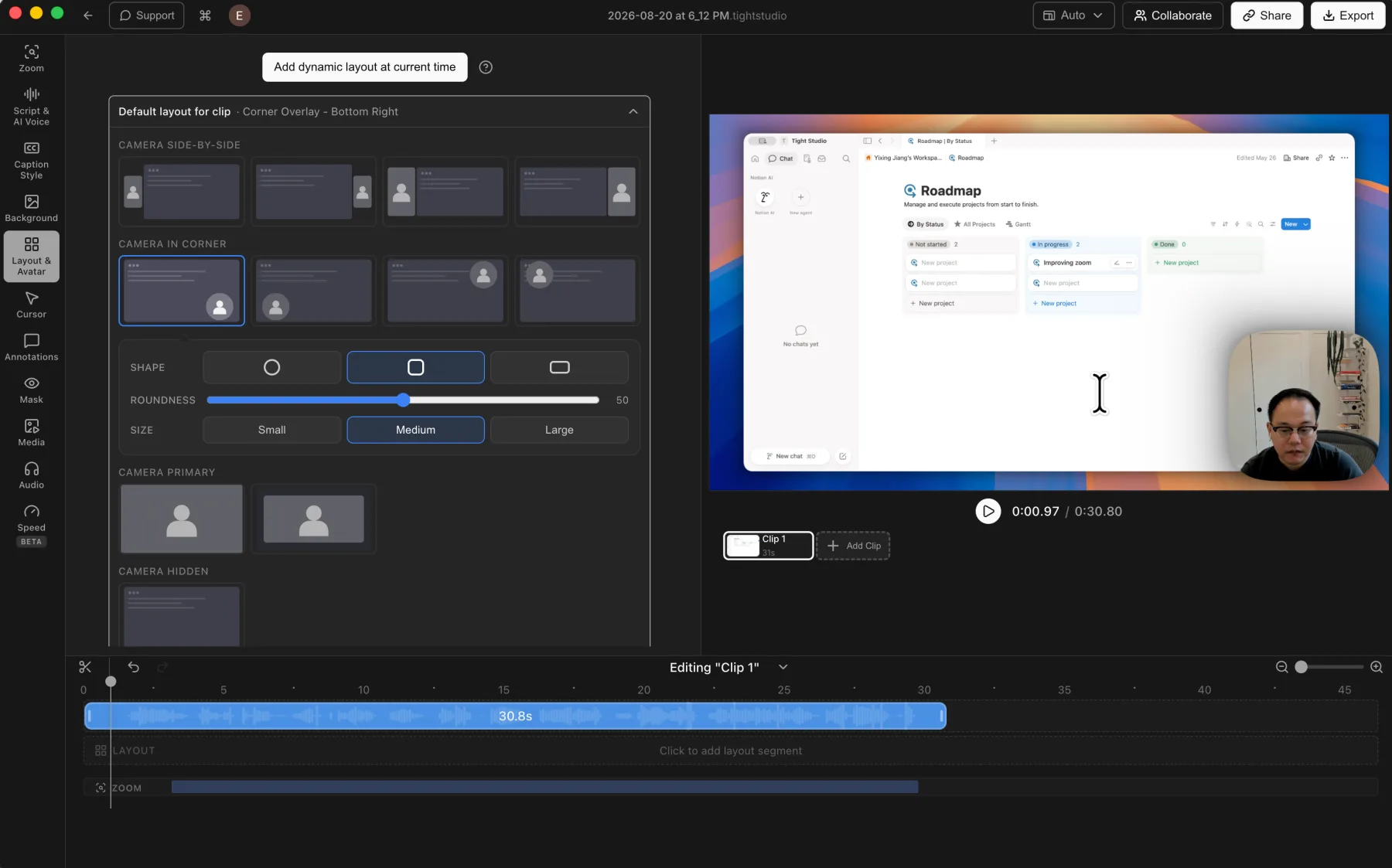
Tight Studio: side-by-side, corner, camera-primary, and hidden-camera layouts that can change across the timeline.
Pros
Supports camera position, shape, size, mirroring, and layout changes across the timeline.
Offers side-by-side, corner overlay, camera-primary, and camera-hidden layout styles.
Can remove the camera background, use a preset virtual background, or upload a custom brand image.
Cons
The broader layout library takes longer to scan than Recordly's single webcam panel.
Does not provide the same interactive crop grid for reframing the recorded webcam source.
Adjusts webcam visibility, mirroring, size, roundness, and corner position after recording.
Uniquely provides an interactive crop grid for reframing the recorded webcam image.
Can make the webcam react to screen zooms so the presenter treatment follows the motion.
Cons
Webcam placement is limited to corner positions rather than broader side-by-side or camera-primary layouts.
Does not support timeline-based dynamic camera-layout changes.
Does not remove the camera background or replace it with a preset or custom virtual background.
Local transcription, transcript correction, and caption styles
Automatic captions make spoken content readable and searchable, but a usable workflow also needs a way to correct transcription mistakes and turn raw text into a consistent visual treatment.
The problem it solves
Automatic transcription can mishear names, technical terms, and short phrases. Appearance controls can improve placement and legibility, but they cannot fix the underlying words when the editor does not expose a transcript correction workflow.
Our take
Recordly wins on local processing: its selectable model generates captions on device and exposes practical appearance controls. Tight Studio wins on correction and presentation with a readable transcript editor, individual word-timing correction, built-in style presets, and detailed custom styling. Choose based on whether local transcription or post-transcription control matters more.
Tight Studio
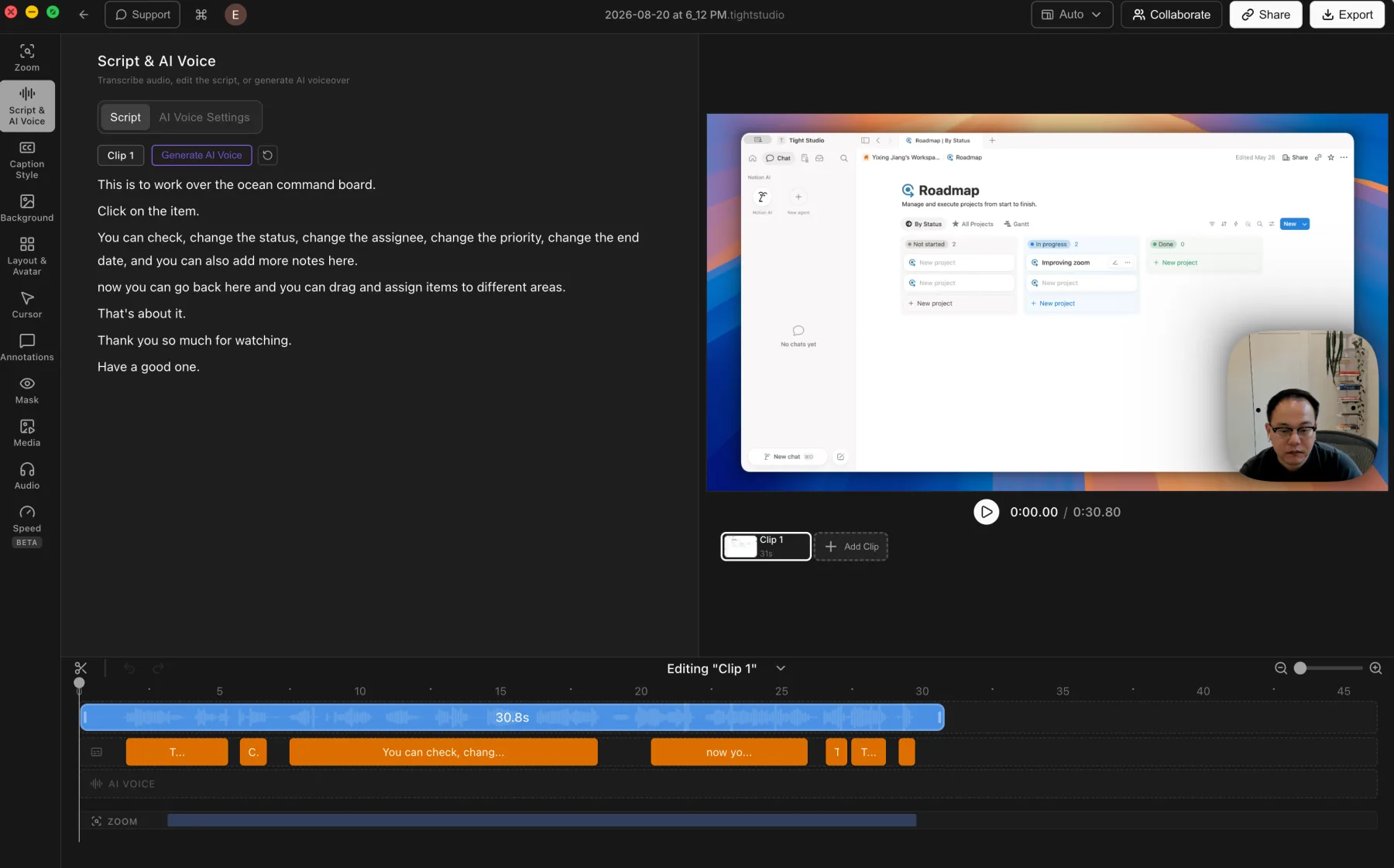
Tight Studio: transcript text stays visible beside its caption segments on the timeline.
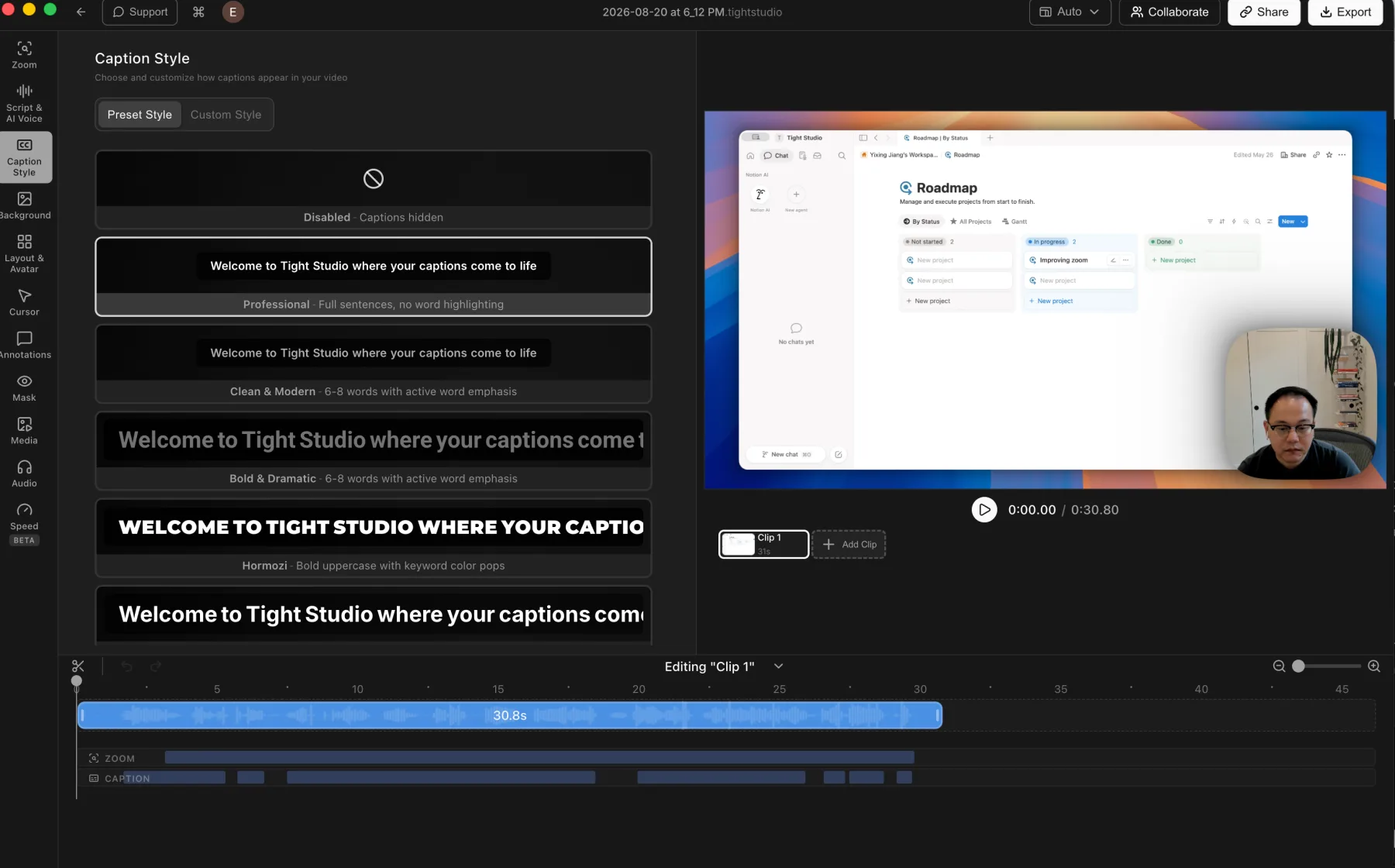
Tight Studio: caption presets plus detailed custom styling controls.
Pros
Presents transcript editing as readable script text beside synchronized caption segments on the timeline.
Retains word-level timestamps and supports correcting the source timing of an individual caption word.
Includes caption style presets and detailed custom styling controls.
Cons
Uses cloud transcription, with Tight Studio's privacy policy stating that audio is deleted after processing and not stored on Tight Studio servers.
Transcription requires an internet connection.
Recordly
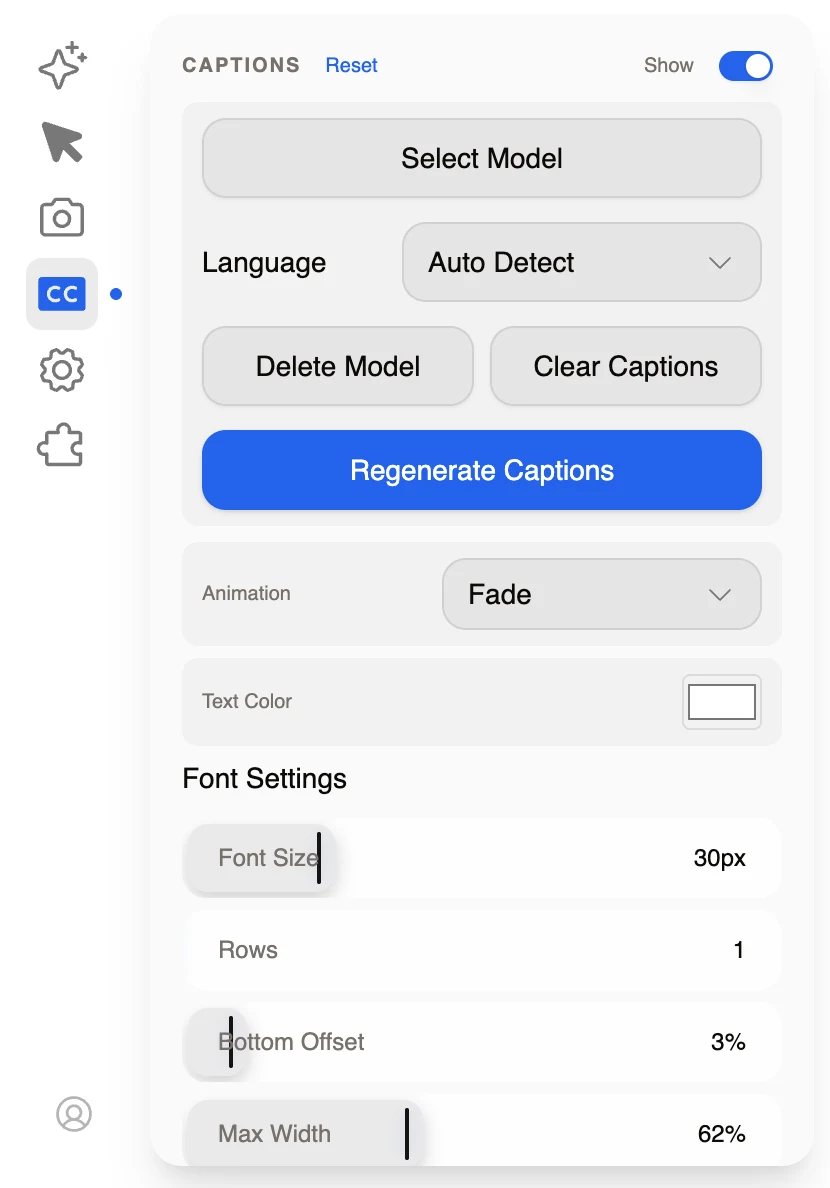
Recordly: local-model captions with regeneration and manual appearance controls.
Pros
Uses a selectable local model for caption transcription instead of sending the recording to a cloud transcription service.
Supports automatic language detection plus controls to regenerate or clear captions.
Provides appearance controls for animation, text color, font size, row count, bottom offset, and maximum width.
Cons
Does not include built-in caption style presets.
Does not provide a transcript panel for reviewing and correcting recognition mistakes.
Regenerating the captions or changing their appearance does not provide a direct way to fix an incorrect name, term, or phrase.
Microphone audio and background music
Microphone controls keep narration balanced, while background music and custom audio give the finished recording a deliberate soundtrack.
The problem it solves
A recorded voice can be too loud, too quiet, or need to be removed, while music often needs its own volume and timing. Without audio controls, narration and soundtrack work must move to another editor.
Our take
Tight Studio wins decisively. It records microphone audio and provides mute and volume controls, original-audio download, built-in and uploaded music, and timed music segments. The Recordly build we tested did not support microphone audio or background music.
Tight Studio
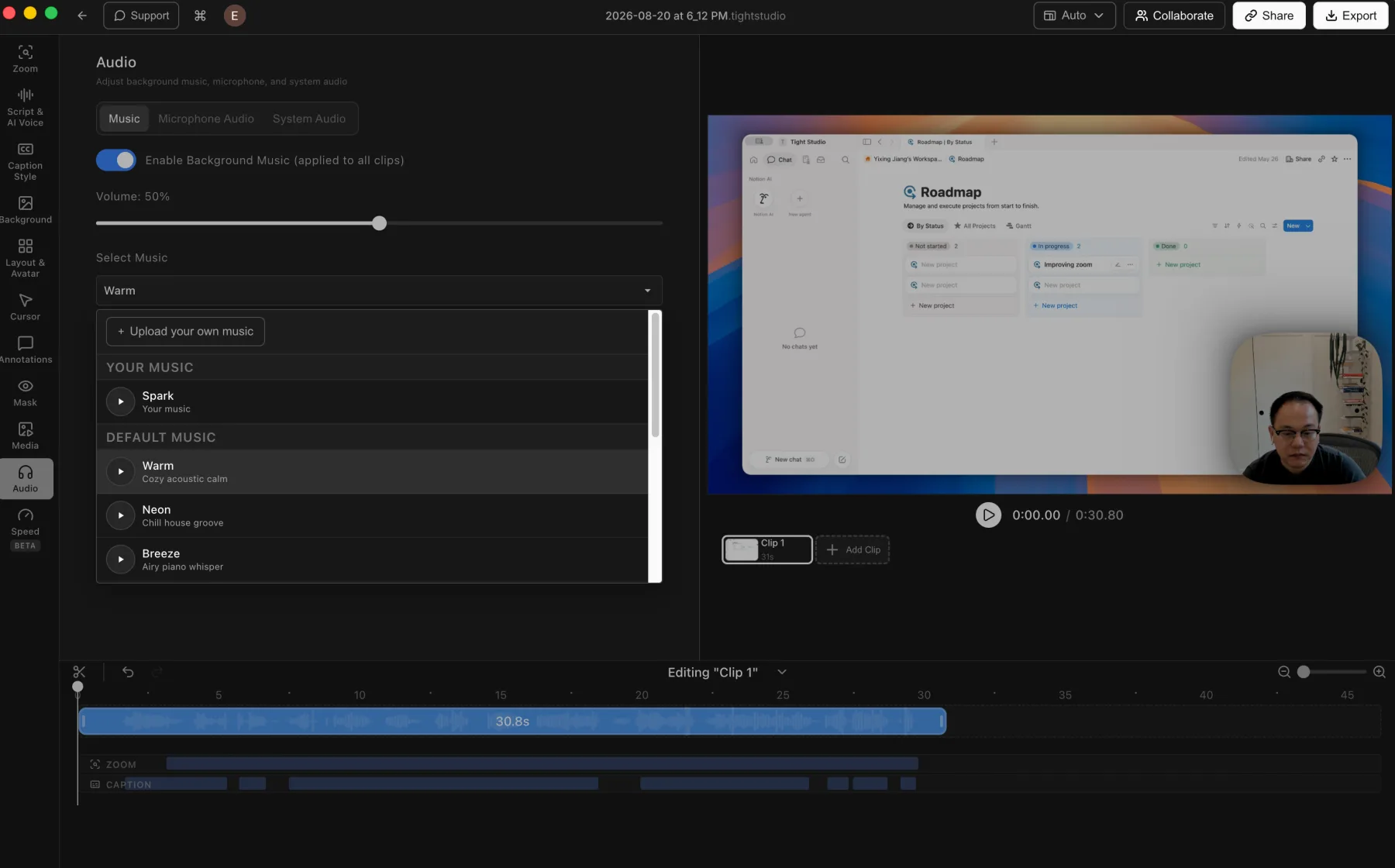
Tight Studio: built-in music, custom uploads, and music volume controls.
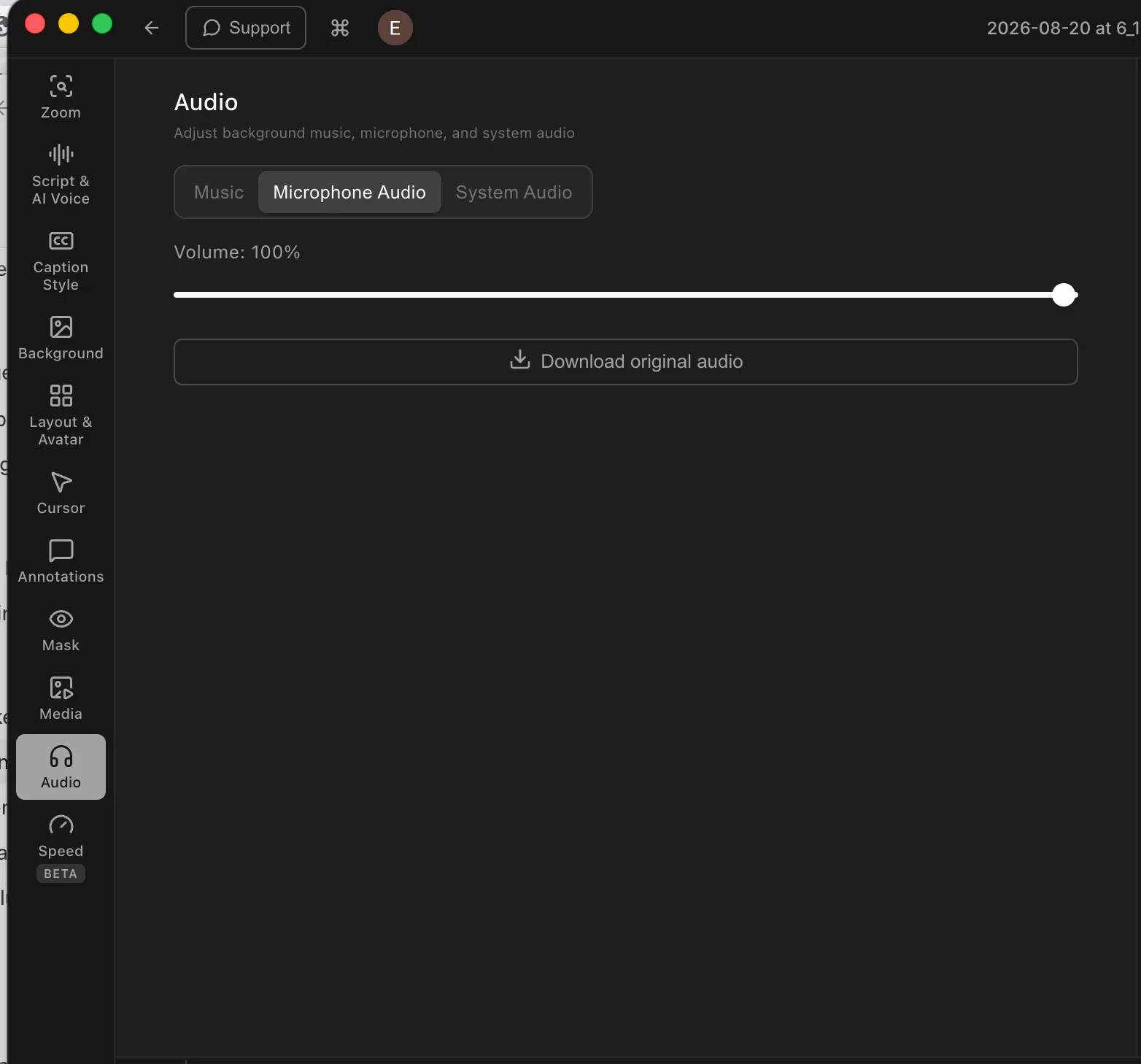
Tight Studio: direct microphone volume control and original-audio download.
Pros
Includes built-in background music and lets users upload their own audio files.
Advanced music segments can be placed and trimmed to chosen time ranges instead of running across the entire video.
Supports microphone muting, direct volume adjustment, and downloading the original microphone audio.
Cons
Does not provide automatic microphone noise reduction or volume normalization.
Custom music timing requires the advanced music-segment workflow rather than the simpler background-music mode.
Recordly
Microphone and music are not supported
The Recordly build we tested did not support microphone audio or background music in its recording and editing workflow.
Pros
The single-clip editor avoids adding audio-library and music-track controls to its primary interface.
Cons
Cannot record or manage microphone audio inside the tested workflow.
Does not include a background-music library or custom audio upload workflow.
Cannot place and trim music across selected timeline ranges.
Text, shape, image, mask, and highlight annotations
Annotations add explanation, emphasis, and privacy treatment directly to the recording instead of requiring a separate graphics or video editor.
The problem it solves
A screen recording often needs labels, arrows, imported visuals, or a blur mask after capture. Highlight overlays solve a different attention problem by dimming the surrounding screen while leaving one selected area clear.
Our take
Tight Studio wins on annotation breadth. Both products cover text, image, shape or arrow, and privacy-mask workflows, and Recordly exposes detailed text styling with Google Font import. Tight Studio adds highlight overlays plus a broader visible shape library with rectangles, ellipses, and lines.
Tight Studio
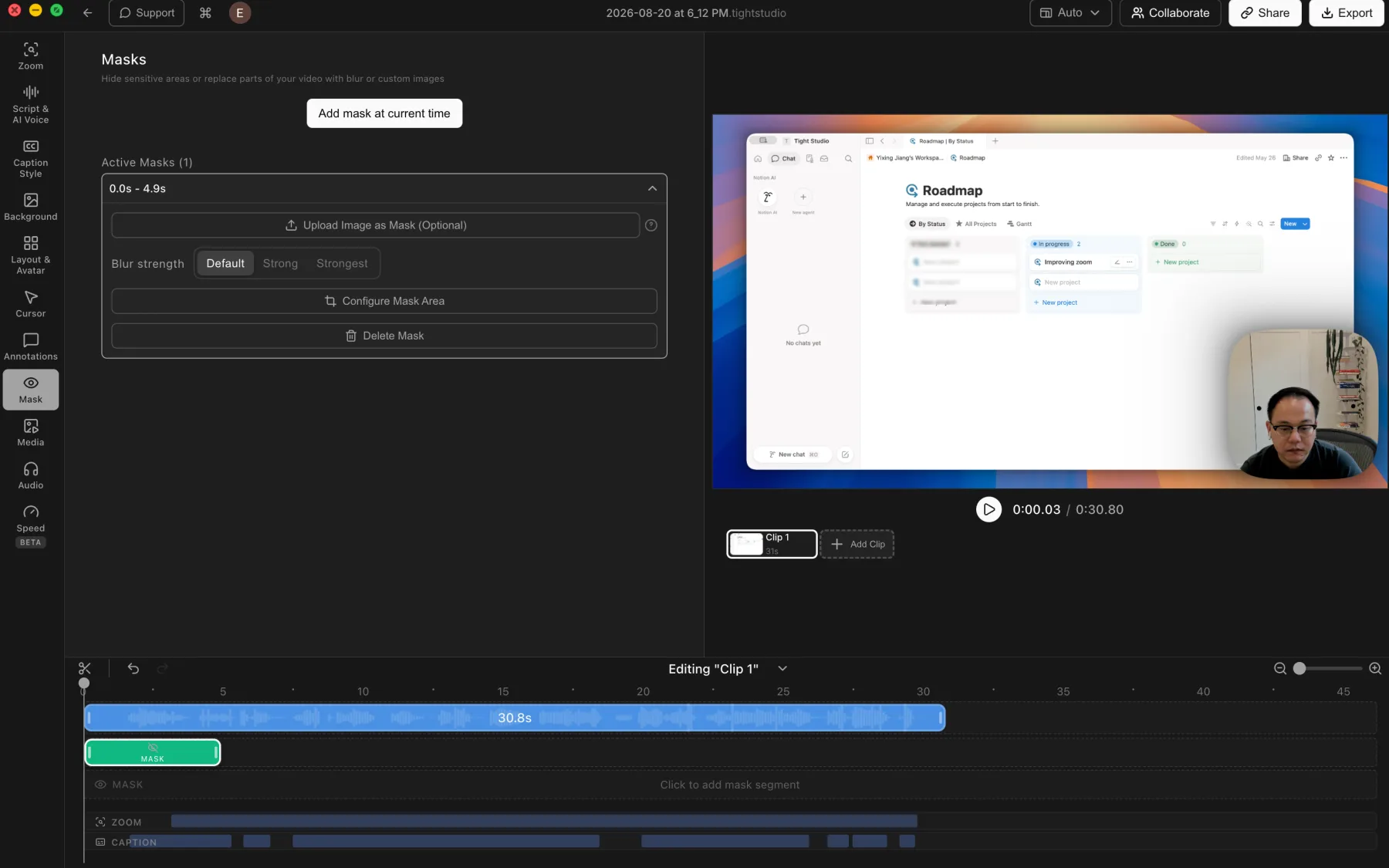
Tight Studio: timed privacy masks with blur strength and custom-image replacement.
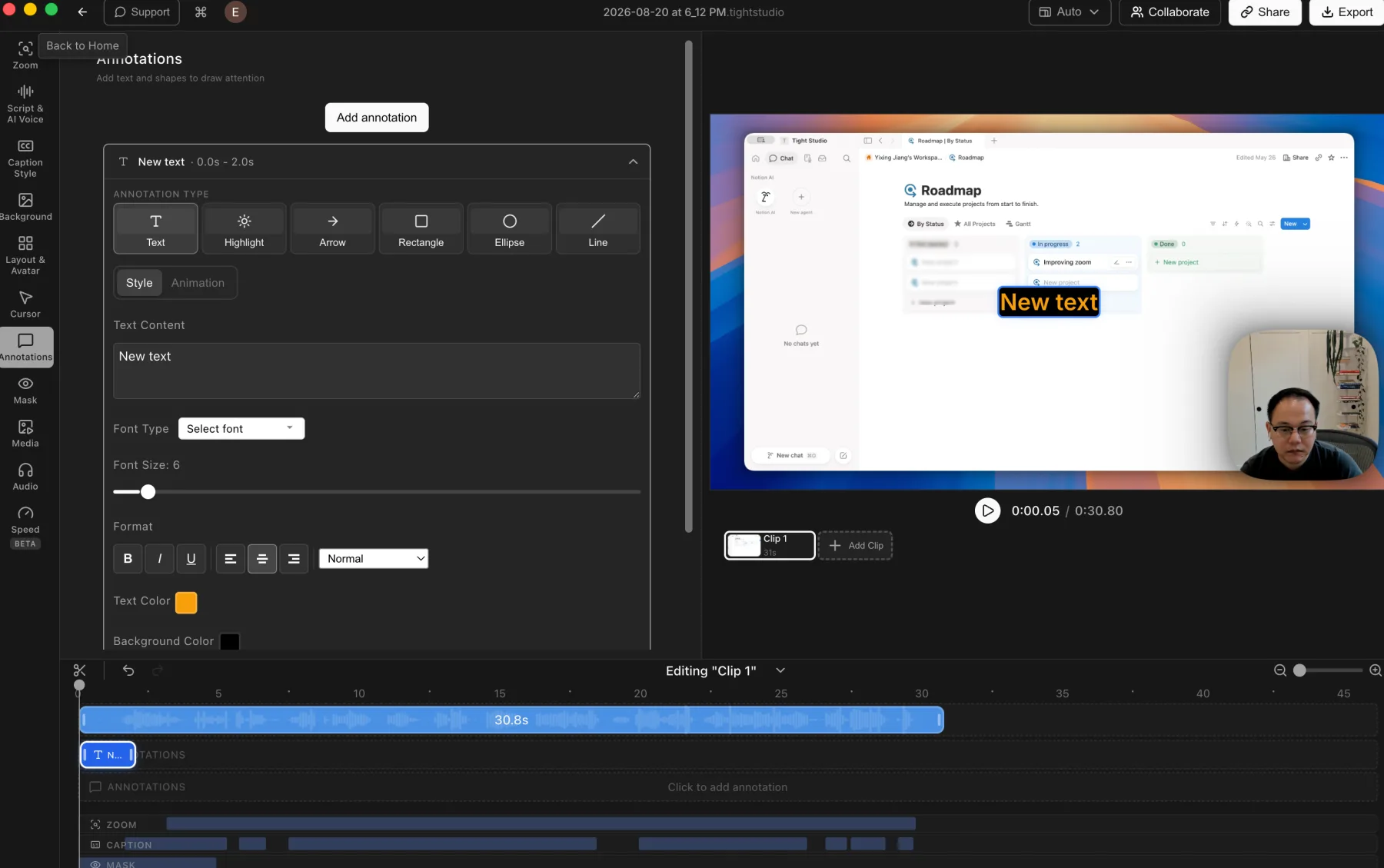
Tight Studio: styled text, highlights, arrows, rectangles, ellipses, and lines.
Pros
Supports privacy masks and highlight overlays for hiding details or directing attention.
Privacy masks can be timed, resized, and adjusted with multiple blur strengths or a custom replacement image.
Adds styled text, imported images, highlights, arrows, rectangles, ellipses, and lines with timeline control.
Cons
The broader toolset adds more controls to learn and adjust.
Masks and annotations still require manual placement and timing.
Recordly
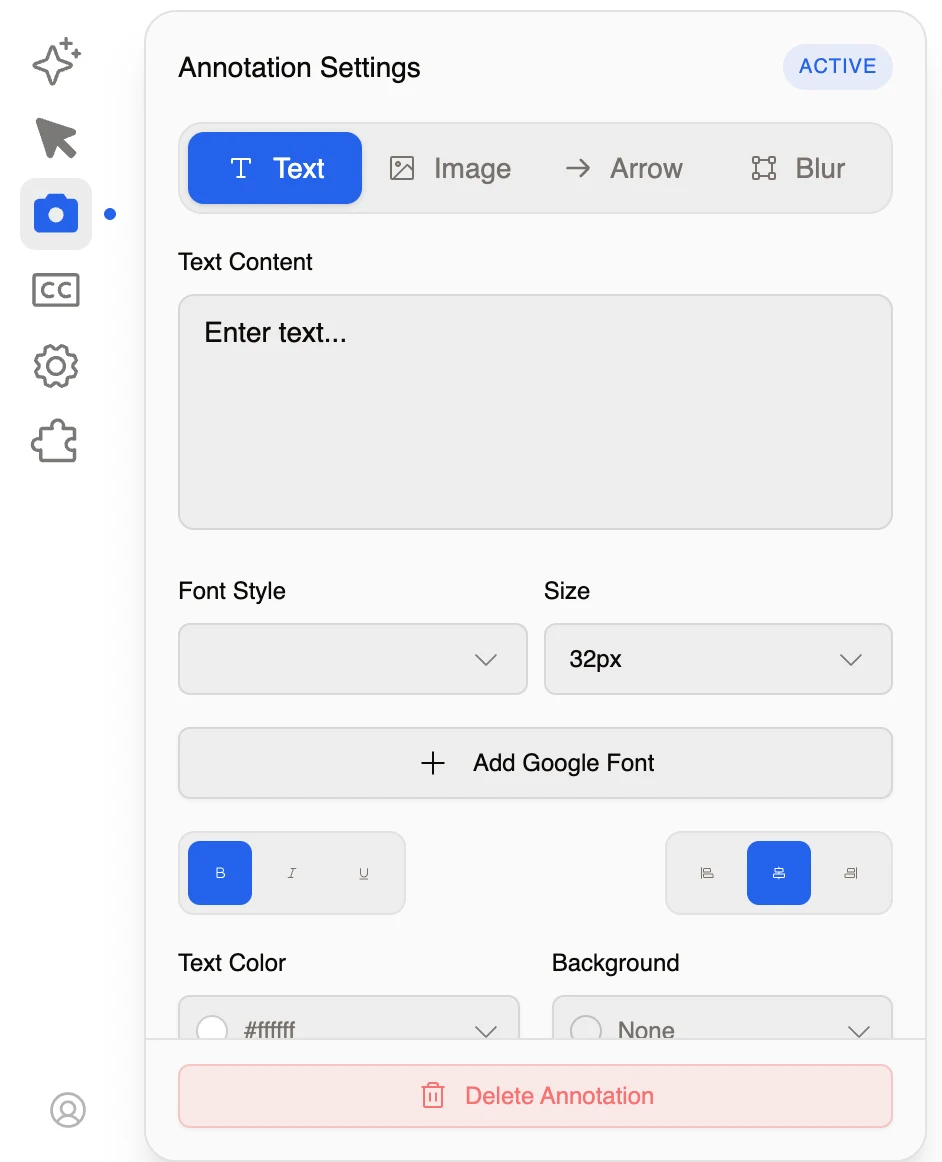
Recordly: text, image, arrow, and blur annotation modes with detailed text styling.
Pros
Covers the core annotation set with text, image overlays, arrow or shape callouts, and blur masks.
Text controls include font, size, Google Font import, bold, italic, underline, alignment, color, and background.
Keeps annotation type and styling controls together in one dedicated panel.
Cons
Does not support highlight overlays that dim surrounding content while preserving the selected area.
The visible shape selection is narrower than Tight Studio's arrows, rectangles, ellipses, and lines.
AI voiceover and personal voice cloning
AI narration turns editable script text into spoken audio, making it possible to revise wording or delivery without recording another microphone take.
The problem it solves
Traditional narration changes require reopening the recording setup and matching the original delivery. Built-in text-to-speech and voice cloning keep script revisions inside the editor and place the generated result directly on the timeline.
Our take
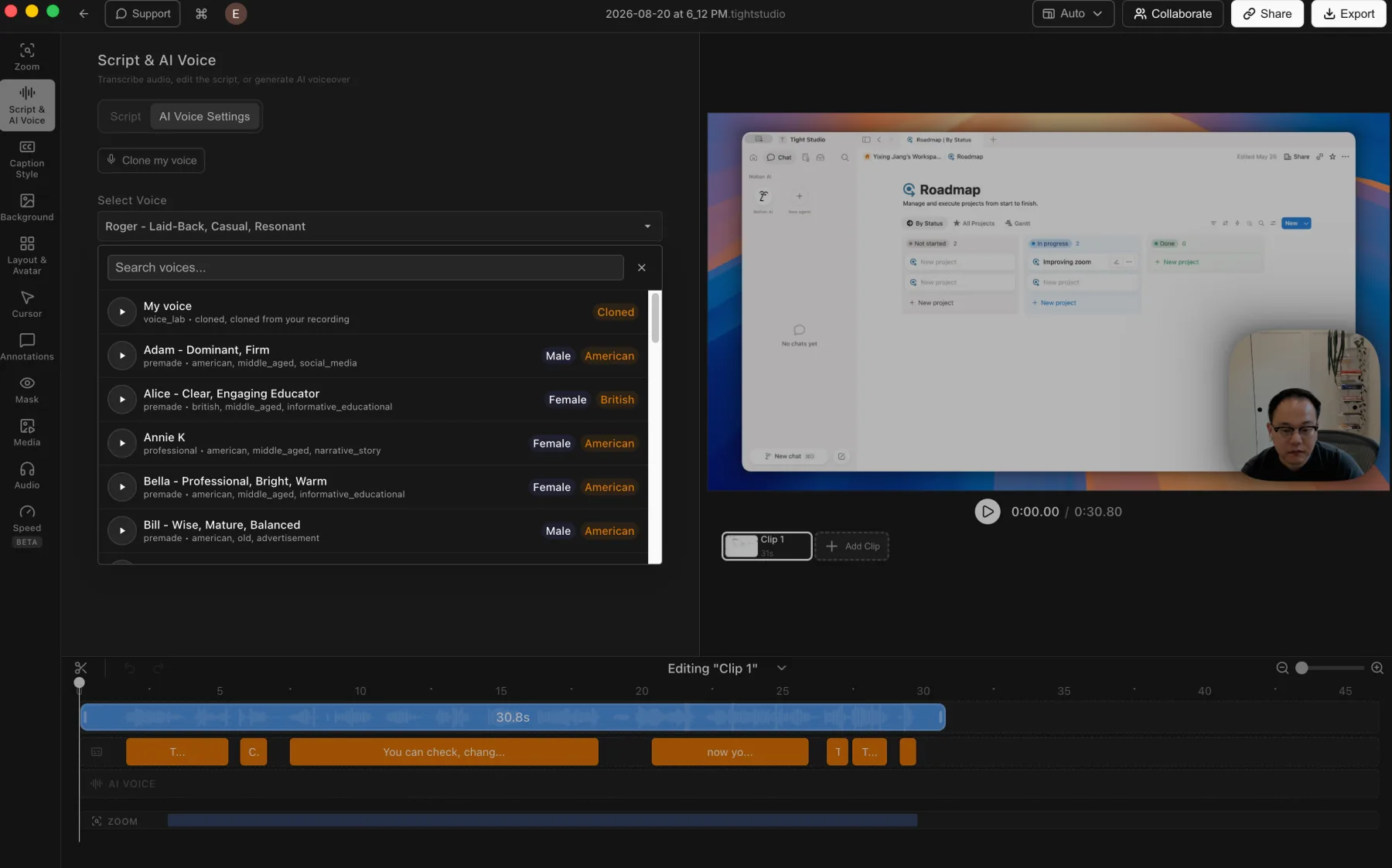
Tight Studio wins decisively. Its Pro workflow generates narration from script text, includes searchable premade voices, supports personal voice cloning, and creates an editable AI Voice track. Recordly does not support built-in AI narration or voice cloning.
Tight Studio
Tight Studio: voice cloning and a searchable voice library connected to the editing timeline.
Pros
Turns an edited script into generated narration without recording another take.
Lets users clone their own voice or choose and preview a searchable library of premade voices.
Keeps generated narration on a dedicated AI Voice track for timeline-based editing.
Cons
Generated speech may still need previewing and script adjustments to match the intended delivery.
AI voice generation is a Pro feature rather than part of the free editing workflow.
Recordly
AI voice is not supported
Recordly does not provide built-in text-to-speech narration, a premade AI voice library, or personal voice cloning.
Pros
The core screen-recording workflow does not depend on an AI voice service.
Cons
Cannot generate narration from edited script text inside the editor.
Does not provide built-in premade voices or personal voice cloning.
The tested build also did not support microphone audio, so narration requires an external recording and editing workflow.
Multi-clip recording and imported media
Multi-clip projects keep retakes, additional recordings, external videos, and supporting visuals inside one editable timeline.
The problem it solves
A second take or supporting video should not require a separate editor. Without in-project recording and clip import, every additional segment creates a handoff, another assembly step, and potentially another video encode.
Our take
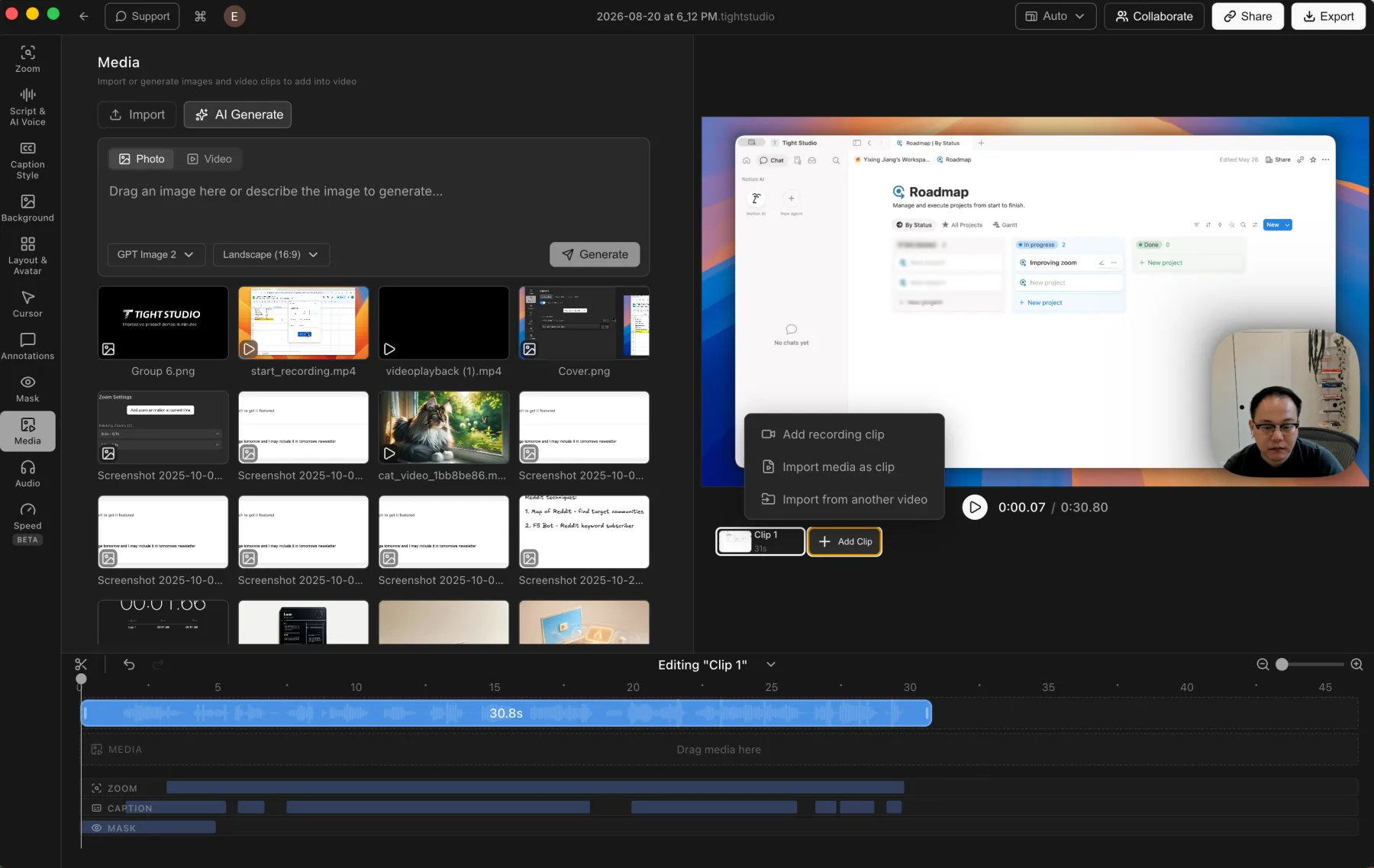
Tight Studio wins decisively. It records additional takes through Add Clip, imports external video as another clip, and keeps photos and videos available as timed media layers. Recordly works with one recorded clip per project and provides no additional-clip import workflow.
Tight Studio
Tight Studio: imported media and additional recording clips stay inside one editable project.
Pros
Combines multiple screen recordings inside one project, including another take recorded from the Add Clip menu.
Imports an external video as another clip instead of forcing it into a separate project.
Imports photos and videos into the media library for timed visual layers alongside the recorded clips.
Cons
Larger multi-clip projects require more timeline organization than a simple one-take recording.
Recordly
No multi-clip project workflow
Recordly works with a single recorded clip and does not record another take inside the same project or import an external video as an additional clip.
Pros
A single-clip timeline is simpler to scan when the recording is completed in one take.
Cons
Does not combine multiple recordings inside one project.
Does not import an external video as another clip in the project timeline.
Additional takes and supporting footage have to be assembled in another editor.
Connected iPhone and iPad recording
Direct device capture brings a clean mobile screen into the same editor without filming the phone or coordinating a separate recording workflow.
The problem it solves
Showing a mobile app through a webcam adds glare, hand movement, and uneven focus. Native connected-device capture preserves sharp interface detail and keeps the mobile take beside the rest of the project.
Our take
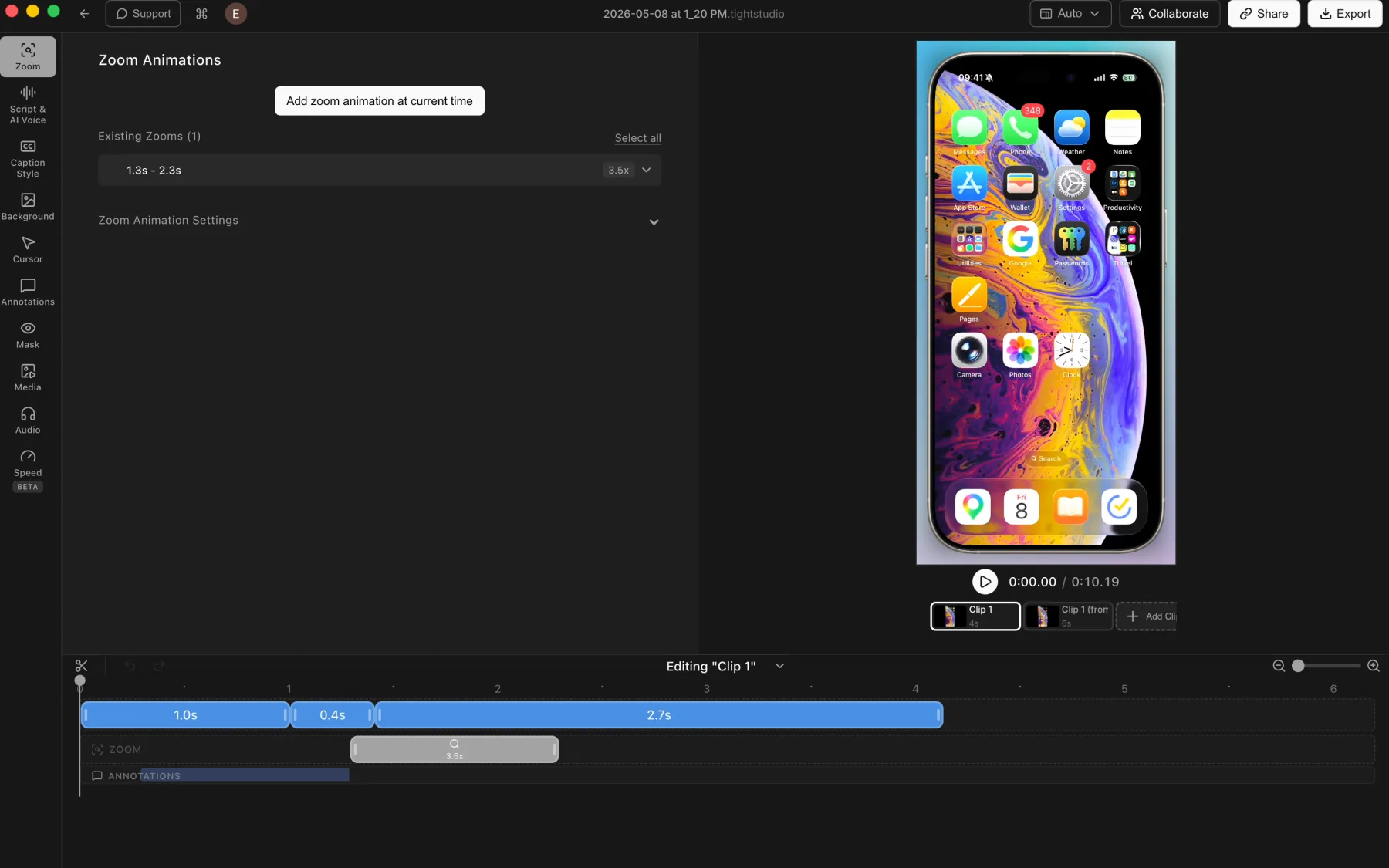
Tight Studio wins decisively. It captures a connected iPhone or iPad directly into the editor and applies the usual clip, zoom, background, caption, mask, and annotation tools. Recordly does not support native iPhone or iPad recording.
Tight Studio
Tight Studio: a connected iPhone recording with multiple clips, zoom, and annotation tracks.
Pros
Captures a connected iPhone or iPad directly into the Tight Studio editor.
Applies the usual post-recording tools, including manual zooms, backgrounds, captions, masks, and annotations.
Combines multiple mobile-device takes as clips inside one project.
Cons
Requires connecting and trusting the device before recording.
Touch gestures do not provide desktop-style cursor metadata, so zooms may need manual placement.
Recordly
iPhone recording is not supported
Recordly does not provide a native connected-iPhone or iPad recording source inside the application.
Pros
Its standard desktop recorder remains available across Mac, Windows, and Linux.
Cons
Cannot capture a connected iPhone or iPad directly into the editor.
Mobile footage has to be recorded through another workflow outside Recordly.
Does not provide Tight Studio's direct mobile-device take and editing workflow.
Camera-only recording
A dedicated camera mode records the presenter and microphone without forcing every take to begin with a screen capture.
The problem it solves
Some recordings need a direct-to-camera introduction, explanation, or standalone presenter segment. Without camera-only capture, that footage must be recorded elsewhere and brought into the project through a separate workflow.
Our take
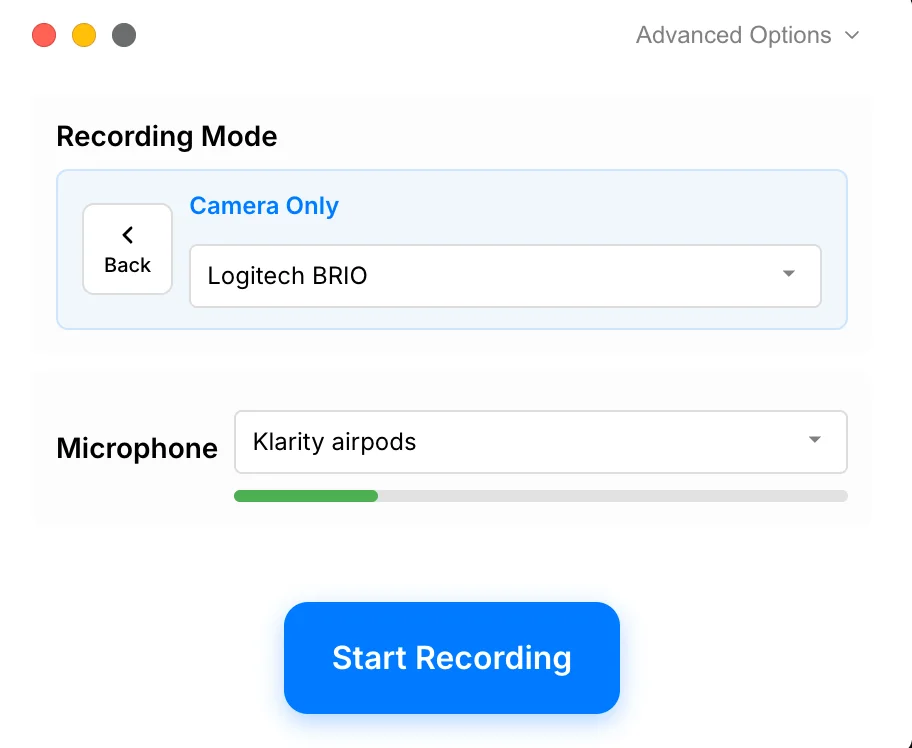
Tight Studio wins. It records the selected camera and microphone without capturing the screen, then keeps that take in the same editing workflow. Recordly can include a webcam with screen capture but does not support camera-only recording.
Tight Studio
Tight Studio: choose Camera Only, select the camera and microphone, then record without capturing the screen.
Pros
Records the camera and microphone without requiring a screen capture.
Keeps the camera-only take inside the same editor used for screen and mobile recordings.
Can combine camera-only footage with other clips inside one project.
Cons
A camera-only recording does not include screen content unless another clip is added to the project.
Recordly
Camera-only recording is not supported
Recordly can capture a webcam with the screen, but it cannot start a camera-only recording. The tested build also did not support microphone audio.
Pros
Records a webcam alongside a desktop screen capture.
Cons
Does not provide a camera-only capture mode without screen recording.
Standalone camera footage requires another recorder and a separate file workflow.
Export speed in the tested project
Export performance determines how quickly an edited recording becomes a finished file and how much waiting each revision adds.
The problem it solves
Export time is repeated every time a title, caption, zoom, or audio change needs another review file. A slower renderer can turn small revisions into a much longer feedback cycle.
Our take
Tight Studio wins this test. Recordly took roughly twice as long to complete the comparison export, so Tight Studio finished in about half the time. This is a single measured result, not a guarantee for every project, codec, resolution, computer, or future version.
Tight Studio
Faster in this test
Tight Studio completed the tested export in roughly half the time Recordly needed.
Pros
Completed the comparison export in about half of Recordly's export time.
Shorter export waits make repeated review and revision cycles faster.
Cons
This was one comparison test, not a benchmark across every codec, resolution, project length, and Mac model.
Recordly
About twice the export time
Recordly took roughly twice as long as Tight Studio to complete the tested export.
Pros
Completes local exports without requiring a paid software license.
Cons
Took about twice as long as Tight Studio in the comparison export.
A slower export becomes more noticeable when a project needs several review and revision passes.
The measured ratio should not be assumed for every computer, project, codec, or export setting.
Extension marketplace and editor extensibility
Extensions can let a recording editor add integrations and specialized workflows without waiting for every capability to become part of the core application.
The problem it solves
A fixed editor cannot anticipate every workflow. A functioning marketplace can let a community fill narrower gaps, but it also introduces dependencies on the catalog service, extension maintainers, compatibility, and installation security.
Our take
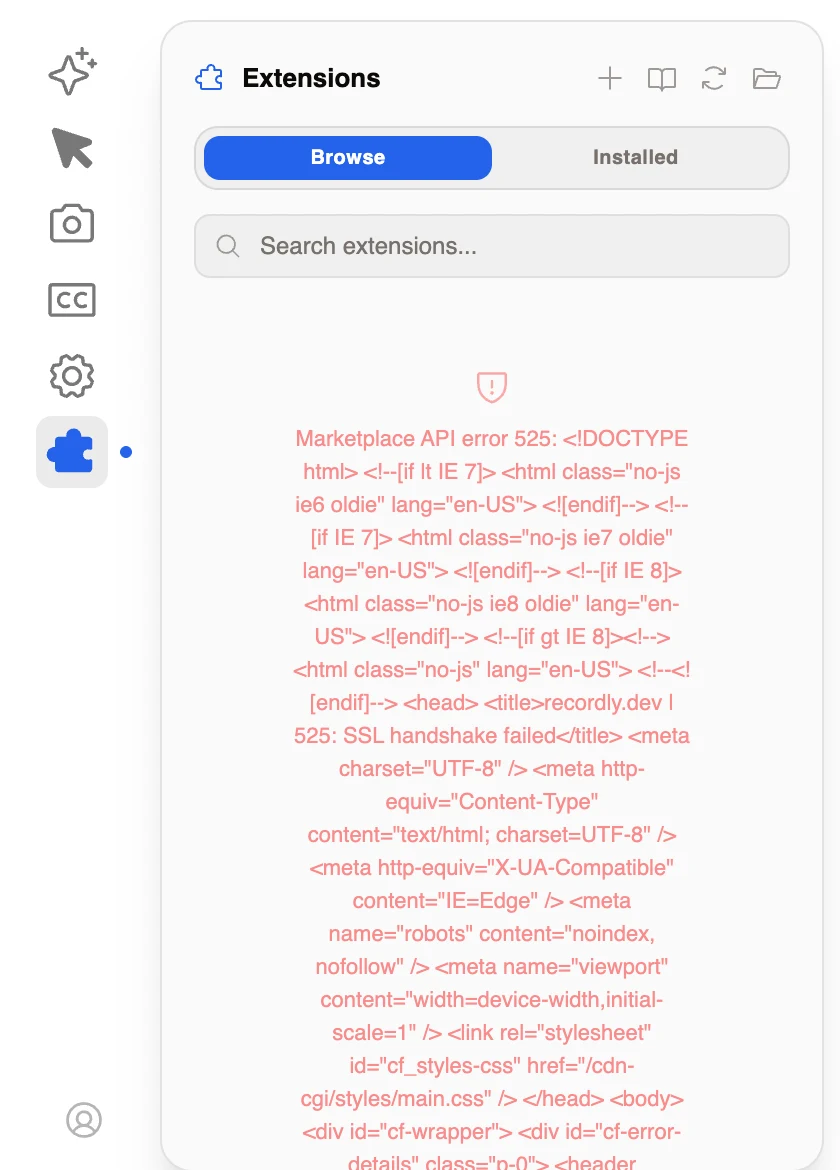
Recordly wins on the idea, not on tested functionality. Its dedicated marketplace is a distinctive concept, but Browse returned API error 525 with an SSL handshake failure in our August 21 test, and the editor displayed the raw HTML response. Tight Studio has no extension marketplace, but its advertised editor features are shipped and supported as first-party capabilities.
Tight Studio
No extension marketplace
Tight Studio does not currently expose a plugin marketplace or public extension API. Its editor features ship as first-party product capabilities instead.
Pros
Advertised editor features ship inside the maintained first-party application.
Core editing workflows do not depend on a separate community marketplace being available.
Cons
Does not offer a marketplace for community-built extensions.
Users cannot install a plugin to add a missing workflow or integrate another service.
Recordly
Recordly: the extension marketplace returned API error 525 and displayed the raw SSL failure page in our August 21 test.
Pros
An extension marketplace is an interesting way to expand a screen recorder without putting every integration in the core editor.
The interface separates Browse and Installed views and includes search, refresh, documentation, add, and folder controls.
Cons
The marketplace did not work in our test, returning “Marketplace API error 525” and “SSL handshake failed” from recordly.dev.
The editor rendered the raw HTML error response instead of a concise recovery message.
Because Browse failed, we could not evaluate the available catalog or complete an extension installation.
The core difference
Strong zoom, local captions, backgrounds, and webcam cropping, with limited correction and layout tools
Recordly delivers genuinely good automatic zoom, smooth panning, detailed cursor motion controls, local-model captions, a wide background library, recorded-webcam cropping, core annotations, and an interesting extension-marketplace concept in a free open-source cross-platform desktop editor. Its caption workflow has useful appearance controls but no built-in style presets or transcript correction panel. The tested build also lacks microphone audio, music, multi-clip recording, additional video-clip imports, AI voice, native iPhone and iPad capture, camera-only recording, highlight overlays, and dynamic camera layouts; its selected 2.5x cursor showed rough, haloed edges; its export took roughly twice as long as Tight Studio's; and its marketplace returned API error 525 in our test. Tight Studio pairs comparable zoom polish with deeper caption correction, faster tested export, and those broader audio, assembly, capture, and creation workflows inside a maintained first-party product. Recordly's August 11, 2026 community update said its lead developer remained unreachable and its admins had forked the codebase into Beam and NekoCut.
Recordly strengths
When should you choose Recordly?
You need source access at no cost
Recordly provides a public codebase and no paid tier. That can be decisive when you are comfortable evaluating, building, or maintaining the software yourself.
You work on Windows or Linux
Recordly supports Windows and Linux as well as Mac. Tight Studio currently requires Apple Silicon macOS.
You like its zoom workflow
Recordly creates attractive automatic close-ups, pans smoothly across different zoom centers, and lets each timeline segment switch to a manually specified center.
You want detailed cursor motion tuning
Recordly exposes motion blur, click bounce, bounce speed, sway, and looping controls. Its tuning range is a strength even though the selected cursor image showed concerning edge quality in our preview.
You want a wide background library
Recordly shows 24 built-in image presets in the tested panel, along with custom upload, video, color, gradient, blur, shadow, radius, padding, removal, and crop controls.
You need to crop a recorded webcam
Recordly uniquely provides an interactive crop grid for reframing the recorded webcam after capture, along with visibility, mirroring, size, roundness, corner-position, and reacts-to-zoom controls.
You need the core annotation types
Recordly covers text, image overlays, arrow or shape callouts, and blur masks. Its text controls include font, size, Google Font import, emphasis, alignment, color, and background.
You want caption transcription to stay local
Recordly uses a selectable local model for captions and provides automatic language detection, regeneration, clearing, and manual appearance controls. This avoids sending the recording to a cloud transcription service.
You want to experiment with an extension architecture
Recordly exposes Browse and Installed extension views with search and management controls. The marketplace itself failed with API error 525 in our test, so treat this as an experimental architecture to verify rather than an available catalog to rely on.
Tight Studio strengths
When should you choose Tight Studio?
You need accountable product ownership
Tight Studio has active first-party development, support, and public release notes. Recordly's original maintenance path is uncertain after its admins announced two independent forks.
You want deeper motion and creation controls
Tight Studio adds zoom animation style and duration, motion blur, auto-centering, dynamic camera layouts, camera-background removal and replacement, AI narration, styled captions, music, generated media, and richer overlays.
You want camera layouts and virtual backgrounds
Tight Studio can move between corner, side-by-side, camera-primary, and hidden-camera layouts across the timeline. It can also remove the camera background, use a preset, or upload a custom image. Recordly keeps the webcam in a corner and provides no equivalent background workflow.
You need highlight overlays and broader shapes
Tight Studio adds highlight overlays that dim surrounding content, plus arrows, rectangles, ellipses, and lines. Recordly covers core text, image, arrow or shape, and blur tools but does not provide the highlight treatment.
You need to correct and style captions
Tight Studio keeps readable transcript text beside synchronized caption segments, supports individual word-timing correction, and includes built-in style presets plus detailed custom styling. Recordly provides local generation and appearance knobs but no transcript correction panel or style presets.
You need AI narration or voice cloning
Tight Studio Pro generates narration from edited script text, provides a searchable premade voice library, supports personal voice cloning, and keeps generated audio on an AI Voice timeline track. Recordly does not support these capabilities.
You need microphone and music controls
Tight Studio records microphone audio and provides muting, direct volume adjustment, original-audio download, built-in music, custom audio uploads, and timed music segments. The Recordly build we tested did not support microphone audio or background music.
You record in parts or import supporting clips
Tight Studio records another take through Add Clip, imports external video as an additional clip, and keeps photos and videos available as timed media layers. Recordly works with a single recorded clip and does not provide those assembly workflows.
You want faster export iteration
Recordly took roughly twice as long as Tight Studio to complete the comparison export. That result comes from one test rather than a broad performance benchmark, but it makes Tight Studio the faster choice in the measured project.
You record iPhone, iPad, or camera-only footage
Tight Studio records a connected iPhone or iPad directly into the editor and provides a Camera Only mode for capturing the presenter and microphone without the screen. Recordly supports neither capture mode.
You want cleaner, more flexible cursor images
Tight Studio offers a broader preset library, custom cursor uploads, adjustable sizing, and a cleaner outline in the tested editor preview.
You need a complete production workflow
Tight Studio combines several takes and imported clips, creates shareable links, supports collaboration, and keeps those workflows under the same maintained product.
You want supported first-party capabilities
Tight Studio does not offer an extension marketplace, but its advertised editor features ship with the maintained application rather than depending on a separate catalog service or community extension.
What both do well
The table does not need to repeat the basics
Both products already cover the foundation of a polished Mac screen recorder. The comparison below focuses on the differences that can actually change your choice.
Automatic zooms generated after recording
Manual zoom targets and editable timeline segments
Cursor-aware framing and animated panning
Preset cursor replacement and adjustable cursor size
Preset and custom image backgrounds, colors, and gradients
Webcam visibility, mirroring, size, and corner placement controls
Automatic captions with adjustable appearance controls
Text, image, arrow or shape, and privacy-mask annotations
Local desktop recording and editing
Decisive differences
The differences that can change your decision
Zoom is competitive in both products. Export performance, caption correction, microphone and music tools, multi-clip assembly, media imports, AI voice, recording modes, annotation breadth, webcam layouts, extension reliability, ownership, and support are more likely to change the decision.
Feature
Tight Studio
Recordly
Automatic zoom
YesEditable zoom segments with motion controls
YesGood zoom-in motion and panning in our test
Manual zoom center
YesAdd or adjust on the timeline
YesSwitch a segment from Auto to Manual
Animation controls
YesStyle, duration, motion blur, auto-centering, and camera size
PartialMagnification presets and Classic Animation toggle
Cursor image selection
YesBroader preset library
PartialFive built-in choices shown in the tested panel
Custom cursor upload
YesUpload a branded or product-specific pointer
NoNo custom upload found
Cursor motion controls
PartialSmooth movement, size, and hide-when-idle
YesBlur, click bounce, bounce speed, sway, and loop controls
YesBlur, shadow, radius, padding, removal, and crop
Webcam size, mirroring, and shape
YesLayout-level position, size, shape, and mirroring
YesSize, mirroring, roundness, and corner position
Crop recorded webcam
NoNo equivalent interactive source-crop grid
YesDrag an interactive crop region after recording
Dynamic camera layouts
YesChange layouts across the timeline
NoWebcam remains a corner overlay
Camera background removal and replacement
YesRemove, use presets, or upload a custom background
NoNo camera-background controls found
Caption transcription
Cloud AIElevenLabs processing with stated deletion after transcription
Local modelSelectable model processes captions locally
Transcript mistake correction
YesEdit readable transcript text and individual word timing
NoNo correction panel found
Built-in caption style presets
YesProfessional, Clean and Modern, Bold and Dramatic, and Hormozi presets
NoManual appearance controls only
Caption appearance controls
YesPresets plus detailed custom styling
YesAnimation, color, size, rows, offset, and width
Microphone audio
YesRecord, mute, adjust volume, and download original audio
NoNot supported in the tested build
Built-in and uploaded music
YesMusic library, custom audio upload, volume, and timed segments
NoNo music workflow found
Text, shape, and image overlays
YesStyled text, imported images, arrows, rectangles, ellipses, and lines
YesText, Image, and Arrow modes
Privacy mask or blur overlay
YesTimed blur or custom-image replacement masks
YesBlur annotation mode
Highlight overlay
YesDim surrounding content and preserve the selected area
NoNot supported in the tested editor
Extension marketplace
NoFirst-party features only
PartialMarketplace surface exists but returned API error 525 in our test
Marketplace catalog tested
Not applicableNo marketplace
NoBrowse failed before the catalog loaded
Open source
NoClosed-source commercial app
YesSource code is public
Supported desktop platforms
Apple Silicon MacM-series chips
Mac, Windows, LinuxCross-platform Electron app
AI narration and voice cloning
YesScript-generated narration, premade voices, and personal voice cloning with Pro
NoNot supported
Connected iPhone and iPad recording
YesCapture a trusted USB device directly into the editor
NoNot supported
Camera-only recording
YesRecord camera and microphone without the screen
NoNot supported
Multi-take project recording
YesRecord additional takes inside one project
NoSingle recorded clip per project
Import video as another clip
YesAdd an external video to the project timeline
NoNo additional-clip import workflow
Export time in tested project
1x baselineCompleted in roughly half of Recordly's time
~2xTook about twice as long in this test
Hosted sharing and collaboration
YesShare links and team workspace
NoNo first-party cloud sharing
Original project continuity
Active vendorRegular first-party releases and support
UncertainAdmins announced two independent forks on August 11, 2026
Starting price
$0Free tier with no-watermark standard exports
$0Free and open source
Your questions, answered
What is the practical difference?
Choose based on the work you need to finish, not the longest feature list.
Is Recordly still maintained?
The original project is in transition. A dated Recordly Admin Team update says lead developer Derall remained unreachable and the admin team independently forked the codebase into Beam and NekoCut. The Beam GitHub URL shown in the announcement returned 404 when checked on August 21. That does not explain anyone's circumstances, but it makes repository ownership, release signing, support, and project migration questions to verify before adoption.
Is Recordly's zoom actually good?
Both products handle the core motion well. Yes. Its automatic zoom-in animation and panning were pleasing in our test, and manual targets are available. Tight Studio exposes more motion controls, but zoom quality by itself is not the decisive difference.
How does cursor quality compare?
Useful motion controls do not fix a rough source image. Recordly provides five basic cursor images plus blur, click bounce, speed, sway, and loop controls. The selected 2.5x cursor showed a rough white edge and gray halo in its editor preview. Tight Studio provides broader presets, custom uploads, and a cleaner outline. Recordly's final export was not separately pixel-inspected.
Which product has better backgrounds?
Recordly exposes the broader visible selection. Recordly wins on breadth in the tested panels, with 24 visible image presets plus custom upload, video, color, gradient, blur, shadow, radius, padding, removal, and crop controls. Tight Studio covers preset images, gradients, solid colors, and custom brand images in a more compact panel. Recordly's video-background and removal quality were not separately tested.
How do the webcam controls compare?
Recordly crops the source; Tight Studio changes the composition. Recordly has the more distinctive source-framing tool: an interactive crop grid for the recorded webcam, plus size, mirroring, roundness, corner-position, and reacts-to-zoom controls. Tight Studio has no equivalent crop grid, but it supports dynamic layout changes across the timeline and can remove or replace the camera background. Recordly does neither.
How do annotations compare?
The core tools overlap; highlight overlays do not. Both products support text, image, shape or arrow, and privacy-mask annotations. Recordly exposes detailed text styling and Google Font import. Tight Studio adds highlight overlays that dim the surrounding screen while preserving a selected area, along with a broader visible shape set of arrows, rectangles, ellipses, and lines.
How do captions compare?
Recordly keeps transcription local; Tight Studio makes the result easier to correct and design. Recordly uses a selectable local model and provides automatic language detection, regeneration, clearing, Fade animation, text color, font size, rows, bottom offset, and maximum width. It has no built-in caption style presets or transcript panel for correcting recognition mistakes. Tight Studio uses cloud transcription with stated deletion after processing, then provides readable transcript editing, individual word-timing correction, style presets, and detailed custom styling.
Does Recordly support AI voice?
AI narration is available only in Tight Studio. No. Recordly does not provide built-in script-to-speech narration, premade AI voices, or personal voice cloning. The tested build also did not support microphone audio, so narration requires an external recording and editing workflow. Tight Studio Pro supports generated narration and places it on a dedicated timeline track.
Does Recordly support microphone audio or music?
Recordly has no microphone or music workflow. No. The Recordly build we tested did not support microphone audio, built-in music, custom audio upload, or timed music segments. Tight Studio records microphone audio and includes mute, volume, original-audio download, and each of those music workflows, but it does not automatically reduce microphone noise or normalize volume.
Can Recordly combine recordings or import another clip?
Recordly projects remain single-clip. No. Recordly does not record an additional take inside the current project, combine multiple recordings, or import an external video as another clip. Its image annotation is an overlay rather than clip assembly. Tight Studio supports Add Clip recording, imported video clips, and timed photo or video media layers.
Can Recordly record an iPhone or iPad?
Native mobile-device capture is available only in Tight Studio. No. Recordly does not expose a connected-iPhone or iPad source. Tight Studio captures a trusted USB device directly into the editor, supports multiple mobile takes in one project, and applies manual zooms, backgrounds, captions, masks, and annotations to the result.
Can Recordly record camera-only footage?
Recordly requires the screen to be part of capture. No. Recordly can include a webcam with a desktop screen recording, but it cannot start a camera-only take. The tested build also did not support microphone audio. Tight Studio provides a dedicated Camera Only source with camera and microphone selection and keeps that footage beside screen and mobile clips in the same editor.
Does Recordly support extensions?
An interesting marketplace was unavailable in our test. The editor includes a dedicated Extensions panel with Browse and Installed views, search, refresh, documentation, add, and folder controls. On August 21, 2026, Browse returned Marketplace API error 525 and an SSL handshake failure from recordly.dev, then displayed the raw HTML response. We could not evaluate the catalog or installation flow, so verify current service availability and the specific extension you need.
Which product exported faster?
Tight Studio finished in about half the time. Tight Studio won the measured export test. Recordly took roughly twice as long to finish, so Tight Studio completed the export in about half the time. This was one project and should not be treated as a fixed multiplier across different media, effects, resolutions, codecs, computers, or future releases.
What does open source change?
Source access does not provide a support contract. Recordly can be inspected, forked, and maintained by its community across Mac, Windows, and Linux. Tight Studio is closed source and Mac-only, but provides one accountable first-party release and support path.
Which product costs less?
Free software can still carry operational cost. Recordly costs $0 to license. Tight Studio also starts free for standard no-watermark exports, with paid plans for unlimited multi-take work, sharing, collaboration, and AI. For production use, include troubleshooting, migration, and unsupported-build risk in the Recordly cost calculation.
Pricing
Current plans and practical limits
$0 / month
Standard exports have no watermark. Free includes five Add Clip trial uses, up to five seven-day share links, and 100 trial AI credits; trial AI Voice exports are watermarked.
Recordly is free and open source. Tight Studio Free supports standard exports without a watermark; paid plans fund first-party development, sharing, collaboration, and AI features.
Tight Studio
Free$0No watermark on standard exports; 5 Add Clip trial uses, up to 5 shareable links with 7-day expiration, and 100 trial AI credits
Plus$9/moBilled yearly, or $19/mo monthly. Unlimited multi-clip recording and unlimited non-expiring shareable links
Pro$24/moBilled yearly, or $49/mo monthly. 1,000 AI credits/mo plus team workspace and collaborative editing
Recordly
Free / Open Source$0No paid tier; maintenance and support depend on the active project or fork you choose
Using both products
Can you use both?
Yes. Recordly or one of its forks can cover source-access, Windows, or Linux requirements, while Tight Studio handles maintained production work on Apple Silicon Macs. Moving a finished video between them is a normal file handoff, not a native integration.
How we checked the facts
Reviewed against current public product information
This is a first-party comparison written and reviewed by the Tight Studio team. We reviewed it on August 21, 2026 using official product documentation, pricing pages, and the current Tight Studio pricing and feature pages. Feature availability can depend on plan, platform, or workflow, so the table uses notes and “Partial” where a simple yes/no would be misleading.
“Tight Studio combines simplicity with impact. It's effortless to use, yet the videos I create in minutes consistently help attract new users to our latest product features.”
“I've been using Tight Studio recently to prep presentations and share demos with my colleagues, and it's been a huge time saver. The whole flow feels really smooth, even for someone with no video editing skills. I can go from recording to a clean, shareable product demo in minutes with almost no effort.”
“Awesome tool - I've used it to seamlessly edit my video recordings to show it to peers and for presentations and guides for software usage! Setup is super easy, and I LOVE the auto-zoom feature. Crazy how fast the team is shipping too.”
Choose Recordly when free open-source cross-platform desktop access, strong automatic zoom, local-model captions, detailed cursor-motion tuning, a wide background library, recorded-webcam cropping, core annotations, or an extension architecture you can verify and troubleshoot are decisive. Choose Tight Studio when you want similarly polished automatic zoom with faster export in our test, transcript correction, built-in caption styles, microphone and music controls, multi-clip recording, imported video clips, AI narration, personal voice cloning, direct iPhone and iPad capture, camera-only recording, highlight overlays, dynamic camera layouts, camera-background removal and replacement, and supported first-party capabilities inside a maintained Mac workflow.
FAQ
Frequently asked questions
Is Recordly still actively maintained?
The original project's maintenance path is uncertain. A Recordly Discord admin update dated August 11, 2026 said lead developer Derall remained unreachable and that the admin team had independently forked the codebase into Beam and NekoCut. The post described Beam as a stable continuation and NekoCut as an AI-focused alternative, but the Beam GitHub URL shown in that announcement returned 404 when we checked it on August 21. That update does not establish anyone's personal circumstances, but it does mean buyers should verify repository ownership, signing, issue response, and support rather than assuming the original project has a stable roadmap.
Does Recordly have good automatic zoom?
Yes. Zoom is one of Recordly's strongest features. In our test it produced a pleasing automatic zoom-in animation and smooth panning between different zoom centers. Zooms remain editable on the timeline, and a segment can switch from automatic framing to a manually specified center.
How does Recordly's cursor quality compare with Tight Studio?
Recordly provides five basic cursor images and unusually detailed motion controls for blur, click bounce, bounce speed, sway, and looping. The concern is image quality: the selected black cursor at 2.5x showed a visibly rough white edge and gray halo in the editor preview. Tight Studio provides a broader preset library, custom cursor uploads, and a cleaner outline in the comparison. We did not separately pixel-inspect Recordly's final export, so this is a documented preview-quality concern rather than a claim that every exported cursor has the same artifact.
Does Recordly have more background choices than Tight Studio?
Recordly showed the broader built-in selection in the panels we tested, with 24 visible image presets plus custom upload, Video, Color, and Gradient modes. It also exposes blur, shadow, radius, padding, background removal, and crop controls in the same workflow. Tight Studio covers preset wallpapers, gradients, solid colors, and custom brand images in a more compact panel, but Recordly wins on visible background breadth. We did not separately test Recordly's video-background rendering or background-removal quality.
Can Recordly crop and reposition a recorded webcam?
Yes. Recordly provides an interactive crop grid for reframing the recorded webcam, along with visibility, mirroring, size, roundness, corner-position, and reacts-to-zoom controls. The limitation is layout depth: the webcam remains a corner overlay, cannot switch between dynamic layouts across the timeline, and cannot use background removal or a replacement camera background. Tight Studio lacks Recordly's dedicated webcam crop grid but supports broader timeline layouts plus preset, uploaded, and removed camera backgrounds.
Can Recordly generate and correct captions?
Recordly generates captions with a selectable local model and supports automatic language detection, regeneration, clearing, a Fade animation, text color, font size, row count, bottom offset, and maximum width. It does not provide built-in caption style presets or a transcript panel for correcting a mistaken name, term, or phrase. Tight Studio uses cloud transcription with stated deletion after processing, then provides readable transcript editing, individual word-timing correction, style presets, and detailed custom styling.
What annotation tools does Recordly support?
Recordly supports styled text, image overlays, arrow or shape callouts, and blur masks. Its text panel includes font, size, Google Font import, bold, italic, underline, alignment, color, and background controls. It does not support highlight overlays that dim the surrounding screen while keeping a selected area visible. Tight Studio covers the shared text, image, shape, and privacy-mask workflows and adds highlight overlays plus a broader visible shape set.
Does Recordly support microphone audio or background music?
No. The Recordly build we tested did not support microphone audio, built-in music, custom audio upload, or timed music segments. Tight Studio records microphone audio and includes muting, volume control, original-audio download, a built-in music library, custom audio uploads, and music segments that can be trimmed to selected timeline ranges.
Does Recordly support AI voiceover or voice cloning?
No. Recordly does not provide built-in text-to-speech narration, a premade AI voice library, or personal voice cloning. The tested build also did not support microphone audio, so narration requires an external recording and editing workflow. Tight Studio Pro can generate narration from edited script text, use searchable premade voices, clone a personal voice, and place the result on a dedicated timeline track.
Can Recordly combine multiple recordings or import another video clip?
No. Recordly works with one recorded clip per project and does not record an additional take inside the same project or import an external video as another clip. Its image annotation mode is an overlay tool, not a multi-clip assembly workflow. Tight Studio records additional takes through Add Clip, imports external videos as clips, and keeps imported photos and videos available as timed media layers.
Can Recordly record an iPhone or iPad?
No. Recordly does not provide a native connected-iPhone or iPad recording source. Mobile footage has to be captured through another workflow outside Recordly. Tight Studio records a connected and trusted iPhone or iPad directly into the editor, then applies the same multi-clip, manual zoom, background, caption, mask, and annotation tools used for other projects.
Can Recordly record only the camera and microphone?
No. Recordly can capture a webcam alongside the desktop screen, but it cannot begin a camera-only recording. The tested build also did not support microphone audio. Tight Studio provides a dedicated Camera Only mode with camera and microphone selection and keeps the resulting footage in the same editor as screen and mobile-device takes.
Does Recordly's extension marketplace work?
It did not work in our August 21, 2026 test. The Extensions panel exposed Browse and Installed views, search, refresh, documentation, add, and folder controls, but Browse returned “Marketplace API error 525” with an SSL handshake failure from recordly.dev. The editor displayed the raw HTML error response, so we could not inspect the catalog or complete an installation. The extension architecture remains an interesting idea, but verify the service and the extension you need before depending on it.
Which exports faster, Tight Studio or Recordly?
Tight Studio was faster in our comparison test. Recordly took roughly twice as long to complete the tested export, which means Tight Studio finished in about half the time. Treat this as one measured result rather than a universal multiplier: project length, source media, effects, resolution, codec, hardware, and application version can all change export performance.
What is the main difference between Tight Studio and Recordly?
Recordly offers free open-source cross-platform desktop recording, a capable zoom timeline, detailed cursor motion tuning, a broad background library, webcam cropping, local-model captions, core annotations, and an extension marketplace that failed to load in our test. It does not provide transcript correction, caption style presets, microphone or music editing, multi-clip projects, imported video clips, AI voice, connected iPhone or iPad capture, or camera-only recording, and it took roughly twice as long to export in our comparison test. Tight Studio is a maintained Apple Silicon Mac product with those workflows plus highlight overlays, dynamic camera layouts, virtual camera backgrounds, hosted sharing, collaboration, and generated media. Product reliability, workflow breadth, export performance, and continuity are the largest differences.
Is Tight Studio free?
Free includes standard exports without a watermark, five account-level Add Clip trial uses, up to five shareable links with seven-day expiration, and 100 trial AI credits. AI Voice exports use a watermark during the trial.
Is Tight Studio open source like Recordly?
No. Tight Studio is a closed-source commercial product. Choose Recordly or one of its active forks when source access and cross-platform support are requirements. Choose Tight Studio when first-party maintenance, support, and the broader production workflow matter more.
Which Recordly fork should I use?
The August 11 community update named Beam and NekoCut, but this page does not recommend one without a separate test of current builds, maintainers, code signing, release cadence, and issue response. If you need dependable production work today, verify the fork carefully before moving existing projects or installing a build.
Want Recordly-style zoom with a dependable roadmap?
Download Tight Studio free for polished automatic zoom, manual framing, and a maintained editing workflow.