Smart Auto-Zoom Screen Recording

Tight Studio detects your clicks and keystrokes and zooms in automatically. Every recording gets smooth, professional zooms - with zero keyframing.

Zooms that follow your actions

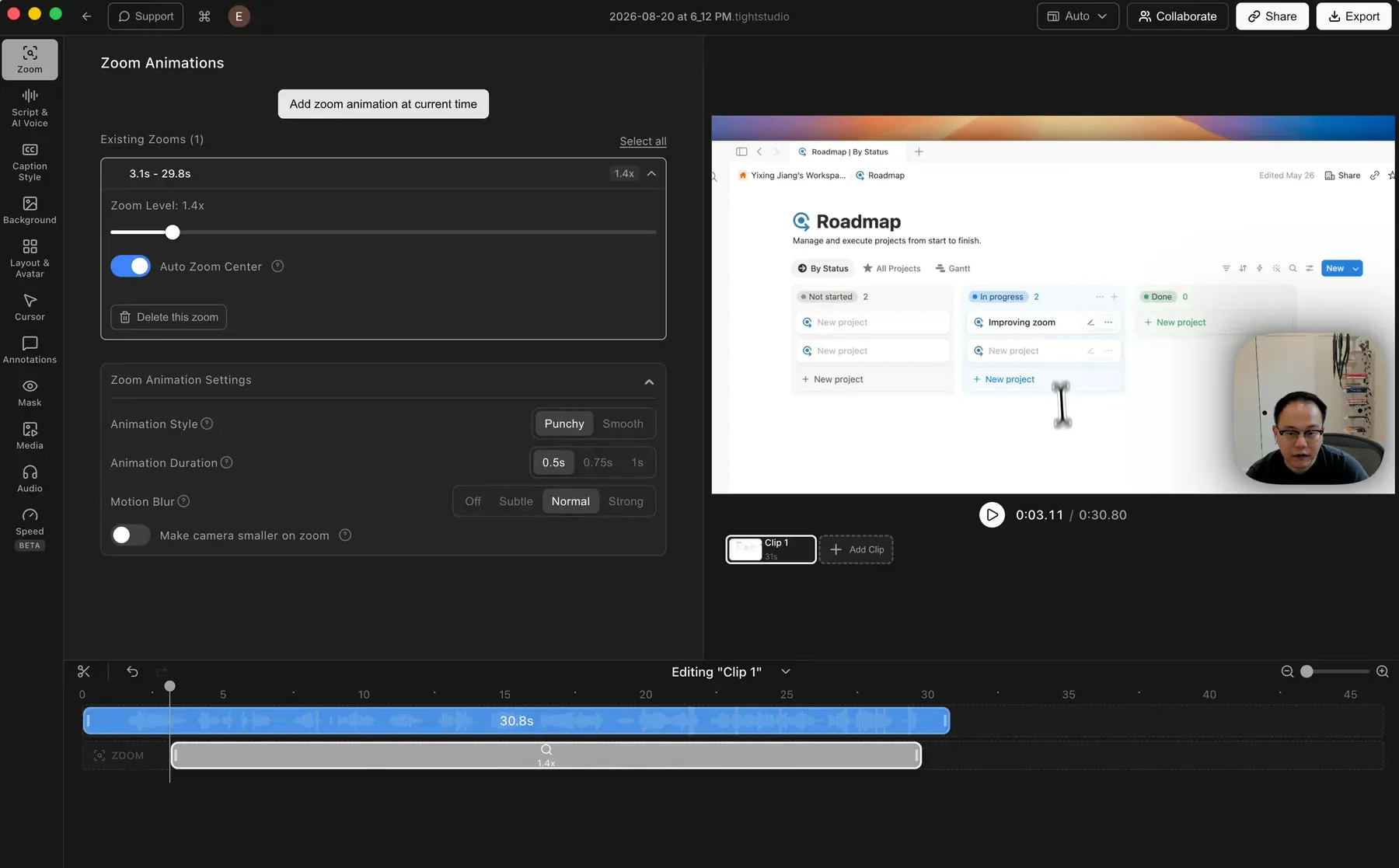
Tight Studio detects your clicks and keystrokes and frames each one with a zoom-in automatically. Viewers always see exactly what matters on screen - the button you pressed, the field you typed in - without you touching a timeline.

Tight Studio Zoom Animations panel showing an automatically detected zoom segment beside a rendered product demo

Buttery-smooth motion, zero keyframing

Every zoom eases in and out smoothly, so the result looks intentional rather than mechanical. There are no keyframes to place and no motion curves to tune - the polish is built in.

Expanded Tight Studio zoom settings showing punchy or smooth motion, duration, and motion blur controls without keyframes

Made for demos, tutorials, and walkthroughs

When you are showing software, clarity is everything. Auto-zoom keeps the viewer focused on the exact part of the screen you are working in, which makes product demos, tutorials, and walkthroughs far easier to follow.

Product walkthrough framed in the Tight Studio editor with zoom controls visible

One effect in a full editor

Smart auto-zoom works alongside the rest of Tight Studio: smooth cursor animation, styled captions, animated text overlays, AI narration, and background music. Record once and finish a polished video in the same app.

Full Tight Studio editor with zoom settings, video preview, clip controls, and timeline in one workspace

Frequently asked questions

How does smart auto-zoom work?

Tight Studio detects your clicks and keystrokes and automatically zooms in to highlight them. The zooms are generated for you with smooth easing - there is no manual editing or keyframing needed.

Do I need to edit the zooms manually?

No. The zooms are created automatically from your clicks and keystrokes. Tight Studio also includes a full video editor, so you can apply zoom effects yourself when you want direct control over a specific moment.

What kinds of videos benefit most from auto-zoom?

Product demos, tutorials, and walkthroughs benefit the most - any video where the viewer needs to see exactly where you clicked or what you typed. Auto-zoom keeps attention on the part of the screen that matters.

Ready for zooms that edit themselves?

Download Tight Studio and record a demo with smart auto-zoom in minutes.

Download free

macOS Apple Silicon - Free to start, no credit card required